
A zero-copy data lakehouse keeps one physical copy of each dataset, usually as Apache Iceberg tables in your own object storage, and lets every engine and platform read it in place through a catalog. Spark, Trino, Flink, Athena, Snowflake, BigQuery, and SaaS platforms such as Salesforce Data 360 all query the same Parquet files instead of each loading its own copy through ETL.
Removing the copies removes real cost: the pipelines that moved the data, the storage for every duplicate, and the arguments about which copy is right. It also removes the isolation those copies gave you. When five engines and two partners read one table, that table's file layout, delete files, snapshot history, and format version decide performance and correctness for all of them. A copy used to absorb a bad table state. Now everyone reads it directly.
So the engineering work in a zero-copy lakehouse moves from moving data to operating the shared copy. Someone has to own each table, decide who may commit to it, maintain it without breaking the readers that depend on its history, and lay it out for a mix of engines it was never tuned for. This guide covers what each zero-copy pattern actually shares, where write authority belongs, how to run maintenance on a table everyone reads, and how to see the whole lake while you do it.
The layer a zero-copy lakehouse still needs
The open stack gives you a table format, a catalog, and engines. None of them is responsible for the state of a table over time. The catalog serializes commits, engines read and write, and each vendor's optimizer maintains the tables in its own platform, on its own terms. On a shared table, the gap between those three is exactly where small files, unexpired snapshots, and dueling compaction jobs accumulate.
Filling that gap is the job of a lakehouse control plane, and it is what LakeOps is built to be. The short version:
- What it is. An operational layer for the tables you share. It sees every table, decides what each one needs, runs it, and records what happened. It doesn't replace your catalog, your engines, or your storage.
- Where it sits. Beside the catalogs you already run: AWS Glue, and any Iceberg REST catalog such as Apache Polaris or Project Nessie.
- How it connects. It reads Iceberg metadata (snapshots, manifests, and file statistics), and maintenance rewrites files in your bucket and commits a new snapshot through your catalog. It is zero-copy too: no data is copied or migrated.
- The loop. Read each table's metadata, classify its health from what it finds, run the maintenance that is due in a fixed order, and record every operation.
- Key features. Health status and ranked insights for every table, Adaptive Maintenance driven by table signals, policies scoped by catalog, namespace, or pattern with exclude lists, one events record for every operation, and layout simulations before rewrites.
- Why not scripts. A nightly Spark job per team compacts on a timer, sees only its own tables, and doesn't know that another engine is maintaining the same table. A control plane acts when table state calls for it, covers every catalog, and has one record of who changed what.
- What you get. One maintenance owner per table, written down as a policy. Health for every table across catalogs. Maintenance that keeps pace with writes. Observe-only coverage for tables another platform owns.
- Why you need it. With one copy, every consumer's speed and correctness depend on one table's state. Something has to be accountable for that state.

Keep that model in mind; the rest of this guide is the engineering it automates.
What zero-copy actually shares
Zero-copy is a family of mechanisms, not one feature. They differ in what crosses the boundary, who can commit, and where the cost ends up. Knowing which one you run tells you what you are responsible for.
| Mechanism | What crosses the boundary | Who can commit | Where the cost lands | Examples |
|---|---|---|---|---|
| Shared tables through one catalog | Metadata and short-lived storage credentials; engines read files directly | Writers the owning catalog authorizes | Every reader pays for the table's state | Glue with Athena, EMR, and Redshift; Polaris or Snowflake Horizon with Spark, Trino, and Snowflake; Salesforce Data 360 File Federation |
| Catalog federation | Metadata requests, answered by the owning catalog | Only the owning catalog | Metadata calls and latency to a catalog you don't run | Snowflake catalog-linked databases; cross-catalog federation between Snowflake and Google Cloud |
| Sharing protocols | A scoped reference to the provider's files | Only the provider | The provider pays storage and egress; the recipient pays compute | Delta Sharing to Iceberg clients; Salesforce Data 360 File Sharing into Snowflake and Databricks |
| Format virtualization | Iceberg metadata generated over another format's files | The source format's writer | Metadata generation, and features that don't translate | Delta Lake UniForm, Apache XTable |
| Zero-copy streaming | Topic data committed as tables | The streaming platform | The commit cadence sets the file count | Confluent Tableflow, Redpanda Iceberg Topics |
Query federation, where one engine pushes SQL down to another system, is often sold under the same name. It copies no files, but the work moves to the source system on every query, and nothing persists between runs.

The vendors have converged on this model. Snowflake's Interoperable Lakehouse made external-engine reads and writes through Horizon Catalog generally available. Databricks serves Delta tables to Iceberg clients through Delta Sharing. Salesforce reads Iceberg tables directly at the storage layer, without the source's compute. AWS runs Athena, Redshift, EMR, and Glue over the same tables in S3. SAP announced native Iceberg support in Business Data Cloud, with an Apache Polaris-based catalog and zero-copy sharing with Databricks, Snowflake, Google, AWS, and Microsoft. The common substrate is an Iceberg table, a catalog that serves its current metadata, and credentials scoped to that table.
What one copy changes for the engineers who run it
Every reader pays for the table's state
A query on Iceberg costs what the table's state makes it cost. Planning reads the manifest list and every relevant manifest. Execution opens each data file that survives pruning and applies every delete file that touches it. When a table has thousands of small files, hundreds of manifests, and a pile of unmerged equality deletes, that work is repeated by every engine on every query.
With copies, a degraded source table hurt one ETL job, and each downstream copy had its own layout. With one copy, the same degradation reaches Trino dashboards, Snowflake queries, Spark jobs, the partner reading through File Federation, and the agent sampling the table over MCP, all at once. Cost doesn't disappear; it moves to the readers, query after query, until someone maintains the table.
The table becomes a contract
Every consumer has its own Iceberg implementation and its own limits. The table has to stay inside what all of them can read, which in practice means the most restrictive consumer sets the rules.
Salesforce is a useful example because its limits are documented. For Snowflake File Federation, Data 360 needs Iceberg v1 or v2 tables managed by Open Catalog or Horizon Catalog, organized as copy-on-write on AWS, with storage credential vending. It doesn't support tables that use merge-on-read position or equality deletes, or v3 deletion vectors. It doesn't support the time and timestamp_ntz types or Iceberg views. Its change-data features need a primary key declared with identifier-field-ids and access to the parent snapshot. For Databricks File Federation, the Delta tables must generate Iceberg metadata through UniForm with deletion vectors turned off.
None of that is unusual. Each engine version supports a different slice of the spec. The contract for a shared table covers:
- Format version. Upgrading to v3 is one-way, and an older reader that meets deletion vectors or a new type fails in production.
- Delete mode. Merge-on-read is cheap for writers and expensive or unsupported for some readers. Copy-on-write is the reverse.
- Types and schema evolution. Nanosecond timestamps,
VARIANT, and default values are v3 features; renames and type promotions must be supported by every reader. - History. Readers that time travel, read incrementally, or build change feeds need snapshots to exist for as long as they read them.
- Layout. One partition spec and one sort order serve every engine.
For a table you expose to a consumer that can't read delete files, set the write mode on the table itself, so every writer follows it:
1-- Spark SQL. Table properties travel with the table, so every engine that writes honors them2ALTER TABLE lake.crm.accounts SET TBLPROPERTIES (3 'format-version' = '2',4 'write.delete.mode' = 'copy-on-write',5 'write.update.mode' = 'copy-on-write',6 'write.merge.mode' = 'copy-on-write'7);8 9-- Declare the key that change feeds rely on (the column must be NOT NULL)10ALTER TABLE lake.crm.accounts SET IDENTIFIER FIELDS account_id;Copy-on-write moves the cost of updates to the writer, which now rewrites whole files for every changed row. That is the right trade for a table read by many consumers and updated by one pipeline. For a CDC table with heavy update traffic, it may not be; there, keep merge-on-read and compact delete files aggressively, and expose a copy-on-write table to the consumers that need one. Sometimes the right number of copies is two.
Cost moves, it doesn't vanish
Zero-copy also adds costs that rarely appear in the business case:
- Egress. A sharing recipient in another region or cloud reads your files across that boundary on every query, and you pay for it as the provider.
- Repeated scans. A copy is paid for once per refresh. Live access is paid for on every query, by every engine, including agents that query in loops.
- Metadata calls. Federation and credential vending add a catalog round trip to table loads, which is negligible for a few hundred tables and noticeable at many thousands with aggressive refresh.
- Table state. Every unmaintained table taxes every reader, as above.
None of these is a reason to avoid zero-copy. They are the reason a shared table needs an owner who watches its state.
Write authority: one catalog, one pointer per table
An Iceberg table is a tree of immutable files with one mutable thing at the top: the catalog's pointer to the current metadata file. Every commit is a conditional swap of that pointer. With the REST catalog protocol, the client sends requirements (for example, that main still points at the snapshot it started from) and updates, and the server applies them only if the requirements still hold. That is what lets many engines write one table safely.
The guarantee holds only inside one catalog. Register the same table in two catalogs and you have two pointers, two independent commit domains, and eventually two divergent histories over one set of files. That is the most common way zero-copy goes wrong, and cross-catalog sync explains why pointer registration is safe only for migrations and frozen read-only copies. The rule for a zero-copy lakehouse is simple: each table has exactly one owning catalog, and everyone else reaches it through that catalog or through federation to it.
Enforce the rule with credentials, not documentation. When a client sends the X-Iceberg-Access-Delegation: vended-credentials header on a table load, the catalog returns short-lived storage credentials scoped to that table's location and to what the principal is allowed to do. Apache Polaris, for example, assumes a role with an inline session policy limited to the table's paths and the read, list, or write operations the caller holds. A consumer engine configured like this can read the table and nothing else:
1# Spark consumer of a Polaris catalog. No static S3 keys anywhere2spark.sql.catalog.lake=org.apache.iceberg.spark.SparkCatalog3spark.sql.catalog.lake.type=rest4spark.sql.catalog.lake.uri=https://polaris.internal/api/catalog5spark.sql.catalog.lake.warehouse=analytics6spark.sql.catalog.lake.credential=${CLIENT_ID}:${CLIENT_SECRET}7spark.sql.catalog.lake.scope=PRINCIPAL_ROLE:analytics_reader8spark.sql.catalog.lake.header.X-Iceberg-Access-Delegation=vended-credentials9spark.sql.catalog.lake.token-refresh-enabled=trueGive consumer principals read privileges only (in Polaris, TABLE_READ_DATA without TABLE_WRITE_DATA), and give write privileges to the pipelines that own the table and to whatever runs its maintenance. Then a misconfigured engine can't commit to a table it was only meant to read, and no team ever needs standing bucket credentials.
Who maintains a table that everyone reads
Correct commits are not the hard part; Iceberg's optimistic concurrency handles them. The hard part is that in a shared estate, maintenance responsibility spreads across teams until nobody does it, or two systems do it at once.
Two failure modes are common. In the first, every team that notices a slow table schedules its own compaction, and two jobs rewrite the same partitions, conflict on commit, retry, and burn compute fighting each other. In the second, a platform's managed optimizer maintains the tables that platform writes and skips the ones written by outside engines, so the table your Flink job feeds and three engines read has no maintenance at all. Jack Vanlightly's case against zero-copy Kafka and Iceberg tiering is, at its core, the same question: who is on call for the shared table?
Answer it per table, based on who owns the data:
| Table | Who may run maintenance | What everyone else does |
|---|---|---|
| Iceberg table in Glue or Polaris that your pipelines write | One designated maintainer | Read; never schedule a second compaction job |
| Snowflake-managed Iceberg table | Snowflake | Read through Horizon; never rewrite its files from outside |
| Unity Catalog managed table, or Delta with UniForm | Databricks | Read the generated Iceberg metadata; never compact or clean orphans from the Iceberg side |
| Tableflow table | Confluent | Observe only; Tableflow compacts and expires snapshots itself |
| Redpanda Iceberg Topic | You | Redpanda leaves compaction to external tools, so it needs a maintainer like any other table |
| Table shared in from a partner | The provider | Read |
| Table you expose to a partner | You | Keep it inside the partner's contract, and maintain it as if their queries were yours |
Format virtualization deserves special care, because the Iceberg metadata is only a view over another format's files. If you need Iceberg to own the files instead, migrate deliberately, as covered in Delta Lake to Iceberg zero-copy migration, rather than treating a UniForm table as an Iceberg table you can maintain.
Then write the answer down where every engine and every engineer can find it. Iceberg ignores table properties it doesn't recognize, so they make a cheap registry that travels with the table:
1ALTER TABLE lake.sales.orders SET TBLPROPERTIES (2 'owner.team' = 'commerce-data',3 'maintenance.owner' = 'lakeops',4 'consumers' = 'trino-bi,snowflake,salesforce-data360'5);These keys are a convention, not part of the spec, and nothing enforces them. Their value is that the next person who wants to schedule compaction on this table can read who already does.
Next, check who actually writes the table. Snapshot summaries record their writer when the engine provides it. Spark and PyIceberg set engine-name and engine-version; other engines write their own keys or none:
1SELECT2 summary['engine-name'] AS engine,3 operation,4 COUNT(*) AS commits,5 MAX(committed_at) AS last_commit6FROM lake.sales.orders.snapshots7WHERE committed_at >= current_timestamp() - INTERVAL 7 DAYS8GROUP BY 1, 29ORDER BY commits DESC;replace operations come from compaction and other rewrites. If you see them from more than one source, two systems are maintaining the table.
Apache Iceberg maintenance that doesn't break other readers
On a private table, maintenance only has to be correct. On a shared table, it also has to leave every reader's assumptions intact: the snapshots they time travel to, the files their in-flight queries are reading, and the delete semantics their engine understands. The same four procedures apply, with more care.
Compaction against concurrent writers
Compaction commits a replace snapshot. If a writer commits to the same partitions in the meantime, one side conflicts and retries; Iceberg stays correct, and the retries cost compute. At high write rates they can fail repeatedly. Iceberg commit conflicts covers the mechanics. The practical rules for a shared table:
- Stay out of the partitions writers are committing to. Compact closed partitions and leave the current hour or day to the writers.
- Commit in pieces. Partial progress commits file groups as they finish, so a conflict loses one group instead of the whole job.
- Declare the sort order once on the table. Every writer that honors it and every sort compaction then produce the same layout.
1ALTER TABLE lake.sales.orders WRITE ORDERED BY customer_id, order_ts;2 3CALL lake.system.rewrite_data_files(4 table => 'sales.orders',5 strategy => 'sort',6 -- The table is partitioned by order_date; leave today's partition to the writers7 where => 'order_date < "2026-11-23"',8 options => map(9 'partial-progress.enabled', 'true',10 'partial-progress.max-commits', '10',11 'max-concurrent-file-group-rewrites', '4',12 'target-file-size-bytes', '536870912'13 )14);Run as a Spark job, this brings cluster start-up, executor memory sized for the largest partition, and idle capacity between runs, plus one more job someone must own and page on.
Snapshot expiry against other readers' history
Expiry deletes the files that only expired snapshots reference, so it is what actually reclaims storage after compaction. On a shared table it is also the most dangerous routine operation, because you can't see who is reading which snapshot. A Trino user time travels to last Tuesday. A Flink job reads incrementally from a snapshot ID it saved. A partner's change feed needs the parent of the current snapshot. Expire too aggressively and each of them fails in their own system, not yours.
Set the retention on the table so that every engine that runs expiry uses the same defaults, and pin the points consumers rely on with tags. Expiry never removes a snapshot that a tag or branch still references:
1-- Defaults any engine uses when it expires snapshots without explicit arguments2ALTER TABLE lake.sales.orders SET TBLPROPERTIES (3 'history.expire.max-snapshot-age-ms' = '432000000', -- 5 days4 'history.expire.min-snapshots-to-keep' = '100'5);6 7-- A daily reference point consumers can pin, kept for 30 days8ALTER TABLE lake.sales.orders CREATE TAG `eod-2026-11-22` RETAIN 30 DAYS;9 10CALL lake.system.expire_snapshots(11 table => 'sales.orders',12 older_than => TIMESTAMP '2026-11-18 00:00:00',13 retain_last => 10014);Publish the retention window as part of the table's contract, the same way you'd publish a schema. A consumer that knows snapshots live for five days and end-of-day tags for thirty can design for it. Snapshot retention and time travel goes deeper on choosing the windows.
Orphan cleanup on shared storage
remove_orphan_files lists the table location and deletes every file that no metadata references and that is older than a cutoff. That definition is safe for a table with one writer and a private location. It gets risky in a shared estate:
- In-flight writes. Files a writer has written but not yet committed look like orphans. A long Spark job or a slow streaming checkpoint on another team's engine can hold uncommitted files for hours. Keep the cutoff generous; the default is three days for a reason.
- Virtualized tables. Under UniForm or XTable, the source format's transaction log, and any files only its own history still references, sit in the table location without being referenced by Iceberg metadata. Orphan cleanup from the Iceberg side deletes them.
- Overlapping locations. If two tables, or a table and a staging path, share a prefix, one table's live files are the other's orphans.
Always start with a dry run on a shared table, and read the list before you delete anything:
1CALL lake.system.remove_orphan_files(2 table => 'sales.orders',3 older_than => TIMESTAMP '2026-11-16 00:00:00',4 dry_run => true5);Delete files and the readers that can't apply them
Merge-on-read writes position or equality delete files, or deletion vectors in v3, and every reader applies them at query time until compaction folds them back into data files. On a shared table, that cost is paid by every reader. Some readers can't pay it at all: they reject the table or, worse, read it without applying the deletes. Rewrite position deletes and compact equality deletes before they pile up, and remove dangling deletes that no longer match any data file. If a consumer can't read delete files, the copy-on-write properties above are the only safe setting.
One copy means one layout
With copies, each consumer could lay out its own. With one copy, one partition spec and one sort order serve Trino dashboards, Spark joins, Snowflake queries, and a partner's point lookups. Layout decisions get more consequential, and they need to be made in the right layers:
- 1.Partitioning (coarse pruning). The partition spec decides which groups of files a query can ignore outright. Hidden partitioning, such as
days(order_ts), prunes for any engine that filters on the source column, which matters when you don't control the SQL every consumer writes. - 2.Sort order (fine pruning). Sorting within partitions clusters related rows into the same files, so min/max statistics in manifests let engines skip files. It works best on the leading column.
- 3.Z-order. Interleaving two to four columns helps when consumers filter on different columns with similar frequency. It costs more to write and dilutes quickly beyond four columns.
- 4.File size. Files around 128 to 512 MB suit analytical scans; smaller can be right for tables served mostly by point lookups.
Binpack compaction fixes file counts. It doesn't cluster rows, so large unsorted files still fail file pruning for every engine. And another platform's clustering doesn't carry over: Snowflake's automatic clustering and Databricks Liquid Clustering organize their own tables, not the sort order of an Iceberg table that other engines read.
Choose the layout for the filters that dominate across all consumers, not the loudest one. Changing a partition spec or sort order rewrites files that everyone reads, so compare candidates before you commit to one.
Measure the shared copy
Before you apply any of this, find out what state your shared tables are in. The metadata tables answer it from any Spark session; Trino exposes the same tables with a $ suffix, as in "orders$files".
Small files by partition, where compaction pays off first:
1SELECT2 partition,3 COUNT(*) AS data_files,4 SUM(CASE WHEN file_size_in_bytes < 32 * 1048576 THEN 1 ELSE 0 END) AS small_files,5 ROUND(SUM(file_size_in_bytes) / 1073741824, 2) AS gb6FROM lake.sales.orders.files7WHERE content = 08GROUP BY partition9ORDER BY small_files DESC10LIMIT 20;Delete files every reader has to apply. content is 1 for position deletes and 2 for equality deletes:
1SELECT content, COUNT(*) AS delete_files, SUM(record_count) AS deleted_rows2FROM lake.sales.orders.delete_files3GROUP BY content;Then count manifests in manifests and snapshots in snapshots, and line the results up with the writer query from the ownership section. A table with many small files, hundreds of manifests, and two sources of replace commits has both a maintenance problem and an ownership problem. Run these on twenty tables and you have a spreadsheet. Run them across every catalog every few hours and you have a service to build.
Running the shared copy with LakeOps
That service is what LakeOps runs for every table in the catalogs it connects: AWS Glue, and any Iceberg REST catalog such as Apache Polaris or Project Nessie, on Amazon S3 or S3-compatible storage, with Google Cloud Storage and Azure in alpha. It works from Iceberg metadata, so connecting it changes nothing about how engines and partners read your tables.
See the whole lake first
The dashboard counts total, critical, warning, and healthy tables, shows the last 30 days of maintenance activity, and tracks storage. For a zero-copy estate, it answers the first question: how many of the tables everyone reads are degraded right now?

Health for every shared table
Each scan checks a table's metadata against fixed thresholds: excessive snapshots, excessive manifests, partitions made mostly of small files, high delete ratios, skewed partitions, refs without retention, and tables with no new snapshot in 30 days. Each finding is an insight with a severity. A table is Critical if it has a critical insight, Warning if it has a warning, and Healthy otherwise.

One record of every operation
Every operation is recorded as an event with its table, status, impact, and duration, whether a policy, Adaptive Maintenance, a manual Execute, the REST API, or an agent over MCP started it. On a shared table, this is how you answer the question that used to start an argument between teams: what changed this table, and when?

Insights that say what to fix
Health says a table needs attention. Insights say why, ranked from Critical to Info, with the metrics behind each finding. Refs without retention matter more on a shared table than anywhere else: a branch or tag that never expires pins every file it references, for every reader's storage bill.

Maintenance paced to the write rate
Shared tables degrade at the pace of their busiest writer, not on a schedule. Adaptive Maintenance is one policy that watches each table's signals: the share of small files, compactable bytes, snapshot and manifest counts, position, equality, and dangling deletes, and how fast each is growing per hour. When operations are due, they run in a fixed order: compaction, snapshot expiry, position-delete rewrites, dangling-delete removal, and manifest rewrites. Each has a cooldown. Automatic mode runs when signals cross thresholds; Scheduled mode caps runs to a cron window, for teams that want maintenance to stay out of a busy period.

Jobs run on LakeOps-managed compute with a Rust compaction engine built on Apache DataFusion, so no consumer's cluster pays for maintenance. A job reads only the files it rewrites, writes to your bucket, and commits a snapshot through your catalog without blocking readers or writers. Compaction uses binpack by default and sorts when the table declares a sort order. Orphan cleanup has its own policy, separate from Adaptive Maintenance, which keeps deleting unreferenced files from a shared location a deliberate choice. The table maintenance page covers the full lifecycle.
History that consumers can count on
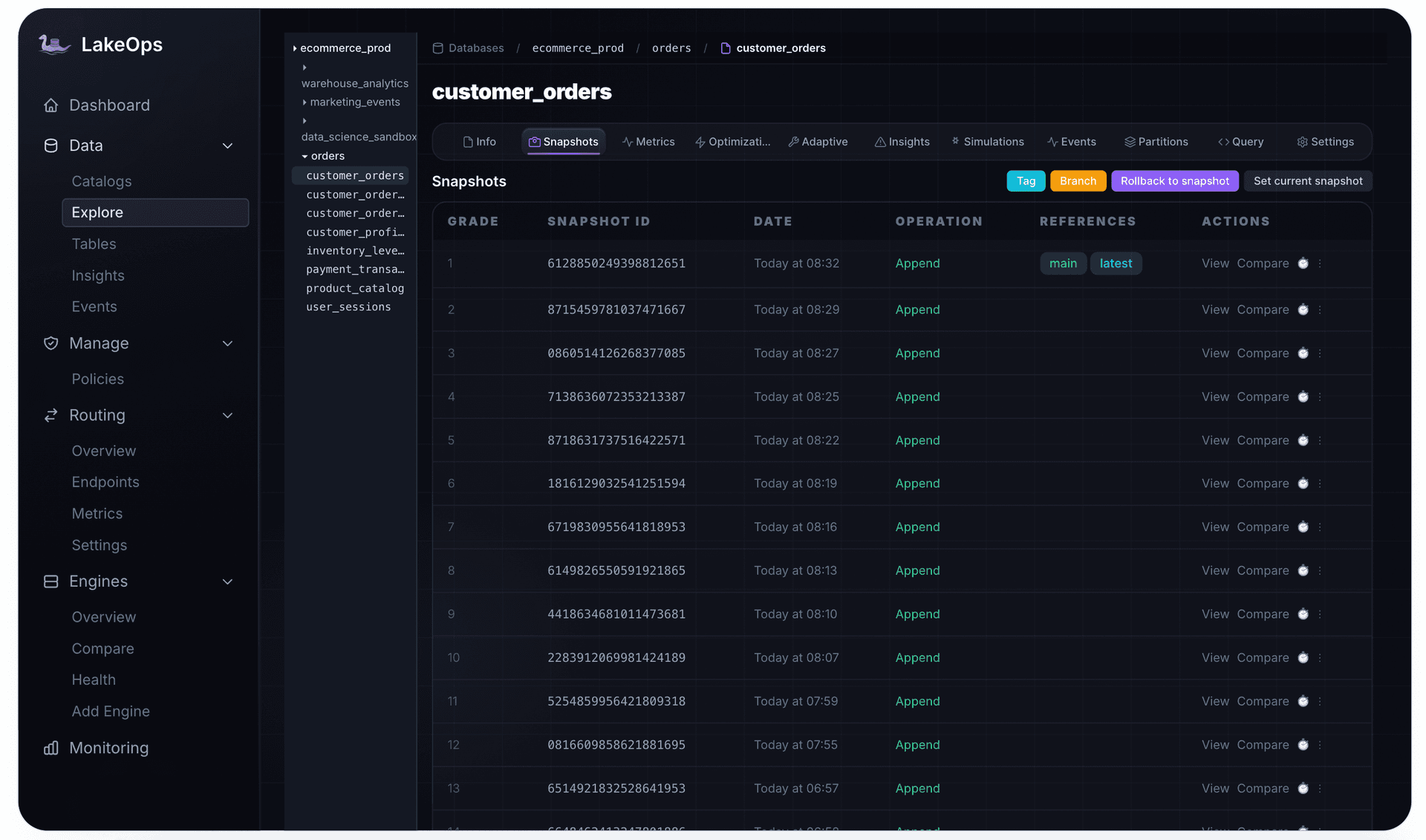
The Snapshots tab lists every snapshot with its operation and the branches and tags that point at it, and lets you tag, branch, or roll back. The Create Snapshot Tags card creates tags on a schedule from a name template (by default eod-{yyyy}-{MM}-{dd}) and gives them their own retention (30 days by default). Expiry never removes a tagged snapshot, so the tags are the reference points you publish to consumers.
Policies that encode who owns what
The ownership table from earlier becomes configuration. Governance policies are scoped to all catalogs, one catalog, or namespaces and tables by exact name or by a regular expression that must match the whole name, with exclude lists. A table policy saved from the table's Optimization tab takes precedence; otherwise the most specific scope wins, then priority, then the most recently created. New tables that match a scope inherit its policy when LakeOps discovers them, so a new shared table is maintained from its first scan.
Exclude lists are how you respect other platforms' authority. Put Snowflake-managed, Unity-managed, and Tableflow tables on the exclude list of every maintenance policy, and they stay in the health view without LakeOps ever rewriting a file. For a table Tableflow writes, that is the only correct setup, as covered in Streamhouse and Lakehouse with Apache Iceberg.

The governance page shows how policies cover a lake as it grows.
Compare layouts before rewriting a table everyone reads
The Simulations tab ranks the current layout against candidates generated from the table's schema, covering partition spec, sort order, and file size, and estimates files scanned, data read, and execution time for each. It computes everything from metadata; nothing is written, branched, or committed. Today the workload is inferred from column names and types, and using real query history as the workload is in alpha. Treat the result as a ranking that tells you which change to test, then apply the winner with ALTER TABLE ... WRITE ORDERED BY or a partition spec change.

The platform overview shows how these pieces fit together across the lake.
One endpoint over the one copy
Zero-copy is half the job if every client still needs its own engine connection. QueryFlux, the open-source SQL proxy maintained by the LakeOps team, gives clients one endpoint over the Trino, PostgreSQL, MySQL, Snowflake, Flight SQL, and MCP protocols, and routes each query to an engine reading the same tables: Trino for dashboards, DuckDB for small lookups, StarRocks for high-concurrency serving. Its overhead is well under a millisecond. QueryFlux's walkthrough of Iceberg on Trino and StarRocks behind one endpoint shows the pattern.
Query routing in LakeOps is built on QueryFlux. The routing screens in the console are alpha with sample data, and routing itself runs on QueryFlux today. We're connecting QueryFlux query history to LakeOps, so the filters real queries use across engines can shape layout candidates in Simulations.
Checklist: a zero-copy lakehouse that holds up
- One owning catalog per table. No table registered as writable in two catalogs.
- Vended, scoped credentials. Consumers get read-only privileges and no standing bucket keys.
- A written contract per shared table. Format version, delete mode, types, retention window, and the most restrictive consumer.
- One maintainer per table. Recorded in table properties and enforced as a policy scope.
- Platform-owned tables are observe-only. Snowflake-managed, Unity-managed, UniForm, and Tableflow tables are excluded from your maintenance.
- Compaction that stays out of hot partitions. Partial progress on, sort order declared on the table.
- Expiry that respects consumers. Retention set in table properties, published reference points as tags.
- Orphan cleanup with a dry run and a generous cutoff. Never on a virtualized table's location.
- Delete files compacted before readers pay for them. Copy-on-write for consumers that can't apply deletes.
- One layout chosen for every consumer. Partitioning for coarse pruning, sort order for fine pruning, compared before rewriting.
- Lake-wide health and one operations record. The state of every shared table, and who changed it.
One copy, one owner
Zero-copy is the right architecture for most lakehouses: one copy in open formats, in your storage, read by whatever engine fits the job. It works when each shared table has one catalog that commits to it, one maintainer that keeps it healthy, and a contract every consumer can read within. Build that discipline into credentials, table properties, and policies, and the one copy stays fast for everyone who reads it. If you'd rather not build and run that operational loop yourself, LakeOps runs it on the Iceberg tables you already share.