
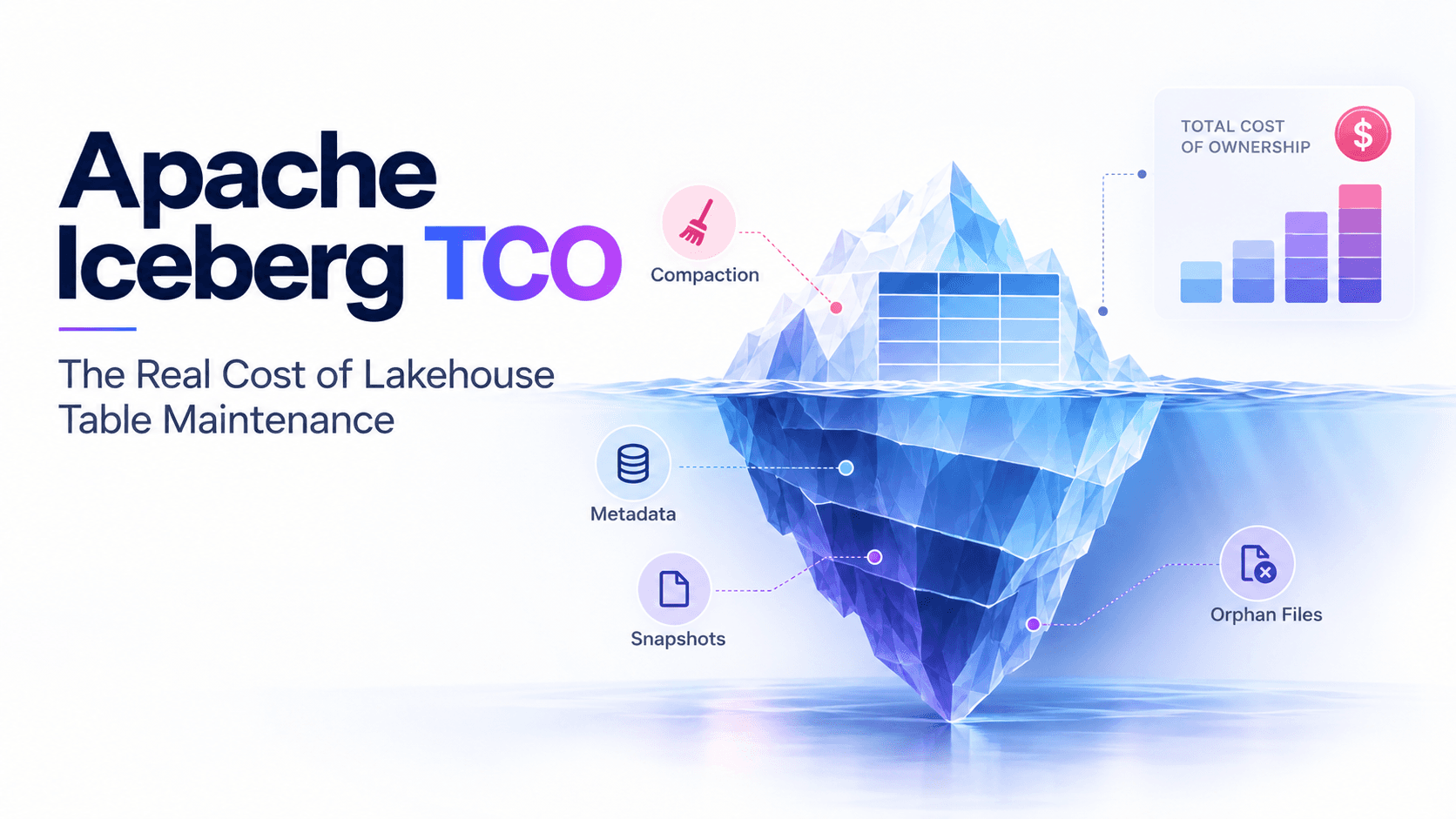
Ask a data team what their Iceberg lakehouse costs and you usually get two numbers: the object storage bill and the compute bill for the engines that query it. Both are real, and both are downstream. The thing that decides them rarely has a line of its own: how the tables are maintained. A table that is compacted, expired, and cleaned at the right time is cheap to store and cheap to read. The same table left alone for a quarter costs more to store, more to query, more to plan, and eventually a week of engineering to rescue — while holding exactly the same data.
That makes Apache Iceberg total cost of ownership (TCO) a maintenance question more than a storage question. Iceberg gives you an open format, every engine, and data in your own account. It also hands you the operational work a warehouse used to hide inside its price: compaction, snapshot expiration, orphan cleanup, manifest rewrites, retention, and layout. Every one of those operations costs money to run, and every one of them saves money when it runs at the right moment. The real cost of lakehouse table maintenance is the sum of both sides — and most teams only measure one.
The cheapest way to run that work is not a bigger maintenance cluster or a longer cron file. It is a lakehouse control plane — the operational layer the open lakehouse does not ship as one system. LakeOps is built as that layer for Apache Iceberg:
- What it is and where it sits — a system beside your data path, above the catalogs (Glue, S3 Tables, Polaris, Nessie, any REST catalog), the Iceberg tables in your object storage, and the engines that query them. It replaces none of them. It connects through standard catalog and Iceberg metadata APIs, so data is not copied, pipelines do not change, and tables stay plain Iceberg in your account.
- What it does — runs one loop on every table: read metadata and query telemetry, score table health, decide which operation each table needs and when, execute in dependency order, then measure the result and feed it into the next decision.
- What you get — one view of what each table costs and why, maintenance that runs only when a table's state calls for it, layouts that match how each table is actually queried, and a record of every operation and what it reclaimed.
- Why scripts cannot do it — maintenance spend and the costs it prevents move in opposite directions, and the balance point is different for every table and keeps moving. A cron job or a DAG applies one rule to every table on a clock. Holding each table at its own lowest-cost point needs a system that measures every table continuously.
The longer definition is in what a data lakehouse control plane is. For TCO, what matters is that decisions come from intelligence about each table rather than from a calendar:
- Intelligent Compaction re-sorts files to match how you actually query — faster reads, less CPU.
- Autonomous Maintenance triggers when table health degrades — no cron jobs, no tickets.
- Change Simulations test every change on a data branch before it reaches production.
- Adaptive learning refines compaction, routing, and timing with every cycle.
Around those sit query routing by cost or latency, attribution per user and per AI agent, and policies that cascade from the organization down to a single table. The walkthrough below shows the loop end to end, from connecting a catalog to autonomous maintenance.
The dashboard is where the TCO picture starts: storage and CPU trends, the operations that produced them, and how many tables are healthy, drifting, or critical.

The rest of this guide builds the TCO model one line at a time: what each cost is, what drives it, how to measure it in your own lake, and where a control plane changes the number.
What Iceberg TCO actually includes
A useful TCO model for an Iceberg lakehouse has seven lines. Some arrive on the cloud bill under obvious names. Others hide inside other teams' budgets or are never billed at all.
1Iceberg TCO = storage held2 + object requests and per-object fees3 + query compute4 + maintenance compute5 + catalog and metadata services6 + engineering time7 + incident and risk cost| Cost line | Where it shows up | What drives it | How maintenance moves it |
|---|---|---|---|
| Storage held | Object storage bill | Live data, plus everything history and failed writes still keep | Expiry and orphan cleanup shrink it; long retention grows it |
| Requests and per-object fees | Request charges, per-object monitoring, KMS | Number of files, not bytes | Compaction lowers file count; every rewrite also adds writes |
| Query compute | Trino, Spark, Athena, Snowflake, Databricks bills | Bytes scanned, files opened, planning, delete merges | Good layout lowers it on every query; neglect raises it on every query |
| Maintenance compute | Clusters, DPU-hours, serverless jobs, credits | Bytes rewritten and how often | The one line you control directly — and the one you can overspend on |
| Catalog and metadata | Catalog API calls, metadata objects | Commit rate, metadata files, API traffic | Manifest rewrites and metadata cleanup keep it bounded |
| Engineering time | Salaries and on-call | Tables multiplied by special cases | Automation removes it; scripts grow it |
| Incident and risk | Reruns, restores, missed SLAs | Unsafe cleanup, failed jobs, silent decay | Correct ordering and safety windows prevent it |
Only one of the seven lines is the price of maintenance itself; the other six are its consequences, and they are coupled. Cut maintenance compute and storage, requests, and query compute rise. Maintain everything all the time and maintenance compute becomes the largest line. A model that tracks each line in isolation always finds a reason to cut maintenance, then pays for it in query compute a month later — usually on another team's budget.
The Iceberg cost optimization guide covers tactics for cutting each bucket. This guide is about the model underneath them.
Why an Iceberg table costs more while its data stays the same
Iceberg never modifies a file in place. Every commit writes new data files, new manifests, a new manifest list, and a new metadata.json, and keeps the old ones reachable through snapshot history. That design is what makes commits atomic and time travel possible, and it makes writes cheap. The cost is deferred, and it lands in three forms.
The per-object tax
Frequent commits — streaming, CDC, micro-batches, many small backfills — produce many small files. Most lakehouse charges scale with the number of objects, not the number of bytes:
- Requests. Every file read is a GET, every file written is a PUT, and S3 bills LIST at the PUT rate. A query that opens many small files pays more in requests than the same query over fewer large ones, before any compute is counted.
- Per-object fees. S3 Tables bills monitoring per object stored and compaction per object processed plus per GB, with sort and Z-order compaction billed at a higher per-GB rate than binpack.
- Encryption. With SSE-KMS and no S3 Bucket Key, object reads and writes generate KMS requests, so the encryption line grows with file count as well.
- Storage classes. Infrequent-access classes bill a 128 KB minimum object size, and Intelligent-Tiering does not tier objects under 128 KB. Small files are billed as if they were larger, or locked out of the cheaper tiers.
- Engine overhead. Every file is a task, an open, and a footer read, on every engine that reads the table.
Storage you pay for but cannot query
The second form is bytes that no current query can read:
- Snapshot history. Data that was deleted or overwritten stays on storage until the snapshots referencing it are expired. On update-heavy and merge-heavy tables, history can outweigh the live table. Open-source Iceberg expires nothing on its own; the defaults (five days, at least one snapshot) only apply when
expire_snapshotsactually runs. - Forgotten branches and tags. Non-main references never expire by default (
history.expire.max-ref-age-ms). An abandoned test branch keeps every file it points to. - Orphan files. Failed writes, aborted compactions, and killed tasks leave files that no snapshot references. Snapshot expiration cannot see them; only orphan cleanup removes them.
- Metadata files.
write.metadata.delete-after-commit.enableddefaults to false, so every commit'smetadata.jsonis kept. On a table that commits every few seconds, the metadata directory grows without bound. - Versioned buckets. On a bucket with versioning enabled, deleting an object adds a delete marker; the previous version stays billed until a
NoncurrentVersionExpirationlifecycle rule removes it. Teams run cleanup faithfully and watch the storage bill not move.
Read amplification
The third form is paid on every query, which makes it the most expensive:
- Manifests. Planning reads every relevant manifest. Fast-append writers produce many small ones, and coordinator CPU on every query grows with them.
- Delete files. Merge-on-read writes position or equality delete files, and every read merges them until compaction folds them back. An uncompacted CDC table is paid for by its readers, query after query.
- Layout. When files are not sorted on the columns queries filter by, min/max statistics overlap, pruning fails, and engines scan files they do not need. Binpack compaction fixes file size; it does not fix order.
None of this is visible on day one. Per-read costs compound with query volume, so a degraded table that is read constantly costs more every day it stays degraded. That is why maintenance is worth paying for — and why its timing matters as much as whether it runs.
What maintenance itself costs
Maintenance compute is the line people argue about, because it is the one with its own invoice. How it is billed depends on who runs it.
Running it yourself
The default for open-source Iceberg is Spark procedures — rewrite_data_files, expire_snapshots, remove_orphan_files, rewrite_manifests — on EMR, Dataproc, Databricks jobs, or Kubernetes, scheduled from Airflow. The compute bill is only part of the cost:
- Cluster overhead. Startup, idle time, and executors sized for the largest table in the job, paid on every run.
- Lost commits. Compaction commits with optimistic concurrency. When it races a live writer and loses, the rewrite is thrown away unless partial progress is enabled — compute paid, nothing gained, and the job still reports that it ran.
- Rewriting what did not change. A job that compacts whole tables, or tables that saw no writes since the last run, spends most of its budget on data that was already fine.
- Wrong order. Compact before expiring and the run plans over history it is about to discard. Rewrite manifests before compaction and you rewrite them twice.
Most of these come from the scheduler, not from Spark — see where scheduled Airflow maintenance breaks down.
Turning on a managed optimizer
Every major platform now offers maintenance as a setting. Each one is a real step up from cron, and each one bills differently:
| Option | What it maintains | Billing unit | Where to find the cost | What it leaves to you |
|---|---|---|---|---|
| Amazon S3 Tables | Compaction, snapshot management, unreferenced file removal | Per object monitored, per object and GB compacted | S3 usage types for the table bucket | Tables outside S3 Tables, sort columns from real queries, engine cost |
| AWS Glue Data Catalog optimizers | Compaction, snapshot retention, orphan deletion | DPU-hours per run | Glue usage and optimizer run history | Per-table thresholds and strategy, a view beyond Glue |
| Databricks predictive optimization | OPTIMIZE, VACUUM, ANALYZE on Unity Catalog managed tables | Serverless jobs DBUs | system.billing.usage and operation history | Tables outside managed Unity Catalog, other engines' query patterns |
| Snowflake-managed Iceberg | Data compaction, manifest compaction, snapshot expiry | Compaction credits | ICEBERG_STORAGE_OPTIMIZATION_HISTORY | Orphan cleanup on external volumes, tables in other catalogs |
The TCO caveat is scope. Each optimizer works inside its own catalog or platform, bills in its own unit, and optimizes the line it owns. A lake with tables in Glue, a REST catalog, and Snowflake ends up with three maintenance systems, three cost reports, and no single answer to whether total cost went down. Defaults are also tuned for the average table, not your CDC table that fragments hourly.
Billing terms also move. Snowflake bundles compaction for Snowflake-managed storage only while Snowflake is the sole writer; once an external engine writes through the Iceberg REST catalog, compaction for that table becomes billable — which is exactly the multi-engine setup Iceberg exists for. The S3 Tables versus self-managed Iceberg comparison works through one of these trade-offs in detail.
The cost nobody bills: engineering time and incidents
The people line is usually the largest one nobody writes down: per-table jobs and thresholds, operation ordering, retention exceptions, conflict handling, alerting, upgrades, and every investigation that starts with "why is this table slow again." It scales with tables times special cases, not with data volume — which is why it surprises teams whose data barely grew.
Incident cost is the line that turns a cost model into a postmortem:
- Orphan cleanup with too short a safety window deletes files from a write that has not committed yet. The table is now broken and needs a restore.
- Snapshot expiry shorter than a reader's lag removes files a downstream job is still reading. The job fails, reruns, and the rerun has its own bill.
- Compaction that loses commit races every night consumes its full budget and leaves the table unchanged. Nobody notices, because the job is green.
- Silent decay is the most expensive. Dashboards slow down, someone upsizes the cluster, and an unmaintained table is paid for permanently by an engine budget.
How to measure your Iceberg TCO
You cannot lower a cost you cannot attribute to a table. Measuring Iceberg TCO means joining three sources: Iceberg metadata tables for what each table holds and how it is shaped, the cloud bill for what you pay, and engine query logs for who reads what. Five measurements cover most of the model. The examples use Spark SQL against an Iceberg catalog named lake.
1. Split storage into live, history, and unreferenced
1-- Bytes the current snapshot needs2SELECT sum(file_size_in_bytes) AS live_bytes3FROM lake.sales.orders.files;4 5-- Bytes any retained snapshot still references6SELECT sum(file_size_in_bytes) AS referenced_bytes7FROM (8 SELECT DISTINCT file_path, file_size_in_bytes9 FROM lake.sales.orders.all_files10);Referenced minus live is what retention costs you on this table. Compare referenced bytes with the prefix size from S3 Inventory, or the equivalent on GCS or ADLS; the remainder is metadata, orphan files, and noncurrent versions on a versioned bucket. A large remainder means cleanup is not running, or is running against a bucket that does not actually delete.
2. Count objects and the small-file share
1SELECT2 partition,3 count(*) AS files,4 sum(CASE WHEN content = 0 AND file_size_in_bytes < 64 * 1024 * 1024 THEN 1 ELSE 0 END) AS small_data_files,5 sum(CASE WHEN content > 0 THEN 1 ELSE 0 END) AS delete_files,6 round(avg(file_size_in_bytes) / 1048576) AS avg_mb7FROM lake.sales.orders.files8GROUP BY partition9ORDER BY files DESC10LIMIT 20;Set the small-file threshold relative to your target file size rather than copying this one. File count drives the per-object lines — requests, per-object fees, KMS, storage-class exclusions — and delete files drive merge-on-read cost. Read the result per partition: table averages hide the hot partition that every dashboard queries.
3. Track commits, history, and manifests
1SELECT2 date_trunc('day', committed_at) AS day,3 count(*) AS commits,4 sum(cast(summary['added-data-files'] AS bigint)) AS files_added,5 sum(cast(summary['added-files-size'] AS bigint)) AS bytes_added6FROM lake.sales.orders.snapshots7GROUP BY 18ORDER BY 1 DESC;9 10SELECT count(*) AS manifests, round(avg(length) / 1024) AS avg_manifest_kb11FROM lake.sales.orders.manifests;Commits per day and files per commit drive almost every other line. When files added grows faster than bytes added, the table is fragmenting faster than it is growing.
4. Attribute maintenance compute to tables
Whichever service runs maintenance, get its spend down to the table. For self-run jobs, tag clusters or job runs by namespace and table and activate those tags as cost allocation tags. For S3 Tables, use the table bucket's monitoring and compaction usage types in the Cost and Usage Report. For Glue optimizers, use the DPU-hours reported per optimizer run. On Databricks and Snowflake, the platforms expose it directly:
1-- Databricks: predictive optimization spend per day2SELECT usage_date, sum(usage_quantity) AS dbus3FROM system.billing.usage4WHERE billing_origin_product = 'PREDICTIVE_OPTIMIZATION'5GROUP BY usage_date6ORDER BY usage_date DESC;7 8-- Snowflake: billed compaction per Iceberg table, last 30 days9SELECT table_name, sum(credits_used) AS credits10FROM snowflake.account_usage.iceberg_storage_optimization_history11WHERE start_time >= dateadd(day, -30, current_timestamp())12GROUP BY table_name13ORDER BY credits DESC;5. Attribute query compute to tables
Query logs close the loop: Trino query events, Athena workgroup metrics and per-query bytes scanned, Snowflake QUERY_HISTORY and ACCESS_HISTORY, Databricks query history. Tie each query to the tables it read. This is the measurement that prices degradation — query cost on a table before and after it is maintained.
Per-table unit economics
Totals hide the signal. Two ratios per table tell you more than any monthly sum:
- Maintenance cost per unit of change — maintenance spend divided by data or files written since the last run. It should stay roughly flat. If it climbs, maintenance is rewriting data that did not change.
- Query cost per query — compute per query on that table over time. It should stay flat as the table ages. If it rises between runs, maintenance is too slow for that table's write rate.
Doing this by hand once is a useful exercise; doing it for every table, every day, is a control plane's job. LakeOps computes these signals across catalogs — file count, small-file ratio, snapshot age, manifest bloat, write velocity — and rolls them into a health status, so the most expensive tables surface on their own.

Every operation it runs lands in a lake-wide event log with its impact — files merged, snapshots expired, bytes reclaimed, duration. That log is the ledger a TCO model needs and rarely has: what maintenance did, to which table, and what it bought.

The maintenance U-curve: under- and over-maintaining
Plot total cost against how often a table is maintained and you get a U. Too little, and storage, requests, and query compute rise. Too much, and rewrite compute, write requests, and commit conflicts rise. The lowest point is different for every table, and it moves whenever the table's write pattern changes.
1total2cost3 │ ╲ ╱4 │ ╲ under-maintained over- ╱5 │ ╲ storage, requests, maintained╱6 │ ╲ query compute grow rewrite ╱7 │ ╲ compute ╱8 │ ╲________________________╱9 │ lowest total cost:10 │ maintain when state changes11 └──────────────────────────────────────────────▶12 maintenance frequencyFixed schedules land on both sides of the curve at once. A nightly job is late for a CDC table that fragments every hour and wasteful for a dimension table that changed twice this month. Over-maintenance is easy to miss because it looks like diligence: compacting partitions that are already compacted, rewriting a whole partition for one new file, sort-compacting a table nobody filters.
The rule that minimizes TCO is simple to state: maintenance spend should track table change — not table size, and not the clock. In practice that means each operation has its own trigger:
| Signal | Operation | Cost it avoids | Cost it incurs |
|---|---|---|---|
| Small-file share rising in changed partitions | Compaction scoped to those partitions | Requests, per-file overhead, bytes scanned | Rewrite compute for the changed scope only |
| Snapshots past the retention window | Snapshot expiration | Storage held by history, metadata size | A metadata commit and deletes |
| Unreferenced files older than the safety window | Orphan cleanup | Storage nothing can read | A listing of the table prefix |
| Manifests growing faster than data | Manifest rewrite | Planning time on every query | A small metadata rewrite |
| Delete files accumulating | Delete-aware compaction | Merge-on-read on every read | Rewrite of the affected data files |
| Filters not matching the sort order | Sort compaction, tested first | Bytes scanned per query | A one-time rewrite, then incremental upkeep |
| No change since the last run | Nothing | — | — |
The last row is the cheapest maintenance there is. LakeOps' autonomous table maintenance is built around this rule. Each table gets its own readiness per operation, derived from how quickly it accumulates small files, snapshots, manifests, and delete files. Streaming tables are maintained as often as they fragment, batch tables after they change, and idle tables are skipped. Compaction is scoped with a watermark to data written since the last run, so it does not rewrite what is already in good shape.

Getting more from every maintenance run
Once maintenance is triggered by state, the remaining lever is efficiency: doing each run in the right order and over the right scope.
Order changes the bill. Compaction replaces small files with large ones in a new snapshot, but the small files stay referenced by older snapshots — you pay for both copies until those snapshots expire. Expiring before compaction keeps the metadata compaction plans over small, and the next expiry releases what compaction replaced. Orphan cleanup comes after expiry so it sees the final set of referenced files, and manifest rewrites come last so they describe the layout compaction just produced.
Orphan cleanup is a delete, not a rewrite. It reads no data and writes none. S3 does not charge for DELETE requests, so the real cost is listing the prefix. That makes it one of the cheapest ways to reclaim storage — as long as the safety window is longer than your slowest write, and versioned buckets have a noncurrent-version expiration rule so the deletes actually free space.
Scope compaction to what changed. Filter rewrites to recent partitions, skip groups below a minimum file count, and enable partial progress so a conflict with a live writer costs one file group instead of the whole run:
1-- 1. Release history past the retention window2CALL lake.system.expire_snapshots(3 table => 'sales.orders',4 older_than => TIMESTAMP '2026-10-14 00:00:00',5 retain_last => 106);7 8-- 2. Compact only the partitions that changed, keeping progress on conflicts9CALL lake.system.rewrite_data_files(10 table => 'sales.orders',11 where => 'order_date >= "2026-10-20"',12 options => map(13 'min-input-files', '5',14 'partial-progress.enabled', 'true',15 'partial-progress.max-commits', '10'16 )17);18 19-- 3. Remove files nothing references, with a window longer than your slowest write20CALL lake.system.remove_orphan_files(21 table => 'sales.orders',22 older_than => TIMESTAMP '2026-10-18 00:00:00',23 dry_run => true24);25 26-- 4. Rebuild manifests to match the new layout27CALL lake.system.rewrite_manifests('sales.orders');Those four calls embed four decisions — retention cutoff, partitions in scope, thresholds, safety window — that are right for one table on one day. A control plane makes them per table on every run, from the table's own metadata.
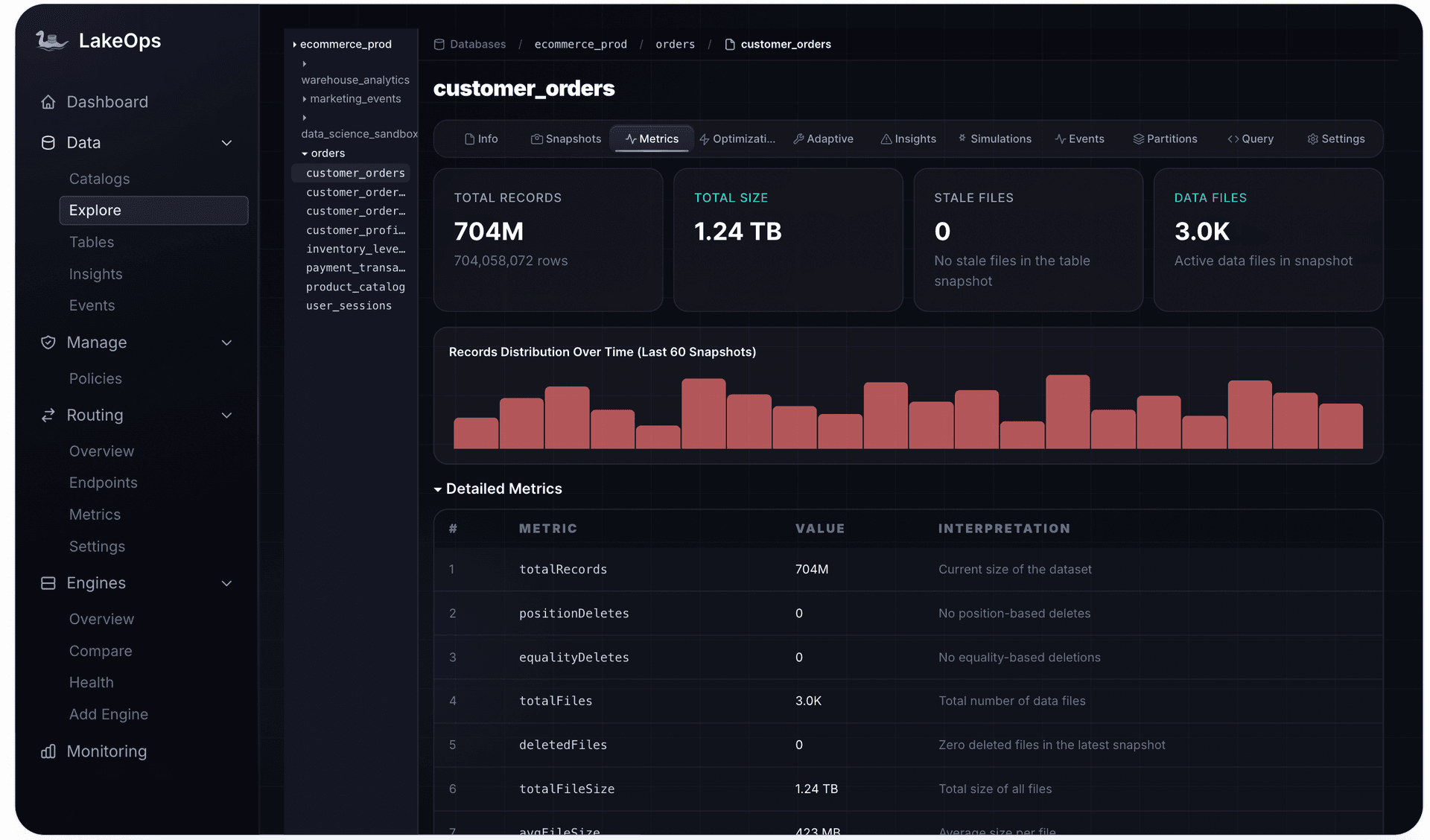
Per-table metrics show whether a run is worth paying for at all: the file-size and record distribution decides whether compaction will pay back its rewrite.
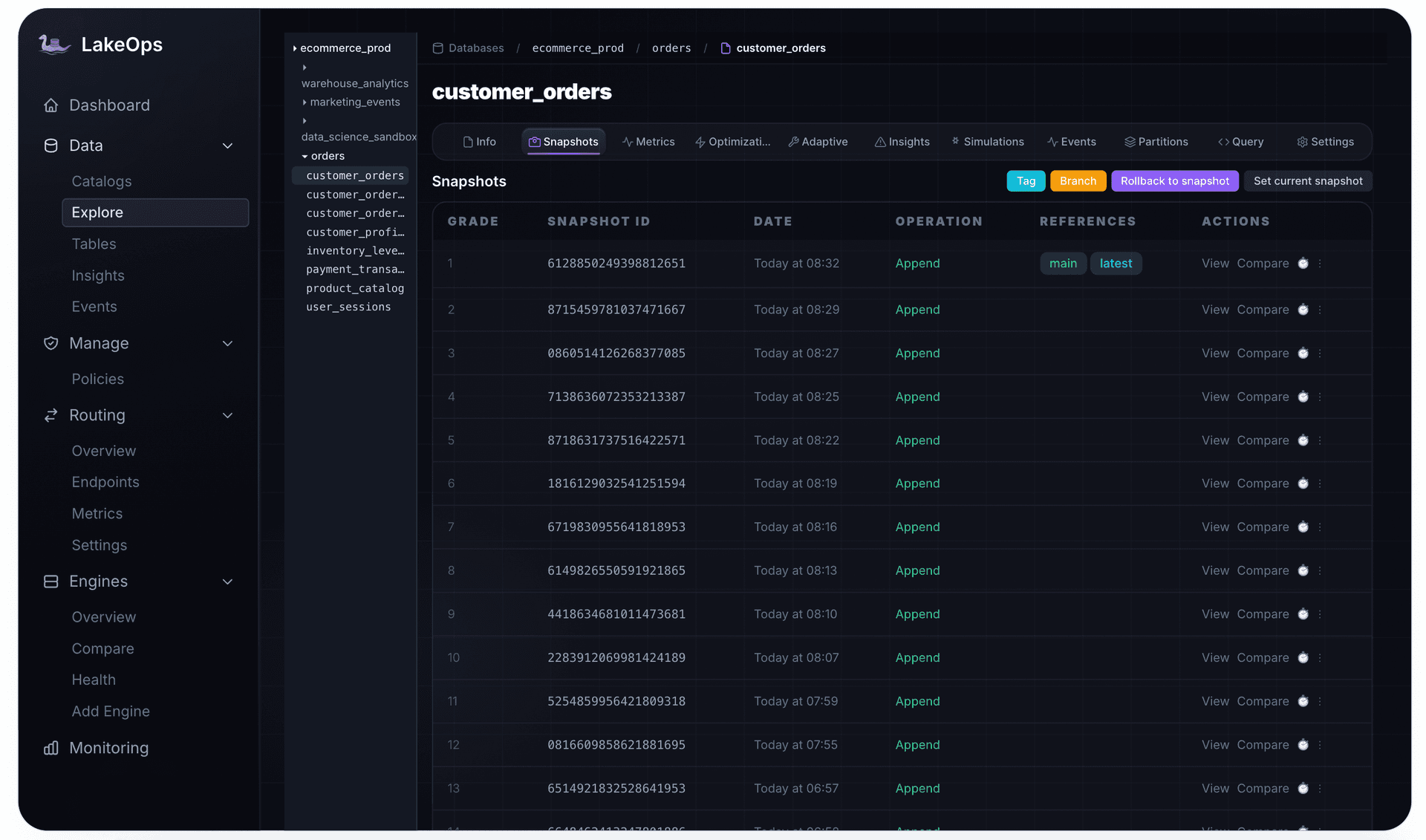
Price retention explicitly. Every day of snapshot retention is storage bought for time travel and rollback. Set it per table from the longest reader lag and the real recovery need, tag the specific snapshots audits require instead of keeping weeks of every commit, and expire stale branches.
The biggest line: query compute and table layout
In most lakes, query compute is the largest line, and it is the one maintenance moves most. File size is only half of layout. Binpack compaction merges small files but keeps rows in arrival order, so min/max statistics still overlap and engines still read files they could have skipped. Sorting or Z-ordering on the columns queries actually filter and join on is what lets engines prune.
Pruning happens in layers. Partition pruning decides which groups of files a query may touch; over-partitioning buys it with more, smaller files — a direct hit on the per-object lines. File pruning works inside the surviving partitions using each file's min/max statistics, and only when rows are clustered so those ranges are narrow. A linear sort clusters best on its leading column; Z-order spreads the benefit across two to four filter columns and dilutes it with each one added. Row-group pruning repeats the test inside each Parquet file. Partitioning decides which files exist; clustering decides whether they can be skipped.
Sort compaction also costs more to run — more CPU on any engine, and a higher per-GB rate on S3 Tables. It pays off only when queries filter on the sort columns. Picking those columns from real query traffic across every engine that reads the table is the decision with the most leverage on TCO, and the easiest to get wrong by guessing once and never revisiting.
LakeOps' query-aware compaction reads the filters, joins, and groupings engines actually issue against each table and re-sorts data to match, on a Rust engine built on Apache DataFusion — no JVM and no Spark cluster to size or keep warm. Because a full re-sort is the most expensive maintenance operation a table will see, candidate layouts are tested first: layout simulations run sort and partition strategies on an isolated Iceberg branch and compare them against the real query mix before anything touches production.

Engine choice is the other half of query compute. The same query on the same table costs different amounts on Trino, Athena, Snowflake, Spark, or DuckDB, and the cheapest engine for a dashboard is rarely the cheapest for a backfill. LakeOps compares engines side by side on identical queries and routes each query by cost or latency behind one SQL endpoint, per routing group. Routing is powered by QueryFlux, an open-source Rust SQL proxy: clients keep their protocol and dialect, so moving a workload to a cheaper engine is a routing change, not a migration — the same approach used to offload Snowflake queries without changing clients.

What a control plane changes in the TCO model
Put the pieces together and the control plane's effect on TCO is not one saving; it is a change in how each line behaves. LakeOps' cost optimization work spans five of them — query CPU, storage waste, maintenance compute, engine selection, and operational overhead:
| Cost line | Typical self-run setup | With LakeOps |
|---|---|---|
| Storage held | Global retention, orphan jobs nobody tunes | Expiry and cleanup triggered by table health; reclaimed bytes logged per event |
| Requests and per-object fees | Small files until the next scheduled job | Compaction when the small-file share rises, scoped to changed data |
| Query compute | Sort order guessed once | Sort orders learned from real queries and tested on a branch |
| Maintenance compute | JVM clusters on schedules, full rewrites, lost commits | Rust engine, runs only where needed, conflict-aware against live writers |
| Engine selection | One engine hardcoded per workload | Routing by cost or latency behind one endpoint |
| Engineering time | A DAG and a threshold per table | Policies that cascade; Autopilot, Policies, or Manual mode |
| Incident and risk | Found by users | Health alerts, safe ordering, and an audit trail per operation |
The walkthrough below follows the same lines through a live lake: where Iceberg spend leaks, and what the control plane does about each leak.
Policies turn TCO decisions into something reviewable. Retention windows, compaction thresholds, cleanup cadence, and sort strategies are declared once, scoped to a catalog, namespace, or table, inherited by new tables, and logged every time they run.

The maintenance loop is itself a production system, and it gets monitored like one: coverage by catalog, failure rate, duration, and a readiness queue of tables that are due, running, or scheduled. A queue that drains steadily is what a stable TCO looks like from the inside.

The vendor line belongs in the model too. LakeOps prices on the data it actually optimizes — compacted, sorted, or cleaned — while monitoring, health scoring, policies, routing decisions, seats, and connected catalogs are not billed; the pricing page has the details. The platform's cost tracks the work it does, the same principle the maintenance itself follows. The platform overview shows how observe, maintain, compact, route, and govern fit together.
Build, toggle, or control plane
There are three honest ways to own Iceberg maintenance, and each has a TCO profile:
| Spark jobs and a scheduler | Managed optimizer toggles | Control plane (LakeOps) | |
|---|---|---|---|
| Scope | Tables someone wrote a job for | One catalog or platform | Every table across catalogs and engines |
| Trigger | The clock | Built-in thresholds | Each table's health |
| Layout | Sort order set by hand | A strategy you choose per table | Learned from queries, tested on a branch |
| Cost visibility | Whatever you build | One report per service | Per table and per operation, lake-wide |
| Maintenance compute | Clusters you size and keep warm | The provider's billing unit | A Rust engine that runs only where needed |
| People cost grows with | Tables times exceptions | Catalogs times platforms | Policies |
| Lock-in | None, at the price of toil | Tied to the platform | None — standard Iceberg in your account |
Self-run jobs are reasonable for a handful of tables with one writer. A managed toggle is reasonable when every table lives in one platform and its defaults fit your workloads. Once tables span catalogs and engines, or outgrow what a team can reason about one at a time, the people line and maintenance waste dominate — and that is where a control plane lowers TCO rather than moving cost between lines.
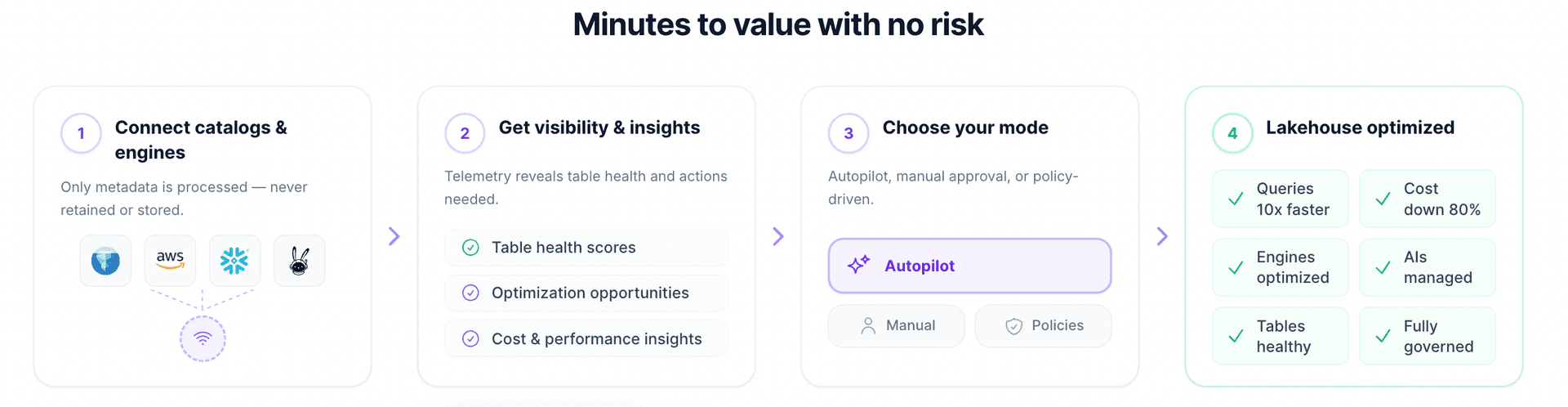
Adopting LakeOps can follow the same order as the TCO work in this guide: connect your catalogs in Manual mode, where every operation waits for approval, and measure first; review what the health scores and insights say about your most expensive tables; then hand over operations one policy at a time.
Iceberg TCO checklist
- 1.Model all seven lines per table, not just storage and compute.
- 2.Split storage into live, history, and unreferenced bytes, and add a noncurrent-version expiration rule on versioned buckets.
- 3.Measure the small-file share per partition and files added per commit.
- 4.Bound metadata: enable metadata cleanup after commit and expire stale branches.
- 5.Attribute maintenance and query compute to tables, and track cost per unit of change and per query.
- 6.Trigger maintenance on table state, and skip tables that have not changed.
- 7.Sequence every run: expire, compact the changed scope, clean orphans behind a safety window, rewrite manifests.
- 8.Set retention per table from reader lag and recovery needs, and tag audit snapshots.
- 9.Pay for sort compaction only where queries filter, test the layout first, and compare engines on the same queries.
- 10.Encode decisions as policy, and monitor the maintenance loop like any production service.
The real cost of an Iceberg lakehouse is not in the storage price or the engine price. It is in whether every table is maintained at the moment its own state calls for it — no later, when queries pay, and no earlier, when maintenance does. That decision is too granular and too frequent for schedules and scripts. Start by measuring your largest tables with the queries above; if the gap between what they cost and what they should cost is wide, that is the work LakeOps takes over, table by table.