
Iceberg is the right table format. The ecosystem has converged — Snowflake, Databricks, AWS, Google Cloud, and every major query engine read and write it natively. That question is settled.
The cost question is not settled. Most data platform teams that have adopted Iceberg are significantly overpaying for their lake — not because of anything Iceberg does wrong, but because Iceberg gives you the primitives to run a healthy lake and then leaves the maintenance entirely to you. In practice, most organizations do partial maintenance at best: they run compaction on their hottest tables, maybe they have a snapshot expiration job that someone wrote two years ago and is afraid to touch, and orphan files accumulate indefinitely.
This post breaks down the four distinct cost components that compound in an unmaintained Iceberg lake, shows you exactly how to measure each one, and explains how autonomous table management eliminates them without code changes or pipeline disruption. For 7 actionable cost reduction strategies you can implement immediately, see the companion strategy guide.
The four cost buckets in an Iceberg lake
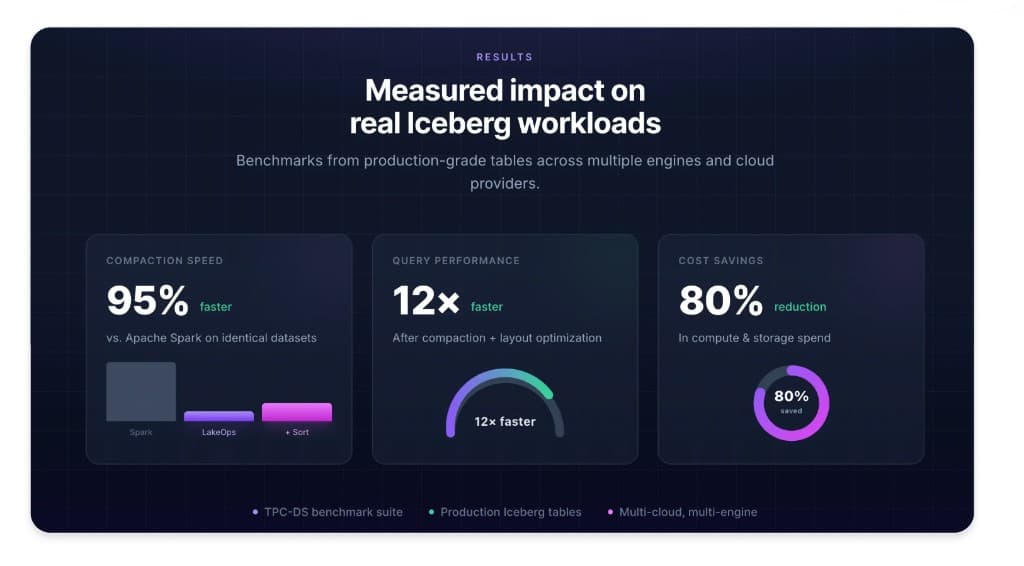
Before diving into solutions, it helps to understand that Iceberg costs come from four distinct sources that interact with each other. Fixing one without the others delivers partial results. The full reduction — we see up to 80% total cost reduction in production — comes from addressing all four simultaneously.
Bucket 1: Object storage costs. This includes the raw bytes you pay to store on S3, GCS, or ADLS. The headline rate looks straightforward, but the actual bill is inflated by files that shouldn't exist at all: expired snapshots that still reference data objects, orphan files from aborted writes and failed compaction runs, and duplicate data from incomplete rewrites. One customer found 120 TB of deletable data in expired snapshots alone — $33K/year in pure waste that had been accumulating for months without anyone noticing.
Bucket 2: Query compute costs. Every time a query engine reads from your lake, it pays per byte scanned and per API call to object storage. A well-maintained Iceberg table with properly-sized files and a good sort order lets engines skip irrelevant data aggressively via predicate pushdown — they read a fraction of the physical bytes. An unmaintained table with thousands of small files and stale statistics forces engines to scan everything. Unsorted tables scan 51% more data per query than sorted equivalents — on every single query, across every engine, indefinitely.
Bucket 3: Compaction compute costs. Maintenance isn't free. Every time you run compaction via Spark, you're paying for JVM startup, executor provisioning, garbage collection overhead, and idle cluster time. The typical Spark-based compaction job is over-provisioned because under-provisioning causes failures, and failures mean 2 AM pages. The compute cost of keeping tables healthy often rivals the compute cost of querying them. A 200 GB binpack compaction on Spark costs roughly $1.54 in compute. The same job on a purpose-built Rust engine costs $0.21 — 86% cheaper, on identical hardware.
Bucket 4: Engineering time costs. Someone wrote those Spark compaction jobs. Someone maintains them, debugs them when they fail, monitors them, and is on-call when they break at 2 AM. As your lake grows from 50 tables to 500 tables, the engineering time to keep maintenance scripts working grows proportionally — but headcount doesn't. This is the cost that never shows up on a cloud bill but often exceeds the infrastructure spend when you factor in fully-loaded engineering time.
Bucket 1: Storage bloat — how it compounds
Storage cost inflation follows a predictable pattern. It starts small and accelerates.
When a Spark job fails mid-write, it leaves partial data files on object storage. When snapshot expiration isn't configured, every snapshot persists forever — and each snapshot holds references to the data files that existed at that point in time, preventing garbage collection. When tables get dropped or renamed, their data stays on disk indefinitely because no one set up orphan file cleanup. After six months of this, a production lake has layers of unreferenced data accumulating at scale.
The numbers from real deployments are striking. One production scan found approximately 200 TB of dead data across 324 tables — roughly 1.8 million orphan files from aborted transactions, failed Spark jobs, and stale tables from departed team members. That was $4,000 per month in storage for data the tables didn't even reference. Another customer had 120 TB removable from expired snapshots alone, representing $33,000 per year in waste. A single cleanup pass reclaimed that storage in 10 minutes.

The other insidious storage cost is manifest metadata. Every Iceberg snapshot contains a manifest list, which points to manifest files, which point to data files. After months of appends and compaction without manifest optimization, a table might accumulate 200+ manifest files where 30 would suffice. Manifests are not free — they take up storage, and more importantly, every query planner reads every manifest before deciding which data files to scan. At 200+ manifests, query planning overhead is often larger than the actual scan.
Bucket 2: Query compute — the small file tax
The small file problem is the most well-known Iceberg cost driver, but its true scale is routinely underestimated. (For a full breakdown of the performance mechanics — how file sizing, sort order, manifests, and routing interact — see Optimizing Iceberg Lakehouse Performance.)
Each Parquet file in your lake requires at least one S3 GET request to read its metadata — the file footer containing row group statistics, column encodings, and schema information. For a table with 47,000 files covering 1 TB of data, every query that touches that table makes 47,000 S3 GET requests just for metadata before reading a single row. At $0.0004 per 1,000 GET requests, that adds up — but the bigger cost is compute time spent waiting for those round trips.
The production measurement: 47,000 files on a single table caused a query to take 52 seconds. After compacting to 280 files, the same query ran in 5.8 seconds. That is a 9× improvement — which translates directly to 9× less CPU time per query, and therefore 9× less compute cost per execution. Run that query 10,000 times per day across your lake and the cost difference is enormous.

Sort order matters as much as file count. When data is physically sorted by the columns your queries filter on, query engines can use min/max statistics in Parquet row group metadata to skip entire row groups without reading them. If your queries filter on event_date and the data is sorted by ingestion_time, every query has to scan every row group looking for matching dates. Sorted layouts cut cumulative scan size by 51% compared to unsorted equivalents — on every query, every day, across every engine.
Sorted data also compresses better. A 1 TB TPC-H Lineitem table compresses to 163 GB when sorted versus 178 GB unsorted — a 9% improvement that compounds into real cost reduction at scale.
Delete files are the hidden third component. Every merge-on-read update or delete operation in Iceberg generates a delete file alongside the original data file. When you query a table with position deletes, the engine has to read both the data files and the delete files and apply the deletions at read time — for every read, on every query, until those deletes are physically compacted away. One production table had 23,433 delete files accumulating over 551 million rows of deleted data. Every query against that table was paying the full cost of reading and filtering that entire delete history.
Bucket 3: Compaction compute — why Spark is the wrong tool
The dominant pattern in Iceberg compaction is Spark-based: a scheduled Airflow DAG spins up a Spark cluster, reads the small files, writes merged output, and commits to the catalog. This works. It also costs 7–10× more than it needs to, and at scale it becomes the single largest controllable cost in your data platform.
The core problem is JVM overhead. Spark's execution model was designed for general-purpose distributed computation — it handles arbitrary DAGs of transformations across heterogeneous workloads. Compaction is none of those things. Compaction is a narrow, IO-bound read-merge-write operation with predictable memory requirements and no complex computation. Running it on Spark means paying for JVM startup time, garbage collection pauses that stall executors at unpredictable intervals, and executor provisioning that has to be over-sized to avoid OOM failures.
The benchmark numbers are clear. On a 200 GB test table (approximately 1 TB uncompressed), binpack compaction takes 1,612 seconds on Apache Spark and costs approximately $1.54. The same job on LakeOps's Rust engine with Apache DataFusion takes 221 seconds and costs $0.21 — 86% cheaper, nearly 8× faster. AWS S3 Tables' built-in compaction takes 6,300 seconds on the same data.

The gap is structural, not marginal. Rust eliminates GC pauses and JVM overhead. Apache DataFusion provides vectorized columnar execution with Arrow. Lock-free parallelism means worker threads never stall waiting on each other. Bounded memory per worker means the engine never OOMs regardless of table size — while Spark routinely OOMs on large tables and requires cluster resizing or job splitting to proceed. For teams running on AWS Glue, see optimizing Iceberg on AWS Glue for Glue-specific tuning patterns.
Production evidence: a 1.192 TB table (balance_snapshots) caused Spark to run out of memory on the same hardware where LakeOps completed the job in 11 minutes at 1,572 MB/s throughput. A streaming table with 42,633 small files was compacted down to 69 files — 99.8% file reduction — in 138 seconds.
The self-improvement characteristic compounds the cost savings further. On three consecutive runs of the same 1.2 TB table, the compaction engine improved from 22 minutes to 18 minutes to 11 minutes as it learned the workload's access patterns and data distribution. No configuration changes between runs — the engine observes query telemetry and adjusts its optimization strategy automatically.
Bucket 4: Snapshot bloat — the metadata trap
Every write operation in Iceberg — every append, overwrite, delete, or compaction — creates a new snapshot. Snapshots are what make time travel and atomic rollback possible. They are also, without active management, a compounding cost problem.
Each snapshot contains a manifest list, which references a set of manifest files, which reference the actual data files. At 10,000+ snapshots on a single active table, the metadata tree becomes deeply nested. Query planning — the phase where the engine determines which data files to scan — reads every manifest to evaluate column statistics. When manifests number in the hundreds and reference stale or redundant entries, query planning time dominates total query time.

The other snapshot cost is storage. Each expired snapshot that has not been explicitly deleted still holds references to data objects that cannot be garbage collected. The metadata itself accumulates — manifest lists, manifest files, statistics files — and the referenced data files remain on object storage even after the data is logically expired. One production expiration run on a table with 23,183 snapshots deleted 2,928 snapshots and 5,819 files, reclaiming 263.52 MB of manifest data in under 4 minutes. On another table, 22,034 snapshots and 675,510 files were expired, reclaiming 179.49 GB of storage.

The correct retention policy balances two competing requirements: enough snapshots to support your time-travel and rollback SLAs, and aggressive enough expiration to prevent metadata bloat. For most production workloads, this means a time window of 7–30 days combined with a minimum snapshot count of 5–10. The expiration policy must also be conflict-aware — it should never expire a snapshot that an active reader currently depends on.
The compounding interaction between cost buckets
The four cost buckets do not operate independently. Each one amplifies the others.
Small files inflate query compute costs directly through API call overhead. They also inflate compaction compute costs because the merge operation has more file handles to manage and more footer reads to perform. Small files cause snapshot accumulation to accelerate because each high-frequency streaming write creates its own snapshot, and without aggressive expiration those snapshots pile up along with their manifests — which further increases query planning overhead.
Orphan files inflate storage costs directly but also degrade compaction efficiency. A compaction engine that must distinguish live files from orphan files during its scan has more work to do and may make suboptimal decisions about which files to merge. Expiring snapshots before running orphan cleanup is critical because expiration itself produces newly unreferenced files — if orphan cleanup runs first, it misses the files that expiration will subsequently dereference.
Manifest fragmentation interacts with small files in a particularly damaging way. A table with many small files will also tend to have many manifests, because each manifest entry corresponds to one or more data files. Fixing small files via compaction reduces manifest count over time, but manifest rewriting should run alongside compaction — not only after it — to capture the planning overhead reduction sooner.
The implication: running these operations in isolation yields partial results. Running them as a coordinated, sequenced maintenance loop yields the full 80% reduction.

What autonomous management actually does
The alternative to manual scripts is not just automation — it is a system that understands the relationships between these maintenance operations and sequences them correctly, at the right frequency, for each table in your lake. This is what a managed Iceberg control plane provides.
Query-aware compaction. The starting point is continuous analysis of actual query patterns against each table. Which columns appear in WHERE clauses? Which partitions are accessed most frequently? What is the file size distribution? LakeOps builds a per-table model from query telemetry and access heatmaps, then compacts and re-sorts data to match those patterns. Tables that receive high-frequency streaming writes get compacted more aggressively. Tables with stable batch workloads get less frequent but deeper compaction.

Snapshot lifecycle management with conflict awareness. Retention policies are straightforward to define — time window plus minimum count — but safe execution is not. A naive expiration run that removes a snapshot an active reader depends on causes data errors. LakeOps schedules expiration with full awareness of concurrent readers, and coordinates snapshot expiration before orphan file cleanup so the full chain of waste removal executes in the correct order.
Orphan file detection and cleanup. The default age threshold of 7 days ensures that files from in-progress writes are never accidentally removed. Scope can be set at the catalog level, namespace level, or per-table, with include and exclude patterns for fine-grained control. The impact at lake scale is significant: 59,831 orphan files removing 74.8 GB from a single table in 13 minutes; 13.6 GB from another in under 90 seconds.
Manifest and metadata optimization. Rewrite Manifests consolidates fragmented manifest files so query planners open fewer — cutting planning time from seconds to milliseconds on large tables. Rewrite Position Deletes merges the delete files generated by merge-on-read operations. Compute Statistics generates Puffin files with column-level statistics that enable engines to skip row groups more aggressively. Each operation has its own configurable schedule and auto-trigger threshold.

Intelligent query routing. Storage optimization reduces the cost per query, but multi-engine routing reduces the cost per query further by ensuring it runs on the cheapest appropriate engine. DuckDB for point lookups and narrow aggregations costs a fraction of Snowflake for the same workload. LakeOps profiles query shapes, partition access patterns, and engine cost profiles to route each workload to the cheapest compute path that meets its latency target — including agentic AI workloads. Production result: 65% compute cost reduction, 47% storage reduction across 100 tables, achieved through routing and compaction working in concert.
Organization-wide policies. At 500+ tables, no individual can manage maintenance decisions manually. The policy engine defines rules at catalog, namespace, or table level — and the specificity hierarchy ensures table-level overrides take precedence over namespace defaults, which override catalog-wide baselines. Operations are staggered off-peak and coordinated to avoid conflicts.

Creating a policy starts with selecting the maintenance operation to automate — Expire Snapshots, Remove Orphan Files, Compact Data Files, Rewrite Manifests, Rewrite Position Delete Files, or Rewrite Equality Delete Files — then configuring its scope, schedule, and parameters.

Layout simulations: optimizing before rewriting
Compaction and sort-order changes can deliver significant improvements — or make things worse if the wrong sort order is chosen. A sort key that accelerates one query pattern may slow down another. Before committing to a potentially expensive rewrite of a large table, it helps to know what the change will actually do.
Layout Simulations run proposed changes on a real Iceberg branch created from the current snapshot. The simulation applies the layout change to the branch, replays actual query patterns against it, and measures the impact on file sizes, scan efficiency, and planning overhead. The branch is discarded after measurement — no production data is touched.

The field access frequency analysis — how often each column appears in SELECT, FILTER, and JOIN operations — is the foundation for choosing the right sort order. Running multiple simulations with different configurations before committing to a rewrite turns a guess into a measurement.
Full-stack visibility: knowing where your money goes
You cannot optimize what you cannot see. Most organizations operate with fragmented visibility: storage metrics in the cloud console, query metrics in each engine's UI, and Iceberg metadata accessible only through ad-hoc Spark commands. By the time someone correlates a latency regression with a compaction backlog, the problem has been compounding for weeks.
A unified lakehouse observability layer changes the feedback loop. The table-level Insights tab surfaces problems at four severity levels before users notice them — a HIGH alert for excessive manifests, a WARNING for partition data skew, a LOW note for small file accumulation. One-click remediation lets you act on the insight immediately rather than filing a ticket.
Per-table metrics give you the inputs you need to understand cost drivers: total records, total size, stale file count, active data files, average file size, position deletes, equality deletes, records distribution over the last 60 snapshots. When average file size drops below your target threshold, that is the early indicator that a streaming table is accumulating small files and compaction should be triggered before query latency degrades.

The Events tab provides a complete audit trail per table — every compaction, snapshot expiration, orphan removal, and manifest rewrite with its duration, impact, and status. This is what an SRE needs to answer "why did this query suddenly get slow" — a complete history of what the maintenance system did and when.

The executive dashboard rolls up the full impact across your lake: total operations run, average query acceleration, cumulative cost savings, CPU and storage reduction percentages, and total data optimized. One deployment measured $1,374,672 in cost savings across 90 days, 12.4× average query acceleration, and −76% CPU and storage reduction across 786 tables.
Getting to 80% cost reduction: what the math looks like
The up to 80% total cost reduction is not from any single optimization. It is the compound effect of the maintenance layers working together continuously.
Storage costs drop through three mechanisms. Orphan cleanup removes files that are consuming storage for no purpose. Snapshot expiration releases the data files that expired snapshots were preventing from being garbage-collected. Compaction consolidates thousands of small files into optimally-sized ones — and since sorted data compresses 9% better, the total bytes stored after compaction is smaller than the pre-compaction uncompressed equivalent.
Compute costs drop from three directions. The Rust compaction engine replaces JVM-based Spark clusters, reducing maintenance compute cost by 86%. Sort-order optimization means every query scans 51% less data — and less data scanned means less compute consumed across Trino, Spark, Snowflake, Athena, and every other engine. Intelligent query routing sends each query to the cheapest appropriate engine instead of defaulting to the most expensive one.
Engineering costs drop to near-zero as policy-based maintenance replaces script maintenance. Policies are defined once and execute continuously. Every action is logged, auditable, and reversible — so the on-call burden disappears along with the maintenance scripts.
Starting the cleanup: what to do first
For most production lakes, the highest-ROI starting point is orphan file cleanup followed by snapshot expiration. These two operations release storage that is being consumed with zero value — and unlike compaction, they do not require choosing sort orders or tuning parameters. You scan, you identify the waste, you remove it.
After the initial cleanup pass, the next priority is establishing retention policies and compaction schedules across your highest-traffic tables. Start with the tables that have the most complaints about latency — those are typically your highest-cost tables from a compute perspective and will show the clearest improvement signal.
The full closed-loop — compaction, snapshots, orphans, manifests, routing — runs continuously thereafter, keeping each table healthy as a baseline rather than as a periodic intervention.
LakeOps connects to your existing catalogs and object storage in approximately 10 minutes. Supported catalog types include AWS Glue, DynamoDB-backed catalogs, REST catalogs (Polaris, Gravitino, Nessie, Lakekeeper), and S3 Tables. The onboarding flow connects your catalog, analyzes table health from metadata and query patterns, enables automated optimization, and starts monitoring — with no agents to install, no data to move, and no pipelines to modify.

If your lake is still running cron-based Spark compaction and manually expiring snapshots, the tooling has caught up with the problem. Apache Iceberg's table format is production-ready. Your maintenance layer should be too — and it should cost a fraction of what your current approach spends to keep the lake healthy.