
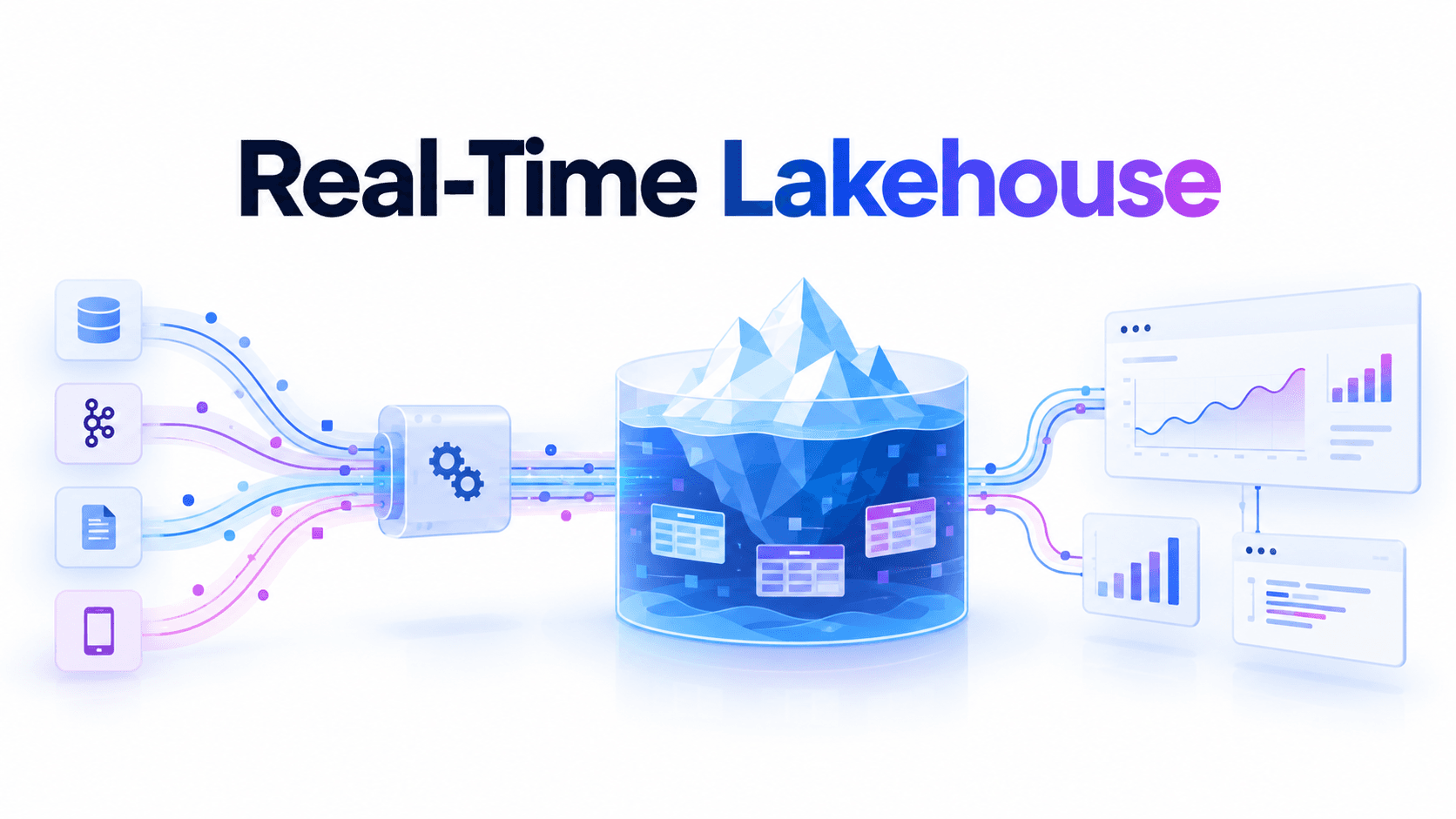
Most real-time lakehouse projects succeed on the first day and fail somewhere around the fourth week. The pipeline demos well: events land in Kafka, Flink commits to Iceberg every few seconds, a dashboard shows numbers that move. Then, with no code changes, queries that took a second start taking ten, the catalog starts timing out under commit load, and someone proposes copying the hot data into a serving database "just for the UI." At that point the lakehouse has quietly stopped being real-time. It is a staging area for a second system.
The failure is almost never the ingestion pipeline. A real-time lakehouse is three loops that have to run continuously and keep pace with each other: the write loop that commits new data, the maintenance loop that keeps the resulting tables healthy, and the read loop that turns them into answers fast enough to matter. Teams build the first loop with care and treat the other two as cleanup. The layer that owns the second and third is a lakehouse control plane — a system beside your data path that watches table state and query patterns across every catalog and engine, and continuously runs the maintenance, compaction, routing, and policy work that keeps reads as fast as writes. LakeOps is built as that layer, and this guide shows where it fits at each step.
It assumes you already know how to get a stream into an Iceberg table; the Kafka to Iceberg ingestion guide covers that side in depth. Here the write path is the starting point, not the destination.
What real-time means for a lakehouse
A workable definition is narrower than the marketing one: an event is queryable on an open table, by any engine, within the window the consumer actually acts on — from a single copy of the data. Open table means Iceberg, not a proprietary store with an export. Any engine means Trino, Spark, DuckDB, Snowflake, or Athena see the same snapshot. Single copy is what makes it a lakehouse rather than a pipeline feeding three databases.
Workloads fall into three bands, and the band decides the architecture:
- Minutes. Operational reporting, inventory views, most "live" internal dashboards. Commit every minute or few, maintain sensibly, and the lakehouse handles this band comfortably. Most workloads honestly live here.
- Seconds. Fraud and risk signals, in-app analytics, order status, agent tool calls that need current state. Achievable directly on Iceberg, but only if commit cadence, maintenance, and query latency are engineered together. This guide is mostly about this band.
- Sub-second freshness. Per-event reactions, bidding, live leaderboards. Iceberg's commit model has a floor here, so these workloads put a hot serving layer in front, with Iceberg as the durable history underneath.
Interrogate the requirement before designing for it. "Real-time" usually means "the consumer makes a decision on a cadence of X" — and X is often a minute, not a second. The best architecture is the slowest one that meets the honest requirement, because every step down a band multiplies the load on the other two loops.
The freshness budget
When someone calls a table "real-time," they usually mean its commit interval. That is one term out of three. What the consumer experiences is the full freshness budget: the time from an event happening to an answer that includes it appearing on a screen.
1freshness budget = commit latency (event → committed snapshot)2 + visibility latency (snapshot → engine sees it)3 + answer latency (query starts → result returned)Measure it end to end, and be explicit about which clock you mean. Event time is when something happened; commit time is when it became queryable. Late events land in old event-time partitions long after they occurred, so a freshness SLO should be stated against commit time, while queries filter on event time.
Commit latency: set once, in configuration
Iceberg data is invisible until a commit publishes a snapshot that references it. Write-side freshness is the commit interval plus buffering: Flink's checkpoint interval, a Spark Structured Streaming trigger, the Kafka Connect sink's commit interval, or a managed service's buffer. Each commit writes metadata and performs an atomic swap through the catalog, so commits are not free — commit too often and metadata work dominates, concurrent writers contend and retry, and file sizes collapse. The Iceberg docs recommend Spark streaming triggers of at least a minute for exactly this reason.
The key property of commit latency is that it is chosen. You pick an interval and it stays where you put it.
The catalog is on the hot path
In a batch lakehouse the catalog is touched a few times per job. In a real-time lakehouse it is a write path: every commit on every streaming table is a catalog transaction, and every query against those tables reads from it. Add up the commit rate across all streaming tables — plus maintenance commits, which are commits too — and that is the load the catalog must sustain at low latency, all day. Load-test it at that combined rate, track commit retries as a first-class metric, and treat a slow catalog as a freshness incident.
Visibility latency: the term nobody budgets for
A committed snapshot still has to be noticed. Engines cache table metadata, and those caches are tuned for batch:
- Spark's Iceberg catalog caches tables by default, with an expiration measured from last access, not last write. A long-running session that reads a hot table constantly keeps resetting the timer and can serve a stale snapshot indefinitely. Disable the cache for catalogs that must see fresh data, or
REFRESH TABLEbefore reads. - Trino caches Iceberg metadata on the coordinator — right for planning speed, wrong when a query must reflect a snapshot committed moments ago.
- Everything downstream caches too. A dashboard that refreshes every five minutes over a table that commits every ten seconds has a five-minute freshness budget.
- Incremental readers poll. A downstream job reading the table incrementally sees new snapshots on its own monitor interval, which adds to the freshness of everything it produces.
1# Spark: a catalog for sessions that must see every new snapshot2spark.sql.catalog.lake_rt.cache-enabled=false3 4# The batch catalog keeps the default cache for planning speed5spark.sql.catalog.lake.cache-enabled=trueAnswer latency: the term that drifts
Answer latency is planning plus I/O plus compute. On a freshly compacted, well-sorted table it is small. On a table that has absorbed weeks of commits without care, it grows on every axis: more manifests to read before planning starts, more small files to open, more delete files to merge at read time, and min/max statistics that overlap across every file so nothing gets pruned.
This is the asymmetry that matters. Commit latency is fixed by configuration. Answer latency gets worse every hour unless something holds it down. A table with a ten-second commit interval and a forty-second query is a fifty-second table — and next month it will be slower. Freshness you cannot query in time is not freshness.
Why real-time tables decay
Decay is not an engine bug. It is the direct consequence of how Iceberg makes commits safe, multiplied by commit frequency.
Every commit adds metadata. Streaming writers use fast appends that skip manifest merging, which keeps commits quick and lets manifest count grow without bound. Planning reads that metadata before a single row, so planning time rises with the table's age, not its size.
Every commit adds files sized by the commit interval, not by what queries want. A few seconds of traffic split across writer parallelism and partitions produces files far below a useful size, and readers pay per file: an object-store request, a footer read, a scheduling slot.
Change data adds delete files. CDC and upsert streams write equality deletes because the writer cannot cheaply find the row it replaces, and every unresolved equality delete is a join the reader performs at query time. Iceberg v3 deletion vectors make position deletes cheap, and Iceberg 1.12 added a Flink task that converts equality deletes into deletion vectors — but conversion is still work that has to run continuously on the right tables. The CDC best-practices guide covers the merge-on-read trade-offs.
And reads concentrate exactly where the damage is. In a time-partitioned real-time table, the newest partition receives every write, so it is the most fragmented, most delete-heavy, least sorted partition in the table. It is also the partition nearly every real-time query reads. Nightly compaction never fixes this: by the time it runs, the hot partition is a new one, and it started fragmenting the moment it opened.
So a real-time lakehouse is really two pipelines: the ingestion pipeline everyone builds, and a maintenance pipeline that must run at the cadence ingestion sets, aimed at the partitions queries actually read, without fighting writers for the same files. The second pipeline is not cleanup. It is half the system.
Iceberg v4 helps, but does not change this. Its adaptive metadata tree lets a small commit become a single metadata file plus the catalog swap, stores data files with their deletion vectors, and stops new equality deletes. That lowers the commit floor. But files inlined by many small commits arrive in time order, not in the order queries filter on, so they prune poorly until something reorganizes them — and faster commits mean more of them. Maintenance moves; it does not disappear.
The control plane: what a real-time lakehouse is missing
Here is the mental model the rest of this guide builds on. A real-time lakehouse has a write path — streaming jobs committing to Iceberg — and a read path — engines and the applications on top of them. Between them sits shared state, the tables, whose health decides whether reads keep up with writes. Nothing in the open stack owns that state. Iceberg ships the primitives (rewrite_data_files, expire_snapshots, remove_orphan_files, rewrite_manifests) with no opinion on when to run them, on which tables and partitions, in what order, or how to avoid colliding with a writer.
A lakehouse control plane owns it. It connects to the catalogs you already run, reads table metadata and query telemetry, and runs a closed loop over the whole estate:
- 1.Sense — file layout, metadata health, delete burden, snapshot accumulation, and the query patterns hitting each table.
- 2.Plan — rank tables by severity, choose the next operation for each, sequence operations in dependency order, and pick the engine to run them.
- 3.Optimize — execute compaction, snapshot expiry, orphan cleanup, manifest rewrites, routing, and policy enforcement.
- 4.Learn — measure the result and adjust: sort orders follow the filters engines actually issue, cadence follows each table's write velocity, routing follows observed latency.
For a real-time lakehouse, the point is simple: when tables change every few seconds, the system operating them has to react to table state continuously, not on a nightly schedule. Real-time data needs real-time operations. The difference from the scripts most teams start with is worth stating precisely, because "we already have a compaction job" is the usual reason this layer gets skipped:
| Scripts and DAGs | Control plane | |
|---|---|---|
| Trigger | A clock | Each table's measured state |
| Scope | One table or job at a time | Every table across catalogs |
| Priority | Whatever runs next | Ranked by impact on reads |
| Ordering | Encoded once, drifts | Sequenced per table, every run |
| Writer conflicts | Fail the job | Retry the affected partitions |
| Layout | Sort order guessed once | Learned from real queries, tested first |
| Engines | Hardcoded per job | Compared and routed per query |
LakeOps implements this loop as an Iceberg lakehouse control plane. It connects to Glue, Polaris, Nessie, Gravitino, Lakekeeper, S3 Tables, or any REST-compatible catalog through standard metadata APIs, works with the engines you already run, and does not change your pipelines. Data stays in your cloud account. What you get, concretely, is six capabilities working as one system:
- Observe — a health score for every table and a record of every operation.
- Maintain — snapshot expiry, orphan cleanup, and manifest rewrites triggered by table health and sequenced correctly.
- Compact — query-aware sorting and merging on a Rust engine, conflict-aware against live writers.
- Route — each query sent to the engine that serves it best, behind one endpoint.
- Govern — declarative policies that cascade from organization to table.
- Agents — MCP access for AI agents, with guardrails, on the same fresh tables.

The sections below follow those capabilities in the order a real-time estate needs them. The managed lakehouse overview shows how they fit together as one product rather than six tools, and the walkthrough below shows the loop running end to end.
Observe: treat freshness and health as service metrics
You cannot hold the freshness budget if you measure one term of it. The signals that matter for a real-time table:
- Snapshot lag — time since the last commit; the first alarm when a writer stalls.
- Commit rate and duration — rising commit duration is the early warning of metadata or catalog contention.
- Files per commit and new-file size — how much fragmentation each commit adds.
- Hot-partition file and delete-file counts — where reads actually pay.
- Manifest and snapshot counts — planning cost before any data is read.
- Query latency per table, per engine — answer latency, measured where users feel it.
Iceberg's metadata tables expose the write-side signals directly, so a first health check is a query, not a project:
1-- Freshness and commit shape over the last hour (Trino)2SELECT3 date_diff('second', max(committed_at), current_timestamp)4 AS seconds_since_last_commit,5 count(*) AS commits_last_hour,6 avg(CAST(summary['added-data-files'] AS bigint))7 AS avg_files_per_commit,8 sum(CAST(coalesce(summary['added-delete-files'], '0') AS bigint))9 AS delete_files_added10FROM analytics."orders_cdc$snapshots"11WHERE committed_at > current_timestamp - INTERVAL '1' HOUR;12 13-- What reads are paying in the newest partitions14SELECT15 partition,16 count(*) FILTER (WHERE content = 0) AS data_files,17 count(*) FILTER (WHERE content <> 0) AS delete_files,18 approx_percentile(file_size_in_bytes, 0.5) / 1048576 AS median_file_mb19FROM analytics."orders_cdc$files"20GROUP BY partition21ORDER BY partition DESC22LIMIT 6;Running that on one table is easy. Running it continuously across every streaming table in every catalog, joining it with query latency from several engines, and deciding which result means "act now" is the real job. That is what per-table health scoring does: fragmentation, manifest depth, snapshot velocity, sort-order drift, and orphan volume folded into one status per table, so "which real-time tables are slipping?" has a sorted answer.

The other half is knowing what was done about it. When a dashboard slows at 14:05, the first question is whether maintenance ran on that table, when, and what it changed. An operations log with the impact of every compaction, expiry, and manifest rewrite turns that from archaeology into a lookup.

Observability in LakeOps combines these table signals with cross-engine query telemetry, so the same system that detects decay decides what to do about it.
Maintain: run the second pipeline at the speed of the first
Maintenance for a real-time table differs from batch maintenance in three ways: cadence is set by write velocity, operation order matters more, and safety margins are set by your slowest reader.
Cadence follows write velocity
A table committing every few seconds and a table committing once a day cannot share a schedule. The stream needs expiry and manifest rewrites often enough that planning cost stays flat; the daily table barely needs them. A uniform nightly window is too slow for one and wasted on the other. The trigger has to be measured state: snapshots since the last expiry, manifests since the last rewrite, small-file ratio in recent partitions. Run it incrementally, too — on a large streaming table, an expiry that recomputes every deletion candidate can itself take long enough to miss the window it was meant to protect.

Order is part of correctness
The four operations depend on each other: expire snapshots, then compact, then clean orphans, then rewrite manifests. Compact before expiring and you rewrite files old snapshots still reference, so nothing is reclaimed. Clean orphans before compaction settles and you scan a moving target. Rewrite manifests last so they describe the table as it now is. Scripts encode this once and drift when someone adds a step; a planner that sequences per table keeps it intact.
Retention is set by your slowest reader
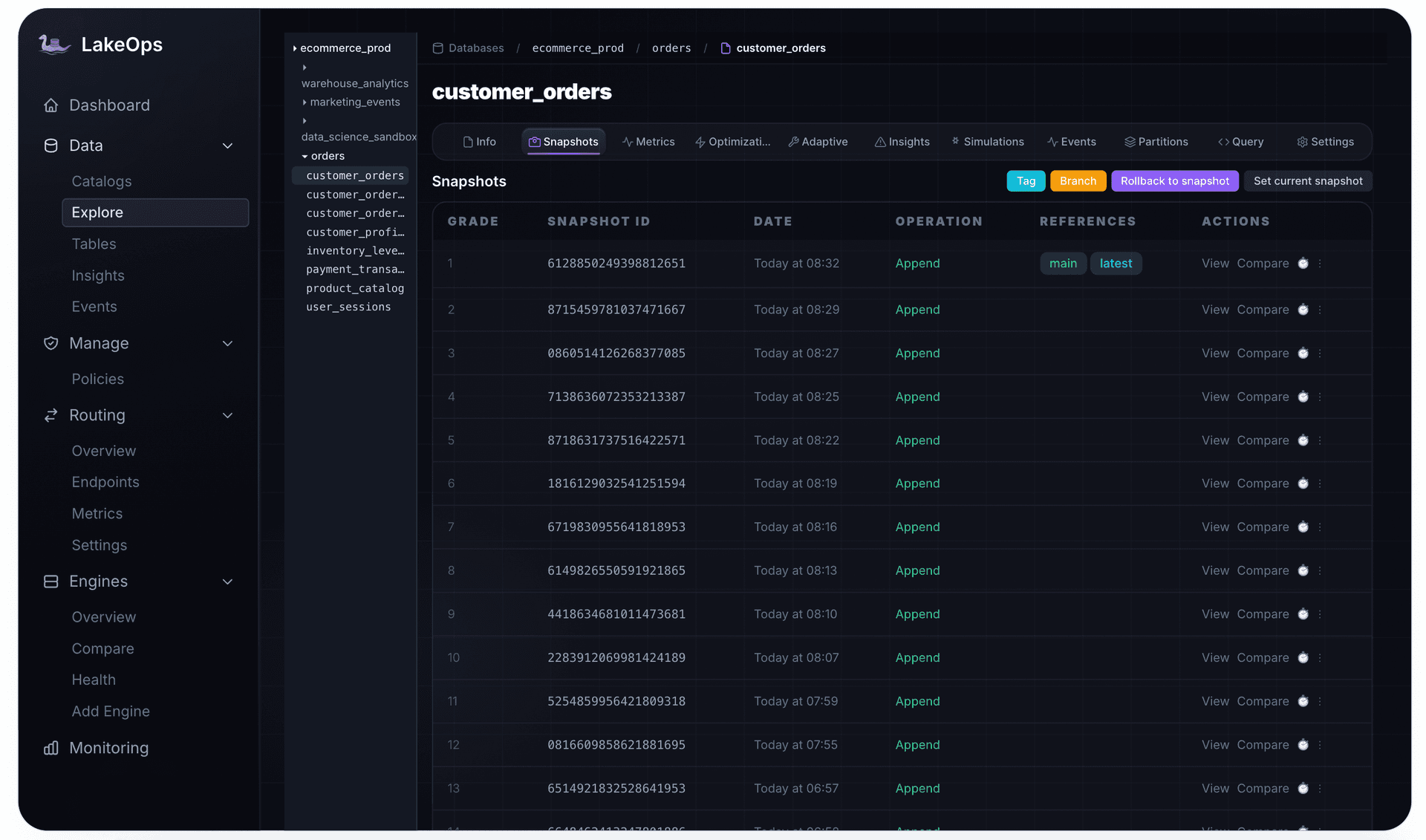
Real-time lakehouses are chains: a raw table read incrementally by a job that maintains an enriched table, read incrementally again by an aggregate. Incremental readers track their position as a snapshot. Expire a snapshot a lagging reader has not consumed, and that reader breaks — it cannot resume from a position that no longer exists. Retention on a streaming table has to follow the maximum lag of its consumers, plus margin, not a round number picked for storage cost.
Orphan cleanup has the mirror-image risk. A streaming writer has files in flight between write and commit, and to an orphan scan they look unreferenced. LakeOps' guidance is an age threshold of at least twice your longest-running write job — and for continuous jobs, "longest" means the longest gap between a file being written and its commit, including checkpoint retries.
Where maintenance runs
Scheduled Spark procedures work, at the cost of a cluster and a schedule that cannot see table state. Iceberg's Flink TableMaintenance API runs expiry and compaction beside the streaming job, triggered by commit or file counts, with locks to prevent collisions — a real step forward, but per table and per job, with triggers, locks, and tuning still yours to own for every stream. Table maintenance in LakeOps runs as a service across the estate instead: triggered by each table's health, sequenced so each step's output is the next step's clean input, on compute separate from your streaming cluster, whether the table is written by Flink, Spark, or Kafka Connect.
Compact: rewrite files without fighting the writers
Compaction on a real-time table is harder for one reason: the writer never stops. Iceberg's optimistic concurrency guarantees correctness, not progress. A large rewrite touching the partition a writer commits to can lose the race repeatedly, and on CDC tables a rewrite that overlaps incoming deletes can fail validation and discard all its work. The patterns that make compaction coexist with streaming writes:
- Target settled partitions first. Compact partitions that have stopped receiving writes, and treat the open hot partition with small, frequent rewrites rather than one big one.
- Commit in pieces. Partial progress commits file groups as they finish, so a conflict costs one group, not the whole job.
- Let deletes keep applying. Rewrites commit with the sequence number of the snapshot they started from (the current default), so deletes committed during the rewrite still apply to the new files.
- Retry the partition, not the table. In LakeOps, a conflicting compaction commit is caught by the metadata version check and the affected partitions are retried on the next run. The worst case is a delayed cycle, never lost data.
1-- Spark: compact settled partitions, commit incrementally.2-- The cutoff is what a scheduler must compute per table, per run.3CALL lake.system.rewrite_data_files(4 table => 'analytics.orders_cdc',5 where => "event_ts < TIMESTAMP '2026-10-18 14:00:00'",6 options => map(7 'partial-progress.enabled', 'true',8 'partial-progress.max-commits', '10',9 'use-starting-sequence-number', 'true'10 )11);That where clause is the problem in miniature. The right cutoff depends on this table's write pattern right now, the right options on whether it carries deletes, and whether to run at all on how fragmented recent partitions are. A static DAG hardcodes all three.
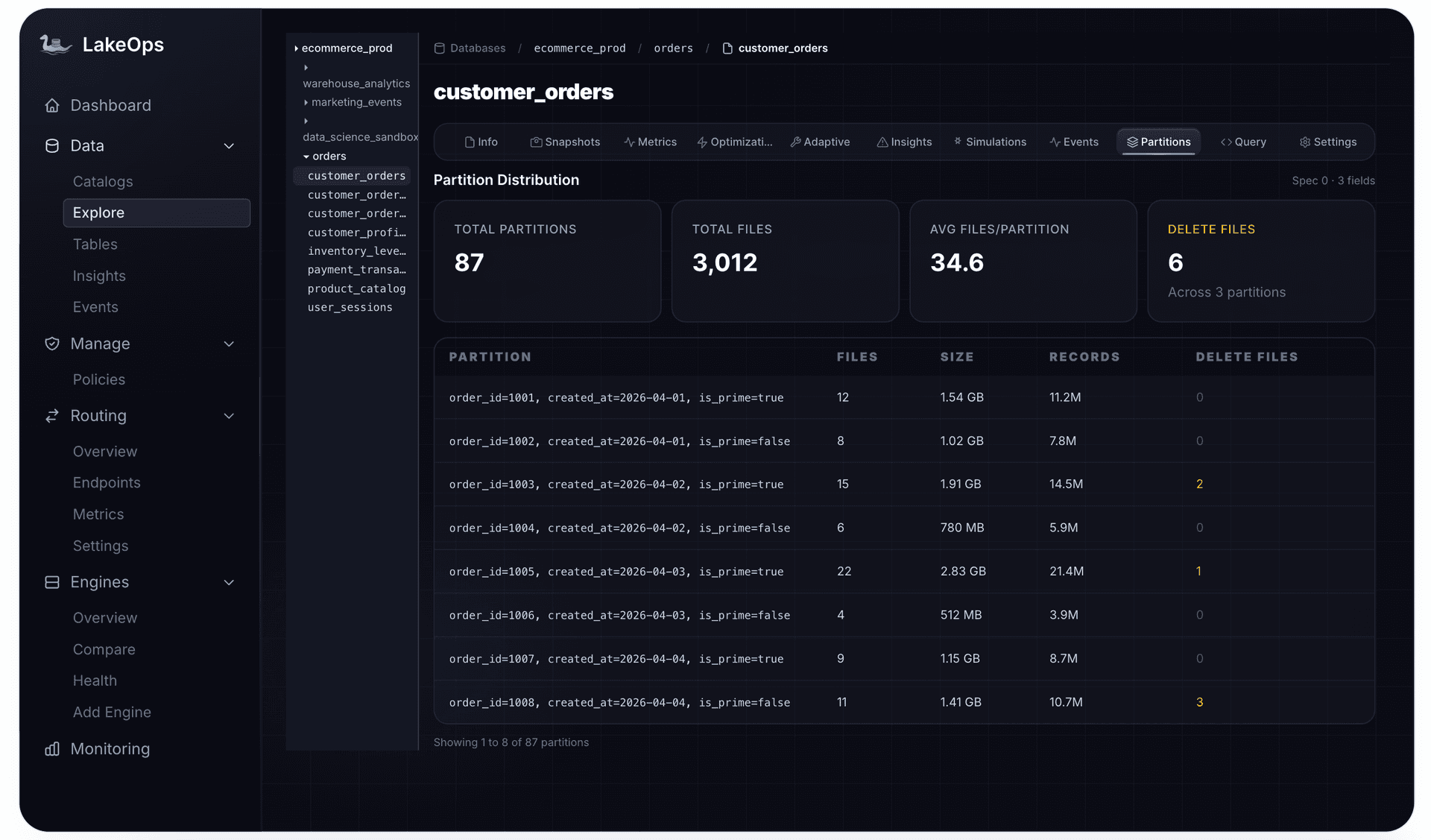
Compact for how the table is read
Merging small files fixes per-file cost. It does not fix pruning. Real-time reads are narrow — one customer's orders, one merchant's last hour, one device's events — and if rows inside each file are not organized by the columns those queries filter on, every file's min/max range overlaps the others and the engine reads them all anyway.
So compaction for real-time tables should be query-aware: read the WHERE, JOIN, and GROUP BY columns engines actually issue, and sort or cluster rewritten files to match. The sort order should move when access patterns do, and new layouts should be tested before they apply. LakeOps runs layout simulations on a real Iceberg branch of the table, comparing candidate strategies against real data before anything touches main.

Execution cost matters more here than anywhere, because real-time tables are compacted continuously, not nightly. LakeOps compaction runs on a purpose-built Rust engine on Apache DataFusion rather than a JVM cluster, which is what makes compacting every streaming table at the cadence it needs an affordable default rather than a budget negotiation.

Route: match each read to the engine that fits its latency
A real-time lakehouse serves a wide range of reads against the same tables at once: point lookups behind an application, dashboards on a timer, analysts exploring, backfills, AI agents issuing iterative SQL, and maintenance itself. No single engine fits all of them. A lookup that returns quickly on Trino or DuckDB can spend longer just scheduling on a batch Spark cluster, while a heavy reprocessing join can exhaust a small interactive engine.
Routing solves two problems. It sends each query to the engine whose cost and latency fit it, and it isolates workloads, so a backfill never queues in front of application queries. Clients see one SQL endpoint; which engine answers is a policy that can change without redeploying anything.
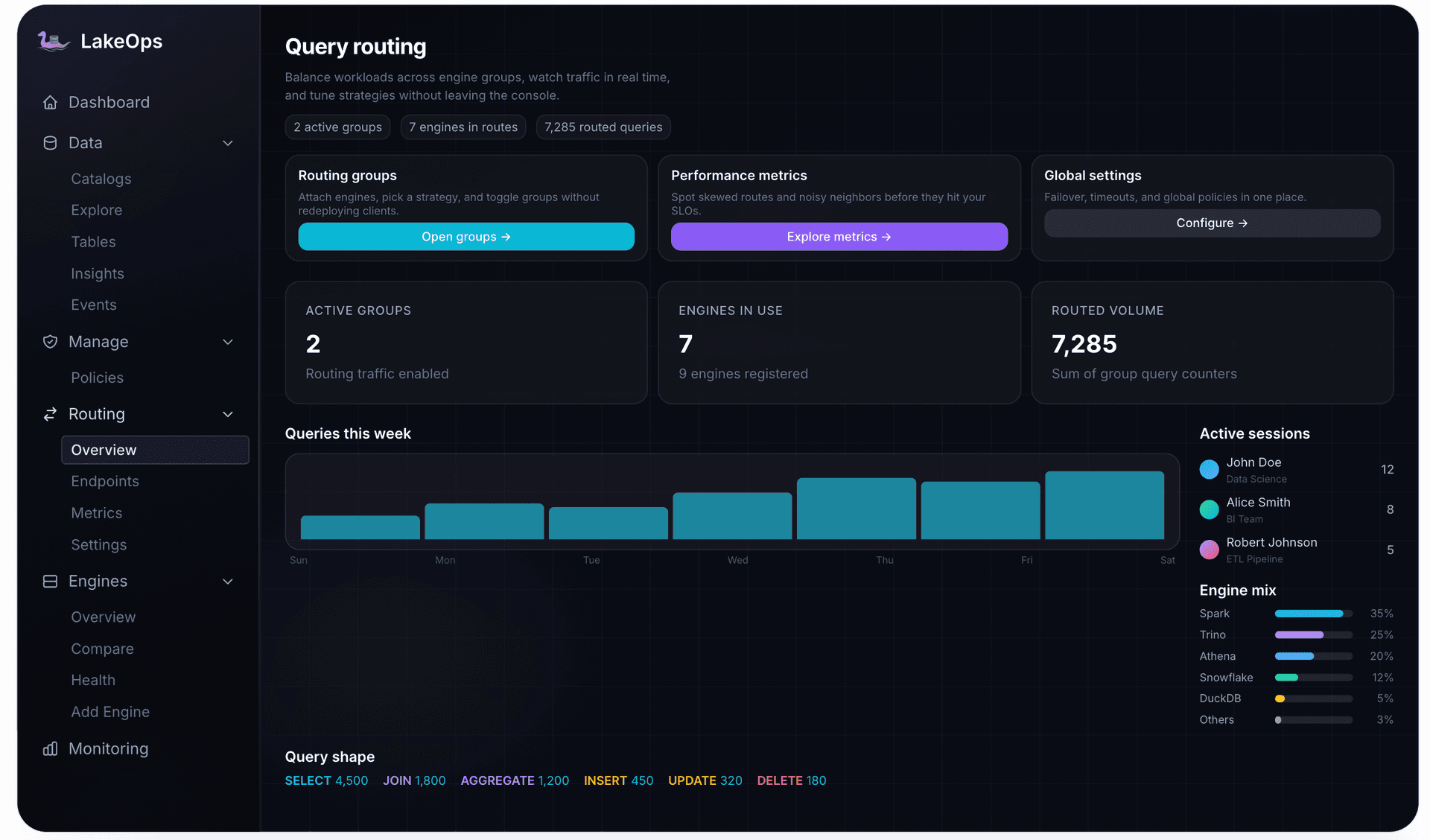
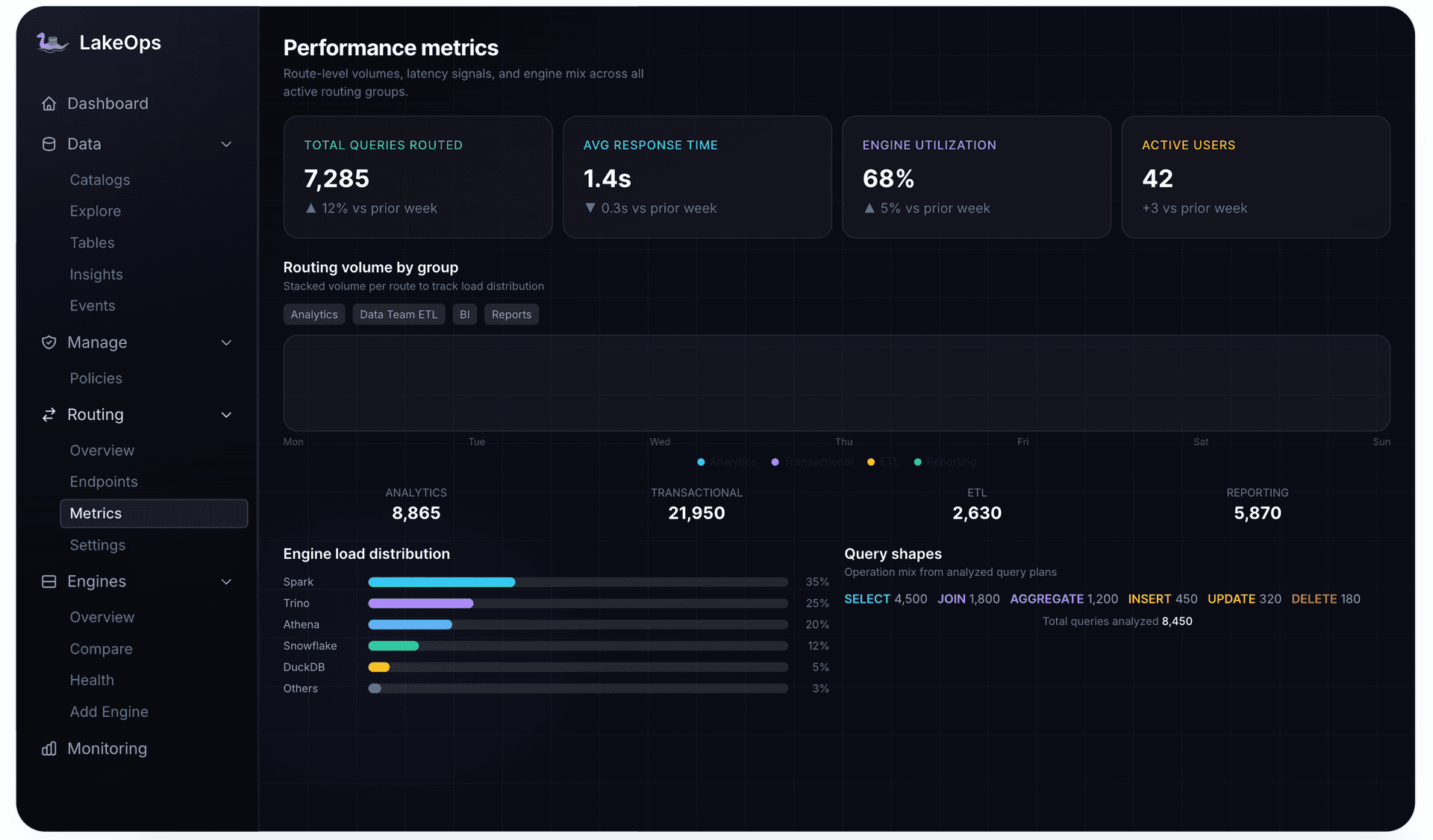
Routing also closes a loop with maintenance. Routed queries produce per-engine, per-table latency data, which shows which tables are slowing which workloads, so maintenance and layout prioritize accordingly. Query routing in LakeOps works this way: profile each query's shape, compare engines on observed cost, latency, and success rate, and send the query to the one that wins.
Serve: render from the lake directly to the UI
This is where the three loops pay off. When answer latency on the lake stays low — tables compacted for how they are read, metadata lean, each query on an engine built for its shape — you can serve product features directly from Iceberg. In-app analytics, customer-facing usage dashboards, operations consoles, and order status pages can query the lakehouse instead of a separate serving database. Removing that copy removes more than infrastructure:
- No reverse ETL to build, monitor, and backfill.
- No second freshness budget — every hop into a serving store adds sync lag on top of what the lake already spent.
- No consistency gap between the dashboard and the warehouse; both read the same snapshot.
- One schema and one governance surface where the data lives.
Patterns that make serving from the lake work:
- 1.Shape tables for the screen. Keep a narrow, incrementally maintained table per serving surface — a rollup by customer and hour, a current-state table per order — so the UI queries a small, well-sorted table, not the raw firehose.
- 2.Use the snapshot ID as the cache key. Snapshots are immutable, so a result computed against one can be cached indefinitely and invalidated exactly when a new snapshot commits — precise invalidation instead of a guessed TTL.
- 3.Give serving traffic its own routing group on an interactive engine, so refresh storms and exploration never queue in front of it.
- 4.Watch the hot partition. Serving queries hit recent data, so the newest partitions' health predicts UI latency.
Be honest about the boundary. If a feature needs per-event freshness or very high concurrency on the same narrow keys, a hot layer — streaming storage, a real-time OLAP store, or a cache fed from the stream — still belongs in front of the lake, with Iceberg underneath. The shift is that this becomes a deliberate choice for the few surfaces that need it, not the default for every screen because the lake was too slow to trust.
Agents are real-time consumers too
AI agents are fast becoming one of the heaviest consumers of real-time data. An agent answering "where is this order" needs current state, issues many small queries in a loop, and retries on timeout — so a slow lake makes agents both slower and heavier. They also need boundaries a dashboard never did. LakeOps for agentic AI exposes the lake through a native MCP interface with composable guardrails: DDL and DML blocked from agent sessions, queries over scan thresholds rejected, sensitive columns hashed before results reach the model, and high-stakes operations paused for review. Agent queries feed the same telemetry as every other workload, so the tables agents rely on get compacted and sorted for how agents read them.
Govern: make freshness a policy, not tribal knowledge
Every decision in this guide — retention relative to reader lag, orphan thresholds relative to write duration, compaction cadence, target file size — is a parameter. In most estates those parameters live in whichever script last touched the table. That works for five tables and fails for fifty, because why a streaming table keeps three days of snapshots instead of seven lives in someone's head.
Declarative policy fixes ownership. Rules are defined once at organization, catalog, or namespace level and inherited by tables, with overrides where a table genuinely differs: the streaming namespace gets reader-aware retention and frequent manifest rewrites; batch namespaces get the defaults. Change a rule and every covered table follows, with every resulting action recorded.

Policy also sets how much autonomy the control plane has. LakeOps runs in three modes: Autopilot, where operations run as tables need them; Policies, where they run within your rules; and Manual, where every action waits for approval. Most teams start with approval on production streaming tables, watch what the system would do, and widen autonomy as trust builds.
Hold the maintenance loop to its own SLOs
The maintenance pipeline is a production system and needs its own SLOs. Is coverage complete, or are some streaming tables outside any policy? What fraction of operations fail? Is a backlog forming on the highest-velocity tables?

A healthy real-time lakehouse shows a clear pattern: maintenance activity tracking write activity hour by hour, near-complete coverage on streaming namespaces, a readiness queue that drains continuously, and query latency that stays flat as tables age. When the queue grows faster than it drains, reads have started falling behind writes — the failure from the first paragraph, caught weeks earlier.
A reference architecture
Putting it together for a typical estate — operational databases via CDC, product events via Kafka, and an application that shows customers their own data:
1sources Postgres / MySQL (CDC) product events partner files2 │ │ │3stream └────────── Kafka ─────────┘ │4 │ │5write loop Flink (CDC upserts) Kafka Connect / Spark (appends)6 │ │7 ▼ ▼8tables raw_orders_cdc raw_events → orders_current usage_by_customer_hour9 (Iceberg on object storage, REST / Glue / Polaris catalog)10 ▲11control plane observe · maintain · compact · route · govern (state-triggered, estate-wide)12 │13read loop routing groups: app-serving → Trino / DuckDB14 dashboards → Trino / Snowflake15 reprocess → Spark16 agents → MCP with guardrails17 │18consumers in-app analytics · ops console · BI · AI agentsRead top to bottom, it is the three loops. The write loop stays exactly as you built it. Tables hold raw streams plus small serving-shaped tables maintained from them. The control plane sits beside the data path, acting on table state; routing is an endpoint the read loop opts into. Nothing copies data out of Iceberg to serve it.
Build it or connect it
Every piece is buildable, and most teams have built some: a compaction job, an expiry job, a freshness alert, a dashboard over metadata tables. What rarely gets built is what makes those pieces a system — the planner that ranks tables, sequences operations, aims compaction at the right partitions, survives writer conflicts, follows reader lag, and learns layout from queries across every engine. That planner is the difference between maintenance that keeps pace with streaming writes and maintenance that is always one incident behind.
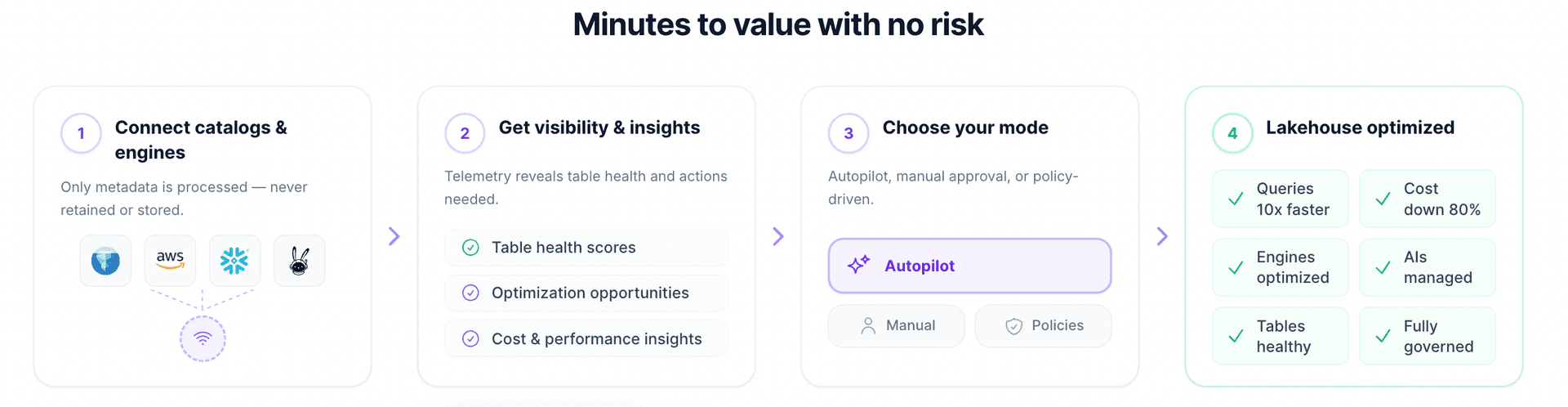
The real question is where your team's attention should go. If the answer is pipelines and the products on top of them, the operational layer is reasonable to adopt rather than write. LakeOps connects to existing catalogs and engines in about ten minutes, starts with visibility before it changes anything, and lets you choose how much it does on its own.
Real-time lakehouse checklist
- 1.Write the freshness requirement down as a number per consumer, and pick the slowest band that meets it.
- 2.Budget all three terms — commit, visibility, answer — measured end to end against commit time.
- 3.Fix visibility caching for every session and service that must see fresh snapshots.
- 4.Load-test the catalog at the combined commit rate of streaming plus maintenance, and alert on commit retries.
- 5.Instrument the write side from metadata tables: snapshot lag, commits per hour, files per commit, delete files.
- 6.Watch the hot partition, not table averages.
- 7.Run maintenance on state, not on a clock: expire, compact, clean orphans, rewrite manifests.
- 8.Set retention from consumer lag and orphan thresholds from write-to-commit duration.
- 9.Compact settled partitions with partial progress and retry conflicts per partition.
- 10.Sort for the real query mix, testing layouts on a branch first.
- 11.Route and isolate reads, with serving traffic on its own endpoint.
- 12.Serve from the lake by default; add a hot layer only where per-event freshness is required.
- 13.Encode it all as policy, and hold the maintenance loop to its own SLOs.
A real-time lakehouse is not won at the ingestion layer. It is won by keeping the tables ingestion produces as fast to read on day ninety as on day one, so the freshness you paid for in the write loop actually reaches the people and systems reading. Get the three loops running together and the lake stops being a staging area for a serving database — it becomes what you serve from. If you would rather spend your time on pipelines and products than on the operational layer between them, LakeOps is the control plane built for exactly that.