
If you run Apache Iceberg in production, you have already met rewrite_data_files. It is the Spark stored procedure that compacts small files, resolves delete files, and re-sorts data to improve query performance. The official docs show the syntax. Stack Overflow and GitHub issues show it crashing with OutOfMemoryError on real tables. For compaction strategy context — when to use bin-pack vs sort vs Z-order — see the strategy selection guide before tuning parameters.
This guide covers both paths: how to run rewrite_data_files correctly in production, and when to replace it with an automated control plane. We reference LakeOps throughout — it is an autonomous control plane for Apache Iceberg that handles compaction and all table maintenance on a purpose-built Rust engine, without Spark clusters or Airflow DAGs. Understanding the manual mechanics is valuable either way — it helps you validate what any system does on your behalf.
What rewrite_data_files actually does
Every Iceberg table tracks every data file in its metadata. More files means more entries in manifest files, longer query planning times, and higher per-query S3 LIST and GET costs. Streaming ingestion, CDC pipelines, and frequent MERGE INTO operations create thousands of undersized files per day. rewrite_data_files is the procedure that fixes this.
A single invocation goes through four phases:
- 1.Scan: The procedure reads all manifest entries for the target table (or filtered partition range). It identifies data files that are candidates for rewriting — files below
min-file-size-bytes, abovemax-file-size-bytes, or associated with more delete files than thedelete-file-threshold. - 2.Plan: Candidate files are grouped into file groups — sets of files that will be merged into a single output. Group sizes are bounded by
max-file-group-size-bytes. The number of groups processed in parallel is controlled bymax-concurrent-file-group-rewrites. - 3.Rewrite: Each file group is read, optionally sorted, and written as new Parquet files at the
target-file-size-bytes. Delete files (positional and equality) are resolved during the rewrite — their deletions are applied to the output, eliminating read-time merge overhead. - 4.Commit: A new Iceberg snapshot is created that references the new files and dereferences the old ones. With
partial-progress.enabled, each file group (or batch) commits independently. Without it, the entire operation is atomic — a single conflict invalidates everything.
Understanding these phases is critical because each one can fail independently. Driver OOM during scanning. Executor OOM during rewriting. Commit conflicts during the commit phase. Knowing where the failure occurs determines the fix.
The automated alternative: A control plane like LakeOps handles all four phases continuously — it monitors table metadata in real time, plans compaction scope based on health signals and write patterns, executes on a Rust engine without Spark (no OOM, no GC), and commits with conflict-aware partition scoping. You never call the procedure directly.
Compaction strategies: binpack, sort, and z-order
The strategy parameter determines how data is physically reorganized during compaction. Each strategy solves a different problem.
Binpack
Merges small files into target-sized files without reordering rows. The cheapest and fastest strategy — essentially file concatenation at the Parquet level.
1CALL catalog.system.rewrite_data_files(2 table => 'analytics.events',3 strategy => 'binpack',4 options => map(5 'target-file-size-bytes', '536870912',6 'partial-progress.enabled', 'true'7 )8);When to use it: Streaming tables accumulating small files rapidly. Tables with no dominant query filter pattern. Quick consolidation runs between heavier sort passes. Binpack is the right default for high-throughput ingest pipelines where the immediate goal is reducing file count, not optimizing data layout.
Sort
Globally sorts all records by specified columns and writes new files where each file covers a narrow, non-overlapping value range for the sort key. This enables Parquet min/max statistics to skip entire files during query planning — the single most impactful read optimization in Iceberg.
1CALL catalog.system.rewrite_data_files(2 table => 'orders.transactions',3 strategy => 'sort',4 sort_order => 'order_date ASC, customer_id ASC',5 options => map(6 'target-file-size-bytes', '268435456',7 'partial-progress.enabled', 'true',8 'rewrite-all', 'true'9 )10);Set rewrite-all to true for sort compaction — you want every file rewritten in the new order, not just the small ones. Choose sort columns based on your actual query predicates: the columns that appear most frequently in WHERE and JOIN clauses.
Z-order
Applies a space-filling curve across multiple columns, clustering data so that queries filtering on any combination of those columns benefit from file skipping. Unlike linear sort, which strongly favors the first column, z-order distributes benefit evenly across 2–4 columns.
1CALL catalog.system.rewrite_data_files(2 table => 'analytics.ad_impressions',3 strategy => 'sort',4 sort_order => 'zorder(campaign_id, event_date, geo_region)'5);Trade-off: Z-order is the most expensive strategy — CPU-heavy bit interleaving plus a global sort. Clustering quality degrades above 4 columns. Run it weekly during off-peak windows, not hourly.
| Strategy | Cost | Query benefit | Best for |
|---|---|---|---|
| Binpack | Lowest | Reduces file count and planning time | Streaming ingest, no dominant filter pattern |
| Sort | Medium | 80–95% scan reduction on sort columns | 70%+ of queries filter on 1–2 columns |
| Z-order | Highest | Balanced pruning across 2–4 columns | Ad-hoc analytics with unpredictable filters |
The automated alternative: Choosing the right strategy requires knowing how each table is queried — and that changes over time. LakeOps observes query telemetry across all connected engines (Trino, Spark, Athena, Snowflake, DuckDB), identifies the columns that appear in WHERE and JOIN clauses per table, and selects the optimal strategy automatically. When query patterns shift, the strategy adapts. You can also test sort configurations against real query patterns before committing to them:

The parameters that matter in production
The official docs list every parameter. This section covers the ones that determine whether compaction succeeds or fails on real tables.
target-file-size-bytes
The most impactful parameter. Controls the output file size after compaction. The default is 512 MB (536870912), which is a reasonable starting point for analytics workloads. Smaller targets (128–256 MB) suit point-lookup tables. Larger targets (512 MB–1 GB) suit full-scan ETL pipelines.
Set this as a table property (write.target-file-size-bytes) rather than per-call so every compaction run — manual or automated — uses the same target.
| Workload | Recommended target | Rationale |
|---|---|---|
| Point lookups, low-latency BI | 128–256 MB | Smaller files = faster individual file reads |
| Mixed analytics | 256 MB | Balanced trade-off |
| Full-scan ETL / ML training | 512 MB–1 GB | Fewer files = less metadata overhead, less S3 GET cost |
max-file-group-size-bytes
The most common cause of OOM in production. Default is 100 GB — far too large for most executor configurations. If a single file group tries to process 100 GB of data, the executor must hold all input and output buffers simultaneously.
Production recommendation: 3–10 GB, depending on executor memory. On AWS Glue or EMR with 16 GB executors, start with 5368709120 (5 GB). The cost of smaller groups is more commits — which is fine when partial-progress is enabled.
max-concurrent-file-group-rewrites
Controls parallelism — how many file groups are rewritten simultaneously. Default is 5. Each concurrent rewrite consumes executor memory proportional to max-file-group-size-bytes. If you see OOM during the rewrite phase, lower this to 3 or even 1 before increasing executor memory.
partial-progress.enabled
Always set to true in production. Without partial progress, the entire compaction operation is atomic. If you compact 50 file groups over 4 hours and group 48 hits a commit conflict, all 50 groups are aborted — including the 47 that completed successfully. Their output files become orphans. Four hours of compute wasted.
With partial progress enabled, each file group (or batch of groups, controlled by partial-progress.max-commits) commits independently. A conflict on one group does not invalidate work on others.
partial-progress.max-commits(default: 10) — caps the number of independent commits. Set to 10–20 for large tables.partial-progress.max-failed-commits— how many commit failures before the job aborts entirely. Set to 3–5 for streaming tables with active writers.
The where clause
Scopes compaction to a partition range. Critical for two reasons:
- 1.Conflict avoidance: Exclude partitions with active writers. On a date-partitioned streaming table,
where => 'event_date < current_date()'ensures compaction only touches settled data. - 2.Memory management: Limiting scope reduces the number of manifest entries the driver must scan during the planning phase.
For detailed conflict handling patterns, see Iceberg Commit Conflicts.
delete-file-threshold
For merge-on-read (MoR) tables, this determines how many delete files must be associated with a data file before it becomes a compaction candidate. Default is 2147483647 (effectively disabled).
On tables receiving CDC or frequent MERGE INTO operations, set this to 5–10. Every pending delete file adds read-time merge overhead to every query that touches the data file. Aggressive delete resolution during compaction is one of the most overlooked performance optimizations in Iceberg. See Iceberg Delete Files: Merge-on-Read Explained for a deep dive.
Complete production-ready example
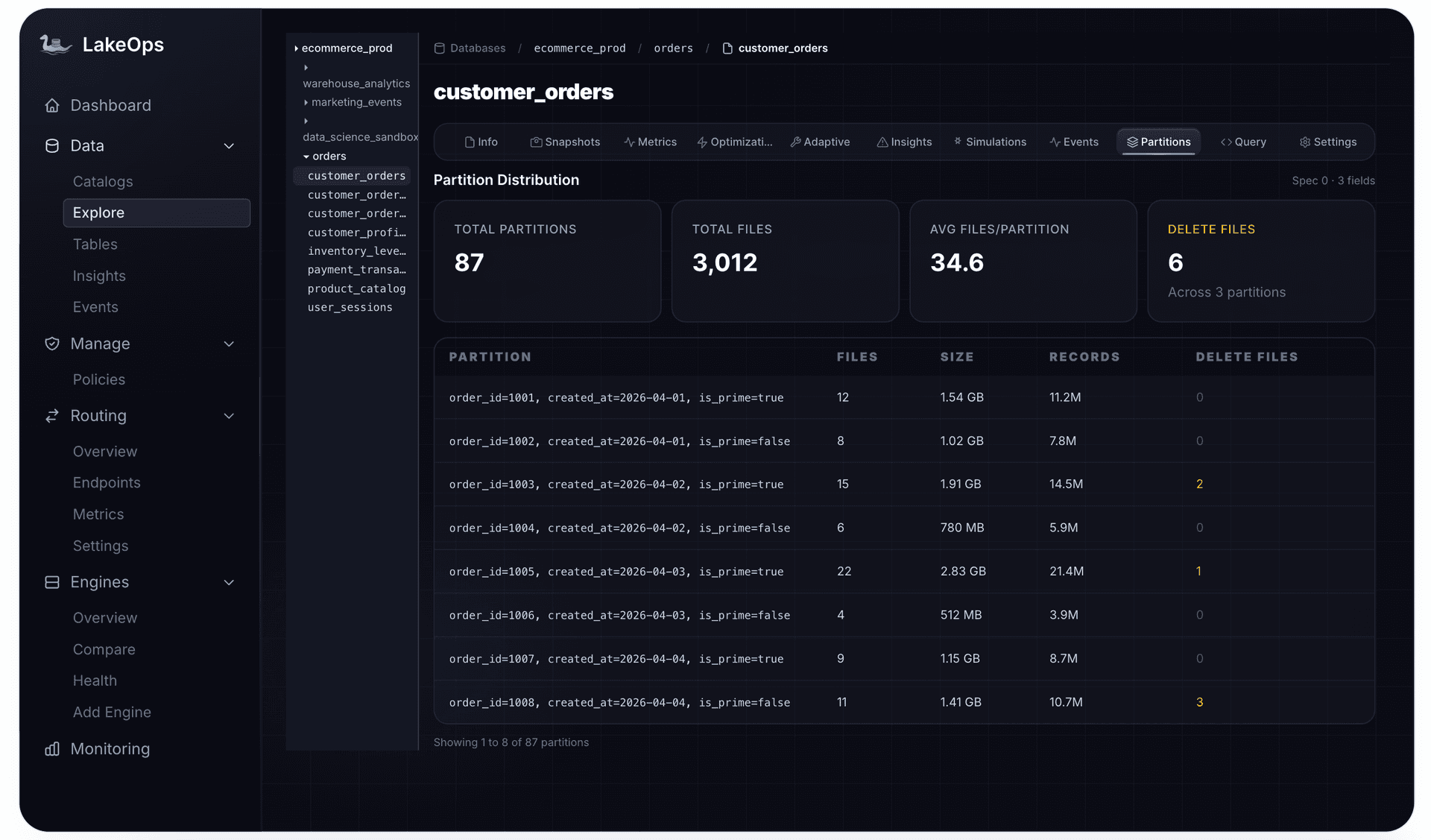
1CALL catalog.system.rewrite_data_files(2 table => 'analytics.clickstream',3 strategy => 'binpack',4 where => 'event_date < current_date()',5 options => map(6 'target-file-size-bytes', '268435456',7 'min-input-files', '5',8 'max-file-group-size-bytes', '5368709120',9 'max-concurrent-file-group-rewrites', '3',10 'partial-progress.enabled', 'true',11 'partial-progress.max-commits', '20',12 'delete-file-threshold', '5'13 )14);The automated alternative: Getting these parameters right requires per-partition visibility — file counts, sizes, accumulation rates. Without that, you are guessing. LakeOps provides this visibility and uses it to auto-tune parameters per table, so you never set max-file-group-size-bytes manually:
Why rewrite_data_files fails in production
The procedure works on tutorial-scale tables. It breaks on production tables for specific, fixable reasons.
Driver OOM during planning
The Spark driver loads every manifest entry for the target table to identify compaction candidates. On a table with 100K+ data files, this means millions of manifest entries deserialized into JVM heap. The driver runs out of memory before a single file is rewritten. Fixes:
- Increase driver memory (
spark.driver.memory) - Scope with
whereto reduce the manifest scan - If the table has millions of files, compact partition-by-partition rather than the whole table
Executor OOM during rewrite
Each executor must read, buffer, and write data for one file group. If max-file-group-size-bytes is 100 GB (the default) and your executor has 16 GB heap, it will OOM. This is the most common failure reported in production — GitHub issues #14679 and #13674 document real teams hitting this on tables with 100K+ files on 256 GB workers.
Fixes:
- Set
max-file-group-size-bytesto 3–10 GB - Lower
max-concurrent-file-group-rewritesto 1–3 - Use
binpackinstead ofsortfor initial consolidation (binpack uses bounded memory; sort requires a global shuffle) - Increase
spark.executor.memoryOverheadto at least 2 GB or 20% of executor memory
Commit conflicts with concurrent writers
When a streaming writer appends to a partition that compaction is rewriting, the commit fails with a non-retriable CommitFailedException. Without partial-progress.enabled, this kills the entire job.
Fixes:
- Always scope compaction to exclude active partitions:
where => 'partition_date < current_date()' - Enable
partial-progressso a conflict on one partition doesn't invalidate work on others - Increase
commit.retry.num-retries(table property, default 4) to 10 for high-concurrency environments
Convergence failure
With certain data distributions, compaction can never converge — output files land between 50–75% of the target size, which is above the split threshold but keeps getting reselected for compaction. Each run rewrites the same files. This is documented in Iceberg issue #6669.
Fix: Set min-file-size-bytes to 50% of target instead of the default 75%:
1options => map(2 'target-file-size-bytes', '268435456',3 'min-file-size-bytes', '134217728'4)Stale sort orders
Sort compaction is only as good as the sort key. If you sorted by region six months ago and your team now queries by customer_id, every compaction run is expensive but delivers zero skip benefit. Sort order selection requires ongoing query pattern analysis — which nobody does manually at scale.
The automated alternative: Every OOM and GC failure above comes from running compaction on the JVM. LakeOps replaces Spark entirely with a Rust engine (Apache DataFusion) that uses bounded memory and disk spill — OOM is structurally impossible. Commit conflicts are avoided by tracking active writer partitions across all pipelines. Stale sort orders are prevented by continuous query telemetry analysis. But first, you need visibility into which tables are degraded and why:

The maintenance pipeline: compaction is not enough
Running rewrite_data_files in isolation is a common mistake. Compaction is one step in a four-operation maintenance lifecycle that must execute in a specific order.
The correct sequence:
- 1.Expire snapshots → dereferences data files from old snapshots. Without this, compaction rewrites files that expiration would have removed — wasting compute on soon-to-be-garbage-collected data.
- 2.Remove orphan files → cleans unreferenced files from storage. Run after expiration to reclaim space from the files that expiration just dereferenced.
- 3.Compact data files (
rewrite_data_files) → operates on live data only, producing the final optimized file layout. - 4.Rewrite manifests → consolidates manifest files to reflect the post-compaction layout. Must be last — rewriting manifests before compaction produces indexes that immediately become fragmented again.
The most common sequencing error: running compaction first without expiring snapshots. The compaction job processes gigabytes of data referenced only by ancient snapshots that no one queries. Hours of compute wasted on data that expire_snapshots would have dereferenced in seconds.
The automated alternative: LakeOps executes all four operations in the correct dependency order automatically. You configure retention policy and target file sizes; the platform handles sequencing, timing, and error recovery — per table, continuously.


From cron jobs to a control plane
At 5 tables, scheduling rewrite_data_files in an Airflow DAG works. You know each table, you tune the parameters, you troubleshoot failures personally. At 50 tables, this breaks down systematically.
The problems with cron-based compaction:
- Blind scheduling: A table that received no writes still gets compacted. Wasted compute.
- Missed degradation: A table with 100K small files waits 24 hours for the next cron window. Queries are slow all day.
- Static parameters: Every table gets the same
max-file-group-size-bytes, same target size, same strategy — regardless of whether it has 100 files or 100,000. - No prioritization: The most degraded table waits in the queue behind healthy ones.
- No conflict awareness: The DAG does not know which partitions have active writers.
- No new-table onboarding: Every new table requires a PR to the DAG, a config entry, and a review. Tables get forgotten.
The automated alternative: The fundamental shift is from time-driven scheduling (compact every 4 hours because we decided that) to state-driven scheduling (compact when this table's partition has 80 files below target size). LakeOps monitors table health continuously, triggers maintenance only when degradation thresholds are crossed, and adapts cadence to each table's write velocity. Policies are declarative — scoped by catalog, namespace, or table — and new tables inherit them automatically:

How LakeOps replaces manual compaction
Each section above covered one dimension of the problem — strategy selection, parameter tuning, failure handling, sequencing, scheduling — and how a control plane addresses it. Here is what the complete system looks like when all of those pieces come together.
Lake-wide visibility
Instead of querying individual tables to check file counts, you see the health of every table across all catalogs from a single dashboard. Tables are scored as Healthy, Warning, or Critical based on file count, average file size, delete file ratio, snapshot age, and manifest bloat. Compaction triggers automatically when a table crosses from Healthy to Warning — before queries degrade.


A Rust engine instead of Spark
Every rewrite_data_files call in this guide runs on Spark — a general-purpose distributed compute framework designed for analytical queries, not maintenance I/O. Every OOM failure and GC stall described above is a direct consequence of that architectural mismatch.
LakeOps replaces the Spark-based procedure entirely with a purpose-built Rust engine based on Apache DataFusion:
- Zero GC — no JVM, no garbage collection pauses, no unpredictable stalls
- Bounded memory — Arrow columnar buffers with disk spill, not heap allocation. The OOM failures described above are structurally impossible.
- Native Parquet I/O — direct column reads and writes without Java interop
- No cluster provisioning — single-process with internal parallelism. No executors, no 2–5 minute JVM warmup tax
- Delete resolution in-line — positional and equality deletes applied during compaction, not as a separate step
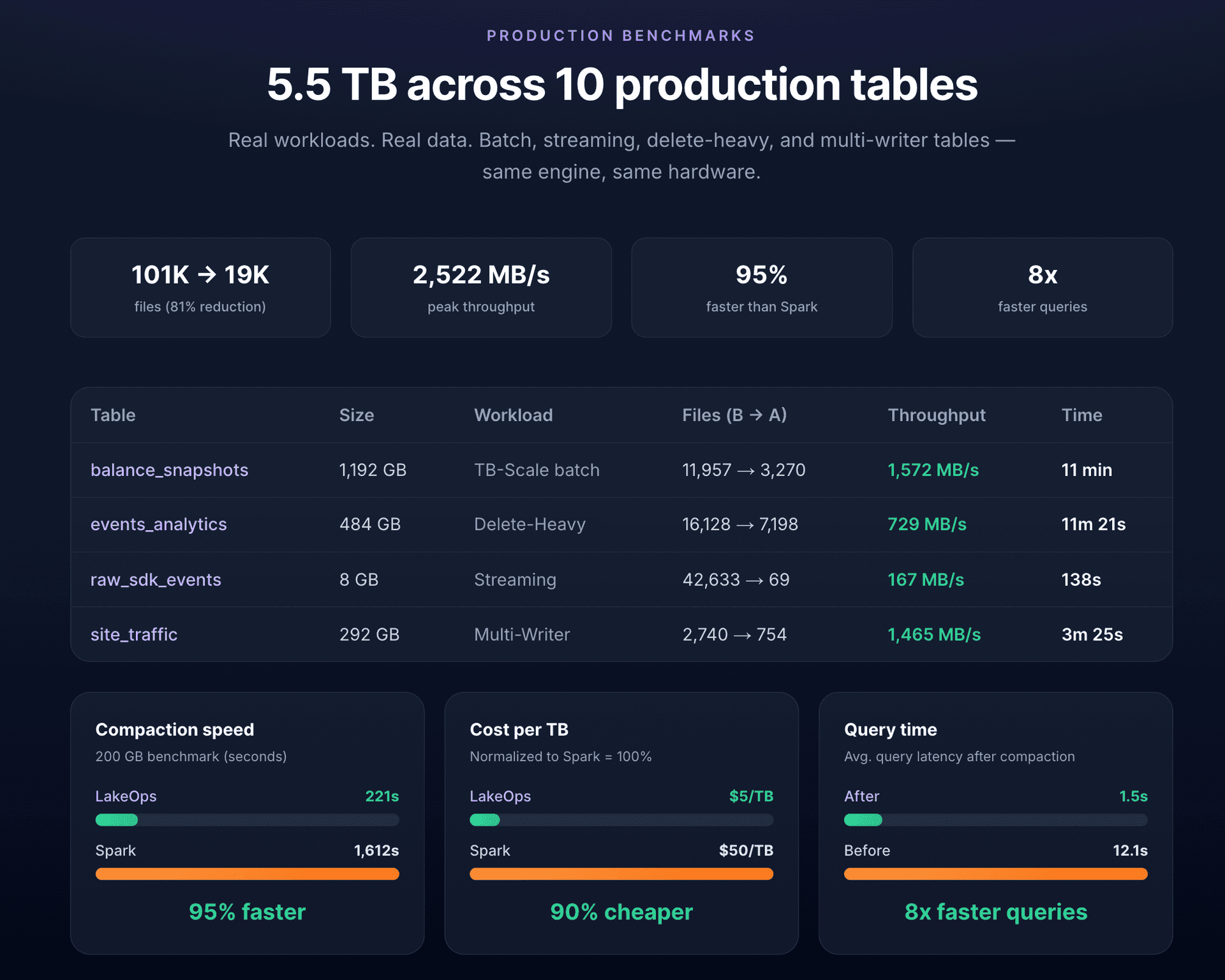
The result on identical hardware: a 200 GB binpack that takes Spark 1,612 seconds completes in 221 seconds. Sort compaction that Spark cannot complete without OOM (on tables with 40K+ delete files) finishes in minutes. Cost drops from ~$50/TB to ~$5/TB, making frequent compaction (hourly for streaming tables) economically viable for the first time. For the full engine comparison, see Replace Spark for Iceberg Compaction.
Conflict-aware partition scoping
Instead of hardcoding where => 'event_date < current_date()' and hoping no other writer touches historical partitions, the control plane tracks which partitions received new data files in recent snapshots across all writers — Flink, Spark, dbt, CDC pipelines — and dynamically excludes active partitions from each compaction run. If a conflict occurs, only the affected partition retries on the next cycle.
Policy-based governance
Instead of per-table Airflow configurations, define compaction policies at the catalog, namespace, or table scope. A catalog-level policy sets the default strategy, target file size, and maintenance cadence. Namespace overrides handle special cases (streaming namespaces get hourly binpack). Individual tables can have exceptions. New tables inherit the applicable policy automatically — no DAG edits, no PR reviews, no forgotten tables.
Getting started
If you are running rewrite_data_files manually or through Airflow — tuning parameters per table, debugging OOM failures, managing maintenance sequencing — transitioning to LakeOps does not require changing your pipelines or data architecture.
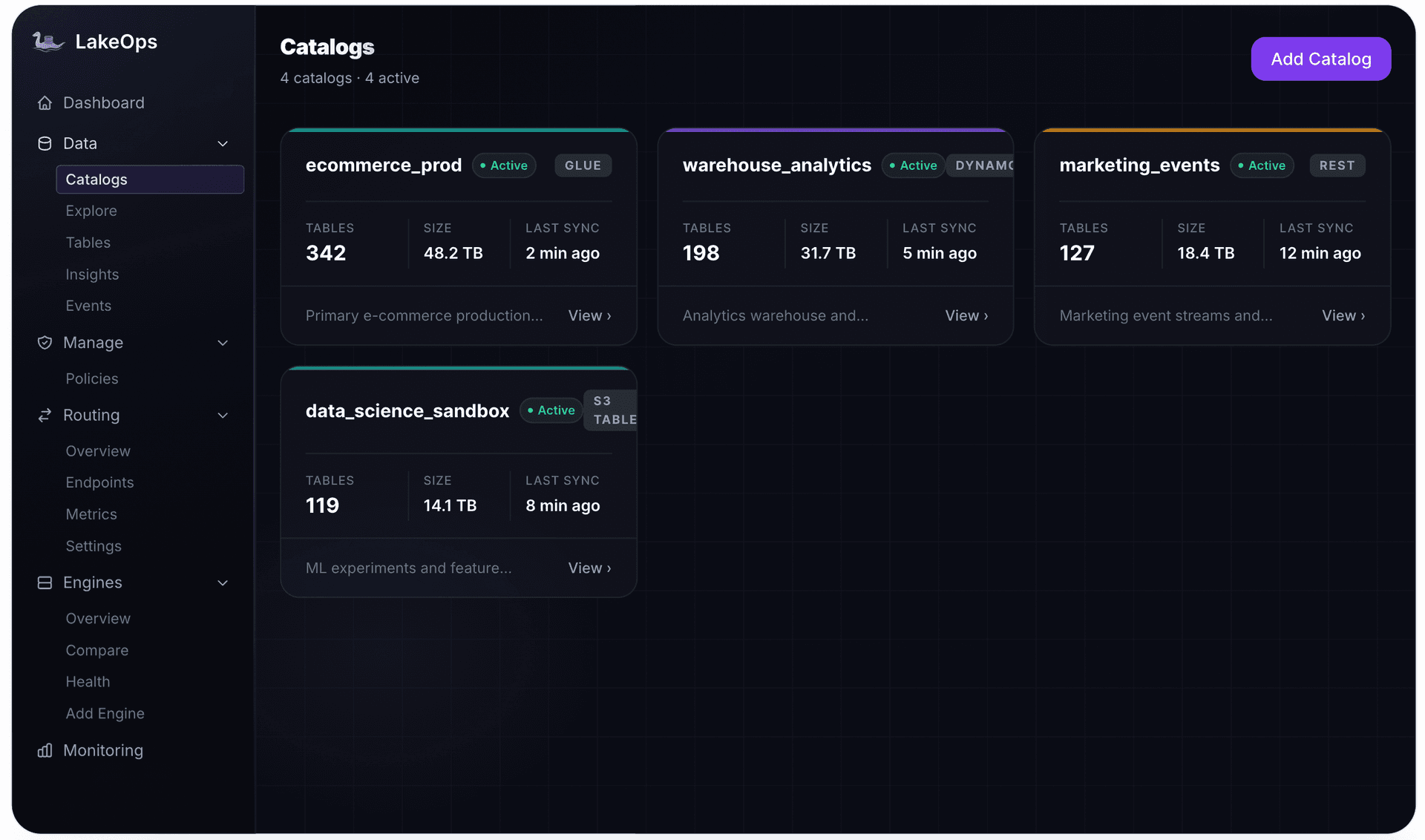
- 1.Connect your catalog — AWS Glue, REST/Polaris, DynamoDB, or S3 Tables. LakeOps reads metadata only; no data moves, no pipelines change.
- 2.See your lake's health — every table is scanned and scored within minutes. You immediately see which tables are degraded, how many small files they have, and what compaction would improve.
- 3.Set policies — define compaction strategy, target file size, maintenance cadence, and snapshot retention at whatever scope makes sense — per catalog, per namespace, or per table.
- 4.Compaction runs autonomously — the Rust engine compacts tables in priority order (worst-degraded first), selects the right strategy per table, avoids writer conflicts, sequences all maintenance operations, and reports results with before/after metrics.
The entire setup takes under 10 minutes. No Spark clusters to provision, no executor memory to tune, no Airflow DAGs to maintain.

If you want to see what this looks like on your own tables — file counts, sort order recommendations, and projected query improvements — connect your catalog and get a free compaction analysis in under 10 minutes.
Further reading
- Fixing Small Files in Apache Iceberg — root causes, measurement, and manual and automated fixes for the small file problem
- Iceberg Operational Runbook — day-to-day operations guide for production Iceberg tables
- Managed Iceberg — full table lifecycle management beyond compaction


