
Apache Iceberg has won. Snowflake, Databricks, AWS, Google Cloud, and every major query engine now read and write Iceberg natively. For data platform teams, the table format question is settled.
But table format adoption and table health are two very different problems. Iceberg gives you powerful primitives — time travel, schema evolution, hidden partitioning, snapshot isolation — and then leaves you responsible for keeping those tables performant at scale. In practice, that maintenance gap — the one a data lakehouse control plane is designed to close — is where most production data lakes quietly start to break down.
The cost of doing nothing
The degradation pattern is predictable. A streaming pipeline appends rows every few minutes, creating thousands of small Parquet files per partition. Snapshots accumulate because no one configured expiration. Orphaned data files linger after failed Spark jobs. Manifest lists grow until query planning alone takes longer than the scan itself.
The financial impact compounds from four directions at once. First, storage costs balloon — orphan files from aborted writes, expired snapshots referencing data no query will ever touch again, and duplicate files from incomplete compaction runs can account for 60–70% of your object storage bill. Second, compute costs spike — query engines scan thousands of small files instead of a few optimally-sized ones, and every query opens hundreds of fragmented manifests just to build an execution plan. Third, query latency degrades — a table that returned results in 2 seconds last quarter now takes 15, and analysts start complaining before platform teams even notice. Fourth, engineering time evaporates — someone has to write, maintain, debug, and be on-call for the scripts that hold it all together.
The irony is that Iceberg provides all the building blocks to prevent this — compaction, snapshot expiration, manifest rewriting, orphan removal — but none of it happens automatically. Somebody has to build and maintain the automation layer.
Why manual scripts stop working
Most teams start with hand-rolled Spark jobs and Airflow DAGs. At 50 tables, it works. At 500 tables across multiple catalogs, engines, and regions, the approach hits four walls.
It is reactive — you discover degradation after users complain, not before. It is engine-blind — a compaction job tuned for Spark does not account for Trino or Athena query patterns, and a sort order that accelerates one workload can hurt another. It is not concurrency-safe — a naive expiration script can remove a snapshot that an active reader still depends on. And it does not scale — the engineering time spent maintaining these scripts grows linearly with table count, while the team size does not.
The compute overhead of manual maintenance is a cost problem in its own right. Running compaction via Spark means spinning up JVM clusters, allocating executors, and paying for compute time that is orders of magnitude more expensive than it needs to be. Most organizations run these jobs on over-provisioned clusters because under-provisioning causes failures, and failures mean 2 AM pages.
This is why the industry is converging on a control-plane approach to Iceberg management: a single service that continuously monitors every table, understands cross-engine query patterns, and applies the right maintenance at the right time — without human intervention or idle compute.
The nine components of a modern Iceberg control plane
The rest of this article breaks down what that control plane looks like in practice — nine capabilities, grounded in the Iceberg control plane concept, that together close the maintenance gap and keep your lake healthy as a baseline, not as an aspiration. The sequence matters: observability comes first because you cannot fix what you cannot measure, then the core maintenance operations that act on those signals, then the policy layer that codifies decisions at lake scale, and finally the routing and AI layers that optimize query execution across engines.
1. Full-stack observability
You cannot optimize what you cannot see — and you certainly cannot automate what you cannot measure. Observability is the foundation that every other capability depends on. Without continuous telemetry collection across tables, engines, and operations, compaction runs blind, expiration guesses at retention windows, and platform teams discover problems only after users complain.
Most organizations have fragmented visibility — storage metrics in the cloud console, query metrics in each engine's UI, and Iceberg metadata accessible only via Spark commands. By the time someone correlates a latency regression with a compaction backlog, the problem has been compounding for weeks.
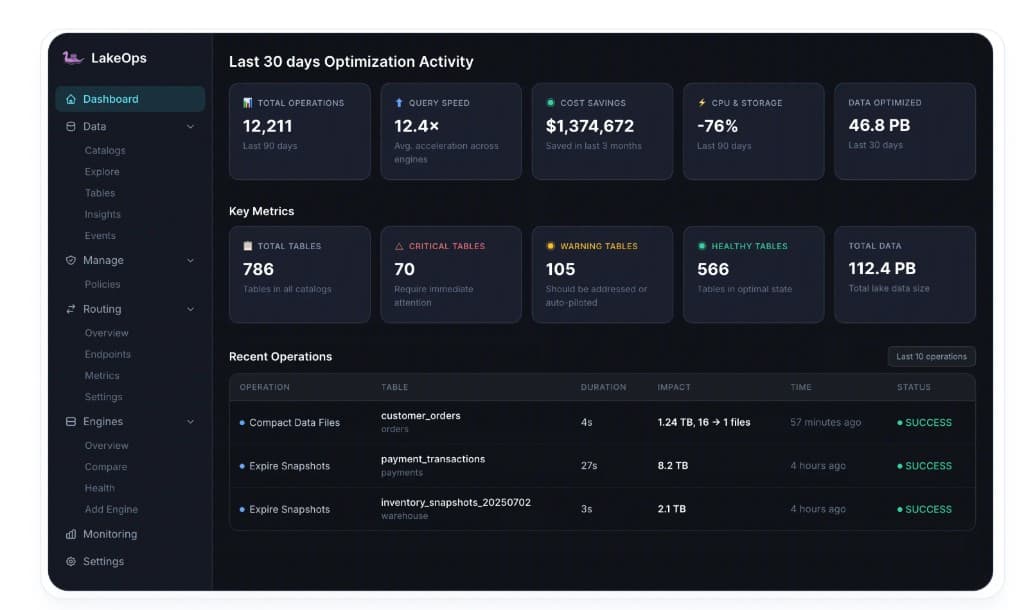
LakeOps delivers full-stack Iceberg lakehouse observability in a single dashboard. The executive view shows total operations run (12,211 over 90 days in one deployment), average query acceleration (12.4x), cumulative cost savings ($1,374,672 over 3 months), CPU and storage reduction (-76%), and total data optimized (46.8 PB). Below, key metrics show total tables under management, how many are critical, warning, or healthy, and total lake data size.

For table-level investigation, the Explore view provides per-table metrics: total records, total size, stale file count, active data files, and a records distribution chart over the last 60 snapshots. You can see average file size, position deletes, equality deletes — everything needed to understand a table's structural health.

The Insights tab surfaces problems at four severity levels before users notice them — CRITICAL alerts for partition data file issues, HIGH alerts for excessive manifests, WARNING for partition skew, and LOW for small file accumulation. Each insight links directly to the affected table for one-click remediation.

Every operation is tracked with full auditability. The Events tab provides a complete operations history per table — every compaction, snapshot expiration, orphan removal, and manifest rewrite with its duration, impact, and status. This telemetry feeds directly into the automated maintenance decisions described in the following sections.

2. Query-aware compaction
With telemetry flowing, the most impactful optimization is compaction. Small files are the root cause of most performance and cost problems in data lakes. Every small file means an additional S3 GET request, an additional metadata entry for the planner to evaluate, and less opportunity for columnar predicate pushdown. Binpack compaction merges small files toward a target size (typically 512 MB), directly reducing file count, storage API costs, and the amount of data engines need to scan.
But the bigger gains come from sort-order compaction, which physically reorders data based on the columns your queries actually filter on. When files are sorted by the right columns, query engines can skip entire row groups using min/max statistics. Queries that used to scan gigabytes now scan megabytes — and the compute cost drops proportionally.
LakeOps runs compaction on a purpose-built Rust engine instead of Spark. The difference is not marginal — it is structural. The Rust engine eliminates JVM overhead, garbage collection pauses, and the need to provision executor clusters. It reads Iceberg metadata, identifies suboptimal partitions, rewrites data files, and commits atomically using Iceberg's optimistic concurrency control. In production benchmarks, binpack completes in 221 seconds versus 1,612 seconds for Spark and 6,300 seconds for S3 Tables' built-in compaction — up to 28x faster, at a fraction of the compute cost.

The cost savings come from two sources: the compaction itself runs on far less compute (no JVM clusters, no idle executors), and the resulting file layout reduces the compute cost of every subsequent query by cutting IO. When thousands of queries per day each scan less data because files are properly sized and sorted, the cumulative compute reduction is substantial.

3. Snapshot lifecycle management
Every write operation in Iceberg creates a new snapshot. Snapshots are what make time travel and rollback possible, but unbounded accumulation is expensive. Each snapshot references a manifest list, which references manifest files, which reference data files. At 10,000+ snapshots on a single table, the metadata tree becomes so deep that query planning alone can take longer than the actual scan. And every expired-but-undeleted snapshot still references data files on storage, preventing them from being reclaimed.

In LakeOps, the Snapshots panel lists every snapshot with its ID, timestamp, operation type, and references. You can tag a snapshot, create a branch from it, roll back the table, or set it as the current version. Retention policies run on a configurable cron and respect both a time window (e.g., 30 days) and a minimum snapshot count. Expiration is conflict-aware — it will never remove a snapshot that an active reader depends on, and it schedules safely around concurrent writers.
The impact at scale is dramatic. A single expiration run on a table with 23,183 snapshots deleted 2,928 snapshots and 5,819 files, reclaiming 263.52 MB of manifest data in under 4 minutes. On another table, 22,034 snapshots and 675,510 files were expired, reclaiming 179.49 GB of storage in a single pass.

4. Manifest and metadata optimization
Iceberg's manifest files are the index layer that tells query engines which data files belong to each snapshot. After many compaction and append cycles, manifests fragment — a table might have 200 manifest files where 30 would suffice. The cost is invisible until it isn't: every time an engine plans a query, it opens every manifest, reads its column statistics, and evaluates which data files to scan. At 200+ manifests, query planning overhead dominates execution time.
LakeOps surfaces fragmentation automatically. The Insights tab flags problems at four severity levels before users notice — a HIGH alert for excessive manifests, a WARNING for partition data skew, a LOW note for small file accumulation.

Three distinct operations address these issues. Rewrite Manifests consolidates fragmented manifests so planners open fewer files — cutting planning time from seconds to milliseconds on large tables. Rewrite Position Deletes merges the position-delete files generated by merge-on-read operations, directly improving read performance on tables with frequent updates. Compute Statistics generates Puffin files with column-level statistics (distinct values, min/max ranges, null ratios) that enable engines to skip row groups more aggressively.

Each operation has its own toggle and schedule. In Auto mode, LakeOps triggers a rewrite when metadata drift exceeds configurable thresholds — for example, when manifest count per snapshot passes 50, or when Puffin statistics are stale beyond a defined window.
5. Orphan file detection and cleanup
Orphan files are data objects on S3, GCS, or ADLS that no live Iceberg snapshot references. They accumulate from aborted writes, failed Spark jobs, interrupted compaction runs, and incomplete table drops. In a typical production lake, orphan files account for a significant portion of the storage bill — they serve no purpose, but object storage charges per-byte regardless.
The challenge is safety. A naive implementation that compares storage against metadata can accidentally delete files from in-flight jobs. LakeOps solves this with a policy-based approach: an age threshold (default: 7 days) ensures only files unreferenced for at least that long are candidates for removal, and cleanup schedules are coordinated after snapshot expiration — since expiration can itself produce newly unreferenced files.

For lake-wide cleanup, the Create Remove Orphan Files Policy wizard scopes to catalogs, namespaces, or individual tables with include/exclude patterns.

A single lake sweep tells the full story. In one production run, orphan cleanup removed 59,831 files (74.8 GB) from a single table in 13 minutes and across the lake cleaned up 13.6 GB from another table in about a minute — all tracked with per-operation status and impact.

6. Organization-wide policies
Once the core maintenance operations are in place — compaction, snapshot expiration, manifest optimization, and orphan cleanup — the next question is how to apply them consistently across hundreds of tables without managing each one individually. At scale, table maintenance cannot be one-off decisions; it requires a policy engine that enforces consistent standards while allowing targeted overrides.
LakeOps provides a centralized Policies dashboard. Every policy is listed with its status toggle, type (Compact Data Files, Expire Snapshots, Rewrite Manifests, Remove Orphan Files, Configuration), timestamps, and action controls. Policies support scoped targeting with namespace patterns and catalog-level control.
When creating a new policy, the wizard prompts you to select which maintenance operation to automate — Expire Snapshots, Remove Orphan Files, Compact Data Files, Rewrite Manifests, Rewrite Position Delete Files, or Rewrite Equality Delete Files. Each type has its own configuration options: retention windows for snapshots, age thresholds for orphan files, target file sizes for compaction, and merge thresholds for manifests.

Scope resolution follows a specificity hierarchy: a table-level policy overrides a namespace-level default, which overrides a catalog-wide baseline. All operations are conflict-aware — scheduling respects concurrent writers so maintenance never blocks production pipelines. The recommended practice is to stagger heavy operations off-peak and schedule snapshot expiration before orphan cleanup so the full chain of waste removal executes in the correct order.
7. Multi-engine query routing
Production lakehouses rarely use a single engine. A typical setup might have Trino for interactive analytics, Snowflake for BI dashboards, Athena for ad-hoc exploration, DuckDB for local development, and Spark for batch ETL. Without a routing layer, each team picks the engine they know — regardless of whether it is the cheapest or fastest choice for that particular query.
This is a major cost driver. A complex analytical join that costs $0.03 on Trino might cost $0.08 on Snowflake. A simple point lookup that runs in 0.5 seconds on DuckDB takes 2.1 seconds on Snowflake. Across thousands of queries per day, the wrong routing decisions compound into significant overspend and unnecessary latency.
LakeOps connects all engines to a unified routing layer that makes per-query decisions based on cost ceilings, latency targets, table health, and historical patterns. Interactive dashboards hit low-latency engines while heavy ETL and compaction land where compute is cheapest.

The Routing Metrics dashboard shows total queries routed, average response time, engine utilization, and load distribution. Engine load, query shape breakdowns (SELECT, JOIN, AGGREGATE, INSERT, UPDATE, DELETE), and weekly volume trends are all visible in one place.

Side-by-side engine comparison makes it straightforward to decide when to add, retire, or reconfigure an engine — comparing success rates, average runtimes, costs per query, and data scanned.

8. Agentic AI enablement
AI and ML workloads are becoming primary consumers of lakehouse data — and they have different requirements than human analysts. Agents need low-latency, consistent access to table state. Feature stores depend on optimized file layouts. Autonomous pipelines need cost guardrails for agentic AI workloads so a runaway agent does not trigger unbounded Snowflake compute.
LakeOps supports this through Routing Endpoints — named, workload-scoped endpoints that give each application or agent a stable URL (e.g., e1fa3c3c.lakeops.dev), a defined engine pool, query-type scope, and priority level. An Analytics endpoint routes SELECT and AGGREGATE queries to Trino and DuckDB at High priority. A Data-Team ETL endpoint routes INSERT and MERGE to AWS Athena and StarRocks. Each is independently configurable.

The platform exposes an agent-native MCP (Model Context Protocol) interface, allowing AI agents to discover tables, execute queries, and receive optimization signals without custom integration code. Layered guardrails — ReadOnly, CostEstimate, PIIMask, and HumanApproval — ensure agents operate within safety boundaries. The system forms a closed loop: the compaction engine continuously reshapes file layout based on actual query patterns (including agent queries), so the lake self-optimizes as AI adoption scales.
9. Layout simulations
Compaction and sort-order optimization can deliver up to 12x query performance improvement — but choosing the wrong sort order or partitioning scheme can make things worse, not better. This is the difference between guessing and knowing.
LakeOps addresses this with Layout Simulations: a safe, branch-based testing environment that lets you evaluate layout changes before applying them to production. Simulations run on a real Iceberg branch created from the latest snapshot — layout changes are applied to the branch, query patterns are replayed, and results are compared against the current baseline. The branch is discarded afterward; no production data is modified.

The Simulations tab shows field access frequency by query mix — how often each column appears in SELECT, FILTER, and JOIN operations. This analysis is the foundation for choosing the right layout strategy. You can run multiple simulations with different configurations, then compare the Layout Customization Diff to see exactly how each approach changes data distribution and file sizes — before committing to a potentially expensive rewrite.
Getting connected
LakeOps connects to your existing catalogs and object storage in approximately 10 minutes — see the managed lakehouse overview for the full feature set. There are no agents to install, no data to move, and no pipelines to modify. Your data stays in your account.

Supported catalog types include AWS Glue, DynamoDB-backed catalogs, REST catalogs (Polaris, Gravitino, Nessie, Lakekeeper), and S3 Tables. The onboarding flow has four steps: connect your catalog and storage, let the platform analyze table health from metadata and query patterns, enable automated optimization, and start monitoring. Three guarantees apply: no vendor lock-in, no infrastructure changes, and no data leaves your environment.
Where the 80% comes from
The up to 80% reduction in CPU and storage costs that LakeOps delivers is not from any single optimization. It is the compound effect of every layer working together — and critically, working together in the right sequence.
Storage costs drop because orphan files are continuously removed, expired snapshots release their referenced data, and compaction consolidates thousands of small files into optimally-sized ones — eliminating redundant storage and the API calls that come with it.
Compute costs drop from three directions. First, the Rust compaction engine replaces JVM-based Spark clusters, eliminating executor provisioning, garbage collection overhead, and idle cluster costs. Second, sort-order compaction and lean manifests mean every query scans dramatically less data — and less data scanned means less compute consumed across Trino, Spark, Snowflake, Athena, and every other engine. Third, intelligent query routing sends each query to the cheapest appropriate engine instead of a default, avoiding overspend on high-cost engines for workloads that don't need them.
Query latency improves up to 12x through the combination of compaction (fewer, larger files), sort-order optimization (predicate pushdown skips entire row groups), manifest consolidation (faster query planning), and Puffin statistics (more aggressive pruning). The improvement is measured across Trino, Spark, and Snowflake after compaction and layout optimization — it is not engine-specific.
A key factor in this performance gain is that compaction is not applied blindly. LakeOps observes actual query patterns — which columns appear in WHERE clauses, which partitions are accessed most frequently, which tables serve latency-sensitive workloads — and uses that telemetry to determine sort order. Files are physically reorganized to match how your organization actually queries the data. When a dashboard filters on event_date and region, the data is sorted on those columns so predicate pushdown eliminates irrelevant row groups before any bytes leave S3. The result is that every query benefits from a layout tailored to real access patterns, not a generic default.
Orchestrating these operations in sequence adds further efficiency. Snapshot expiration runs before orphan cleanup so that newly unreferenced files are captured in the same sweep. Compaction runs after expiration so it does not waste cycles merging files that are about to be garbage-collected. Manifest optimization runs after compaction so it operates on the final file set rather than an intermediate state. Each operation's output becomes the next operation's clean input — eliminating redundant work that manual scripts running on independent schedules inevitably perform.
And the engineering hours that used to go into writing, maintaining, debugging, and being on-call for maintenance scripts are returned to actual product work. Policies are defined once and the system executes them continuously — every action logged, auditable, and reversible.

If you are still running cron-based Spark compaction and manually expiring snapshots, the tooling has caught up with the problem. Apache Iceberg is production-ready. Your table maintenance should be too.