

Apache Iceberg has won the table format decision for most data teams. The specification is solid, the ecosystem is mature, and ACID transactions, schema evolution, and time travel all work. The harder question is everything that comes after: how do you run Iceberg in production at enterprise scale without burning engineering time on maintenance, breaking queries during compaction, or discovering that orphan files have doubled your storage bill?
The gap between a working proof-of-concept and a production-grade deployment spans ten distinct operational dimensions — each with its own failure modes and compounding debt if neglected. Our Iceberg table health and maintenance guide covers the core maintenance operations; this checklist extends those into enterprise-grade readiness. A 2026 survey of 252 data leaders operating Iceberg in production found that most organizations still rely on custom scripts and internal tooling to manage compaction, metadata growth, snapshot lifecycle, and access controls. This is the operational reality: Iceberg provides the primitives, but not the automation layer that keeps them working at scale.
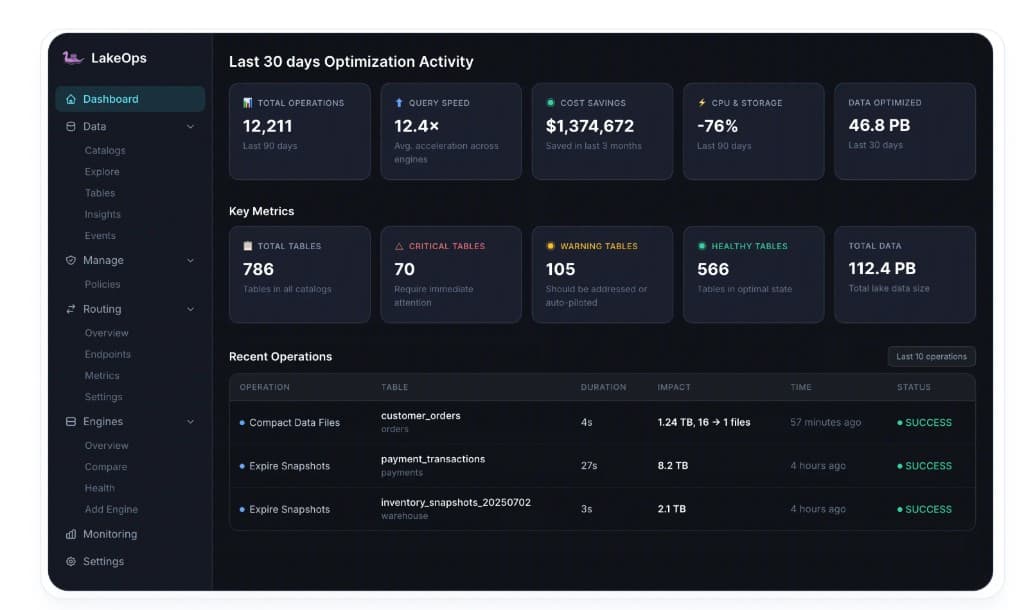
This is precisely what a control plane like LakeOps automates. LakeOps is the autonomous control plane for Apache Iceberg — it connects to your existing catalogs in roughly ten minutes, continuously classifies every table's health, runs sequenced maintenance on a purpose-built Rust engine, enforces policies across the lake, and provides the observability layer that makes production operations manageable. In effect, LakeOps IS the production readiness layer. This checklist covers every dimension with specific configurations, SQL examples, and clear criteria for what production-ready means — referencing LakeOps capabilities where they directly replace manual effort.
1. Catalog architecture
The catalog is the most consequential infrastructure decision in an Iceberg deployment. It resolves metadata pointers, enforces access control, vends credentials, and sequences commits. Every query and every write traverses it. A misconfigured or underpowered catalog creates a single point of failure for the entire lake.
Choosing the right catalog
- AWS Glue — zero operational overhead for AWS-only stacks. Native integration with Athena, EMR, and Redshift Spectrum. Limitations: no credential vending, no RBAC beyond IAM policies, limited multi-engine support outside the AWS ecosystem. Best for teams fully committed to AWS with Spark and Athena as primary engines
- Apache Polaris (REST) — the community-standard open-source REST catalog. Supports RBAC, credential vending, remote signing, multi-catalog federation, and server-side commit deconflicting. Available self-hosted, via Snowflake Open Catalog, or Dremio Open Catalog. Best for multi-engine, multi-cloud environments that need vendor neutrality
- Project Nessie — Git-like branching and tagging for data. Branch isolation enables data CI/CD workflows where ETL results are staged on a branch before merging to production. Requires a separate policy layer (OPA, Cedar) for production security. Best for teams that need branch-level isolation for development, testing, or A/B deployments
- AWS S3 Tables — AWS-managed Iceberg tables with built-in compaction. Eliminates catalog management entirely. Limitations: AWS-only, limited engine support outside Athena and EMR, less configuration flexibility. Best for small teams that want managed everything on AWS
LakeOps connects to all four catalog types — Glue, REST/Polaris, Nessie, and S3 Tables — in approximately ten minutes. Once connected, it discovers every table, classifies health, and applies maintenance policies regardless of which catalog you chose. This means your catalog decision can be driven purely by access control and engine compatibility needs, not by which one has better maintenance tooling.
Configuration checklist
- High availability — the catalog is on the critical path for every read and write. Deploy with redundancy (multi-AZ for managed services, replicated backends for self-hosted)
- REST protocol compliance — standardize on the Iceberg REST spec. If your catalog speaks REST, you can swap implementations later without changing engine configurations
- Credential vending — enable short-lived, table-scoped storage tokens. Engines should never hold long-lived S3/GCS/ADLS keys. Polaris, Lakekeeper, and S3 Tables support this natively; Glue requires separate IAM role chaining
- Commit retry configuration — set
commit.retry.num-retriesto at least 4 andcommit.retry.min-wait-msto 100. Under concurrent writes, optimistic locking failures are normal and the catalog must retry transparently - Connection pooling — engines maintaining persistent connections to the catalog reduce metadata resolution latency. Configure
max-connectionsbased on concurrent query volume
1-- Table properties for commit resilience2ALTER TABLE analytics.events SET TBLPROPERTIES (3 'commit.retry.num-retries' = '4',4 'commit.retry.min-wait-ms' = '100',5 'commit.retry.max-wait-ms' = '60000',6 'commit.status-check.num-retries' = '3'7);2. Table design
Table structure is set at creation time and expensive to change later. Get these right before the first production write.
Partitioning
Iceberg's hidden partitioning decouples the physical layout from query syntax — queries on the source column automatically prune partitions without users knowing the partition scheme. The critical decision is granularity.
- Time-based tables — use
days(event_timestamp)as the default. Only partition byhours()if daily volume exceeds 5 GB per partition. Over-partitioning is the single most common cause of small files in production - Multi-dimensional tables — combine time with a low-cardinality dimension (e.g.,
days(ts), region). Keep total partition count under 10,000 active partitions to avoid metadata explosion - Lookup tables — use
bucket(id, 16)ortruncate(id, 4)for point-lookup patterns where time is not the primary access axis
1CREATE TABLE analytics.events (2 event_id STRING,3 event_timestamp TIMESTAMP,4 user_id STRING,5 event_type STRING,6 payload STRING7)8USING iceberg9PARTITIONED BY (days(event_timestamp))10TBLPROPERTIES (11 'format-version' = '2',12 'write.parquet.compression-codec' = 'zstd'13);Sort order
Sort order determines data skipping effectiveness. When data files are sorted by columns that appear in WHERE clauses, Parquet min/max statistics enable engines to skip entire files. An unsorted table forces every file to be scanned because min/max ranges overlap for every predicate.
- Define a default sort order at table creation for the 2–3 columns that dominate filter predicates
- If query patterns are unknown or evolving, start without a sort order and add one after production query telemetry reveals the access pattern
- LakeOps provides query-aware sort optimization — it collects telemetry from every connected engine (Trino, Spark, Athena, Snowflake, Flink, DuckDB), identifies which columns appear in WHERE, JOIN, and GROUP BY clauses per table, and recommends optimal sort orders based on actual production access patterns rather than guesswork
- Layout simulations in LakeOps let you test proposed sort configurations on a real Iceberg branch with production queries replayed, comparing projected performance impact before modifying any production data
1ALTER TABLE analytics.events2WRITE ORDERED BY event_type, user_id;File format and compression
- Parquet is the default and correct choice for 95% of workloads. Columnar encoding, efficient compression, and universal engine support
- ORC may offer marginal advantages for Hive-heavy environments, but ecosystem support is narrower
- Avro is appropriate only for write-heavy tables where row-oriented access dominates reads (rare in analytics)
- Use ZSTD compression — it provides the best balance of compression ratio and decompression speed for analytical workloads. Set via
write.parquet.compression-codec = zstd
3. Write path configuration
The write path determines how data enters the table — file sizes at write time, how data is distributed across partitions, and how frequently commits occur. Misconfigured write paths are the root cause of most small-file accumulation in production.
Target file size
1ALTER TABLE analytics.events SET TBLPROPERTIES (2 'write.target-file-size-bytes' = '268435456',3 'write.parquet.row-group-size-bytes' = '67108864'4);- 256 MB (
268435456) is the production default for analytical tables. Balances per-file overhead against parallelism - 512 MB (
536870912) for heavy full-scan workloads where fewer, larger files reduce S3 GET costs - 128 MB for point-lookup tables where finer-grained file skipping outweighs the per-file overhead
- Row group size should be approximately 1/4 of the target file size for optimal Parquet column statistics
Write distribution mode
Distribution mode controls how rows are assigned to files during writes. The wrong mode creates partition-spanning files or excessive small files per partition.
hash— distributes rows by partition key hash. Best for streaming workloads where each checkpoint touches many partitions. Produces one file per partition per writer, preventing cross-partition filesrange— sorts rows before writing. Produces well-ordered files but requires a shuffle. Best for batch ETL that writes sorted datanone— no distribution. Fastest writes but produces files with mixed partition data. Only appropriate for single-partition inserts
1ALTER TABLE analytics.events SET TBLPROPERTIES (2 'write.distribution-mode' = 'hash'3);Commit intervals for streaming
For Flink and Spark Structured Streaming, the checkpoint interval directly determines file size and file count. A 60-second checkpoint interval across 100 partitions produces 100 undersized files every minute — 144,000 files per day.
- Set checkpoint intervals to 5–10 minutes minimum for streaming tables
- If latency requirements demand sub-minute commits, accept the small-file creation and ensure aggressive compaction is running (every 1–2 hours)
- Enable
write.metadata.delete-after-commit.enabled = trueto prevent metadata file accumulation from frequent commits - LakeOps detects small-file accumulation from streaming writes via event-driven triggers and automatically runs compaction when thresholds are breached — no fixed cron schedule that leaves a streaming table degraded for hours between runs
4. Maintenance automation
Iceberg provides four maintenance procedures. None of them run themselves. In production, they must execute in the correct order, at the right frequency, scoped to the right partitions, across every table in the lake. This is where most teams accumulate the most operational debt — and where a control plane delivers the most value.
The correct execution order is: expire snapshots → remove orphan files → compact data files → rewrite manifests. Running them independently on separate schedules produces wasted compute, stale metadata, and missed cleanup opportunities. For a detailed breakdown of why order matters, see Automating Iceberg Table Maintenance.
Snapshot expiration
1CALL catalog.system.expire_snapshots(2 table => 'analytics.events',3 older_than => TIMESTAMP '2026-06-10 00:00:00',4 retain_last => 1005);- Streaming tables: 3–7 day retention. Frequent commits create thousands of snapshots per week
- Batch tables: 14–30 days for compliance or debugging rollback windows
- Always set
retain_lastto at least 10–100 to prevent expiring all snapshots on low-write tables - Run before compaction — expiration dereferences files that compaction would otherwise needlessly rewrite
Orphan file cleanup
1CALL catalog.system.remove_orphan_files(2 table => 'analytics.events',3 older_than => TIMESTAMP '2026-06-03 00:00:00'4);- 7+ day age threshold — never go lower. Files from in-progress writes are temporarily orphaned until the writer commits. Premature deletion corrupts the table
- Run after snapshot expiration — expiration releases file references, then orphan cleanup removes the physical files
- On mature streaming lakes, orphans routinely account for 25–40% of storage costs
Data file compaction
1CALL catalog.system.rewrite_data_files(2 table => 'analytics.events',3 strategy => 'sort',4 sort_order => 'event_type ASC NULLS LAST, user_id ASC NULLS LAST',5 where => 'event_timestamp < current_timestamp() - INTERVAL 2 HOURS',6 options => map(7 'target-file-size-bytes', '268435456',8 'min-input-files', '5',9 'partial-progress.enabled', 'true',10 'partial-progress.max-commits', '10'11 )12);- Binpack for general compaction (fast, low risk). Sort for query-optimized layouts. Z-order for multi-column filter patterns
- Always use a
whereclause to exclude the active partition on streaming tables — compacting partitions with active writers causes commit conflicts - Enable
partial-progressso a single conflict does not invalidate the entire compaction run - Schedule every 1–4 hours for streaming tables, daily for batch tables
Manifest rewriting
1CALL catalog.system.rewrite_manifests(2 table => 'analytics.events'3);- Run after compaction — compaction changes the file set, and manifests must reflect the final layout
- A table with 2,000+ manifests can see query planning time drop from seconds to milliseconds after rewriting
- Schedule daily after the compaction window completes
Why a control plane replaces scripts
LakeOps automates this entire maintenance pipeline — sequencing all four operations correctly per table, adapting frequency to each table's write pattern through event-driven triggers rather than fixed cron schedules, and executing compaction on a purpose-built Rust engine that is 95% faster and approximately 10x cheaper than Spark. The Rust engine, built on Apache DataFusion, processes Parquet through Arrow columnar buffers with bounded memory, no JVM startup, no garbage collection pauses, and no OOM failures. A 1.2 TB table that caused Spark to OOM completed in 11 minutes.
Policies apply maintenance rules at catalog, namespace, or table scope — every new table inherits the policy automatically. Every operation is logged with before/after metrics in a full event audit trail. The result in production: 80% cost reduction, 12x query acceleration, and 28x faster compaction than equivalent Spark jobs.
5. Observability and alerting
You cannot manage what you cannot measure. Production Iceberg deployments need continuous monitoring Iceberg table health across three layers: file health, metadata health, and operational health.

Table health metrics
- File count per partition — healthy: fewer than 100 files averaging 256–512 MB. Warning: 500+ files or average below 128 MB. Critical: 1,000+ files or average below 64 MB
- Snapshot count — if exceeding 1,000, expiration is not running or not aggressive enough
- Manifest count — target fewer than 100 manifests per snapshot. Streaming tables with minute-level commits accumulate thousands in days
- Delete file ratio — ratio above 0.1 (one delete file per 10 data files) signals accumulating merge-on-read overhead that forces every scan to reconcile pending deletes
- Orphan file volume — compare total storage size to data referenced by the current snapshot. Large discrepancies indicate orphan accumulation
1-- File health per partition2SELECT3 partition,4 COUNT(*) AS file_count,5 AVG(file_size_in_bytes) / 1048576 AS avg_size_mb,6 SUM(CASE WHEN file_size_in_bytes < 67108864 THEN 1 ELSE 0 END) AS small_files7FROM analytics.events.files8GROUP BY partition9ORDER BY file_count DESC;Degradation detection
Static thresholds catch obvious problems. Production environments also need trend-based detection:
- Query planning time — track p50 and p99. If planning time trends upward over 7 days, manifest fragmentation or snapshot accumulation is the likely cause
- S3 GET request costs — a 20%+ week-over-week spike indicates small-file proliferation before query latency visibly degrades
- Compaction lag — the time between file creation and compaction completion. If lag exceeds 6 hours on streaming tables, compaction frequency is insufficient
- Storage growth rate vs. ingestion rate — divergence indicates orphan accumulation or snapshot retention holding superseded files
Alerting rules
- Critical: file count per partition exceeds 1,000 or average file size below 32 MB. Page on-call immediately
- Warning: file count exceeds 500 or average file size below 128 MB. Create ticket for next business day
- Info: manifest count exceeds 100 per snapshot or snapshot count exceeds 500. Auto-resolve via maintenance pipeline
LakeOps provides this entire observability stack out of the box. Every table is continuously classified as Healthy, Warning, or Critical based on file counts, manifest state, snapshot depth, and delete file ratios. Severity-ranked Insights surface degradation before users notice query slowdowns. Cross-engine telemetry from every connected query engine feeds into a unified view — no custom Prometheus exporters, no Grafana dashboards to maintain, no SQL scripts to schedule. For a deeper treatment of lakehouse observability patterns, see Iceberg Lakehouse Observability.
6. Multi-engine coordination
A production Iceberg lakehouse typically serves multiple engines — Spark for ETL, Trino or Athena for interactive queries, Flink for streaming, DuckDB or PyIceberg for ad-hoc analysis. This is one of Iceberg's defining strengths, but it introduces coordination challenges that are invisible in single-engine PoCs.

Conflict avoidance
- Partition-level isolation — assign different engines to different partitions or time windows. Flink writes to the latest hour; Spark compacts partitions older than 2 hours. No overlap, no conflicts
- Branch-based isolation — with Nessie, writers can commit to branches and merge to main after validation. Prevents write-write conflicts entirely at the cost of merge complexity
- Partial progress compaction — enable
partial-progress.enabled = trueso that if a compaction commit conflicts with a concurrent write, only the affected file group is retried rather than the entire job
Catalog-level commit sequencing
- REST catalogs with server-side commit deconflicting (Polaris, Lakekeeper) handle concurrent commits by sequencing them server-side. The catalog resolves conflicts transparently rather than relying on client-side optimistic retry
- For Glue, which uses client-side optimistic locking, configure aggressive retry parameters and schedule maintenance during low-write windows
- Never run maintenance operations concurrently on the same table from different processes — even with retry logic, simultaneous compaction and streaming writes to the same partition will thrash
Engine-specific configuration
- Flink — use the Iceberg Flink sink with commit interval of 5+ minutes. Enable
hashdistribution mode to control file-to-partition mapping. Configuresink.parallelismto match partition count - Trino — read-only access by default avoids most conflicts. If using Trino for writes (CTAS, INSERT), ensure
iceberg.unique-table-location = trueto prevent write collisions - Spark — primary engine for ETL and maintenance. Configure
spark.sql.iceberg.handle-timestamp-without-timezone = truefor cross-engine timestamp consistency - DuckDB / PyIceberg — lightweight read access. Verify that the catalog client library supports your catalog's authentication mechanism (credential vending requires REST catalog support)
Multi-engine routing with LakeOps QueryFlux
LakeOps includes QueryFlux — multi-engine routing that directs queries to the optimal engine based on cost, latency, and throughput requirements. Instead of manually deciding which engine handles which workload, QueryFlux analyzes query patterns and routes accordingly. Interactive dashboards go to Trino for low latency. Large batch transforms route to Spark for throughput. Ad-hoc exploration routes to Athena for zero-infrastructure simplicity. The cross-engine telemetry that powers QueryFlux also feeds back into sort optimization — every engine's query patterns inform how tables are physically organized.
7. Security and governance
In enterprise deployments, the catalog is the governance boundary. Every security policy flows through it. For a broader view of governance readiness in lakehouse environments, production readiness means every access path is authenticated, authorized, audited, and minimally privileged.
Access control
- Namespace-level grants — assign read/write/admin privileges at the namespace level. Analysts get SELECT on
analytics.*; pipeline service accounts get INSERT on specific tables - Table-level grants — restrict access to PII-containing tables (e.g.,
users.profiles) to authorized roles only - Column-level masking — if supported by your catalog (Unity Catalog, Polaris with external policy engine), mask sensitive columns for non-privileged roles
- Service account separation — never reuse credentials across ETL pipelines, query engines, and maintenance processes. Each service account should have the minimum privileges required for its function
Credential vending
Credential vending is the single most important security mechanism for production Iceberg deployments. Instead of distributing long-lived S3 keys to every engine and notebook, the catalog issues short-lived, table-scoped tokens on demand.
- Polaris — issues STS credentials scoped to specific tables and operations. A Spark job requesting SELECT on
analytics.eventsreceives a token valid for 1 hour that can only read that table's data files - Lakekeeper — similar credential vending with Kubernetes-native identity integration
- Glue — no native credential vending. Use IAM role chaining with scoped policies to approximate per-table access boundaries
- Blast radius — with credential vending, a compromised engine credential exposes one table for minutes, not the entire S3 bucket permanently
Encryption
- At rest — enable SSE-S3 or SSE-KMS on the S3 buckets backing your Iceberg tables. KMS provides key rotation and per-key audit trails
- In transit — enforce TLS for all catalog communication and S3 access. Verify
s3.endpointuses HTTPS - Column-level encryption — Parquet supports column-level encryption (Parquet Modular Encryption). Evaluate if your compliance requirements warrant the query performance tradeoff
Audit and governance
- CloudTrail — enable CloudTrail on S3 buckets to log every GET, PUT, DELETE, and LIST operation. Correlate with catalog commit timestamps to reconstruct who accessed what data and when
- Catalog audit logs — Polaris and Unity Catalog provide audit logs for metadata operations (table creation, grants, drops). Export to your SIEM
- Maintenance audit trail — every compaction, expiration, and orphan cleanup should log what was done, when, by whom, and with what result
- LakeOps provides a complete event audit trail for every maintenance operation — duration, before/after file counts, data volumes, and status. Combined with its policy governance (versioned, auditable policies at catalog/namespace/table scope), it satisfies the operational governance requirements that most enterprise security reviews demand
8. Disaster recovery
Iceberg's snapshot mechanism provides built-in point-in-time recovery — but only if your retention policy preserves the snapshot you need to recover from.
Snapshot retention for recovery
- Minimum retention — retain snapshots for at least as long as your incident response SLA. If your team takes 72 hours to detect a bad pipeline run, 3-day snapshot retention is insufficient
- Compliance retention — regulatory requirements (SOX, GDPR audit) may mandate 30–90 day snapshot retention on specific tables. This conflicts with storage efficiency — use per-table policies to retain longer only where required
- Time travel verification — periodically test that time travel queries against retained snapshots actually work. A snapshot that exists but whose data files have been orphan-cleaned is useless
1-- Verify time travel still works for a specific snapshot2SELECT COUNT(*) FROM analytics.events3FOR SYSTEM_TIME AS OF TIMESTAMP '2026-06-12 00:00:00';Metadata backup
- Metadata files are the table — if you lose all metadata files (metadata.json, manifest lists, manifests), the table is irrecoverable even if all Parquet data files are intact
- Enable S3 versioning on metadata prefixes. This provides object-level recovery for accidentally overwritten or deleted metadata
- Cross-region replication — for critical tables, replicate the metadata prefix to a secondary region. Data files can follow via S3 replication rules
- Catalog backup — back up the catalog's state (Glue: export via API; Polaris/Nessie: database backup; JDBC: pg_dump). The catalog resolves which metadata.json is current — if the catalog is lost, engines cannot locate tables even if storage is intact
Recovery runbook
- Table rollback — use
CALL catalog.system.rollback_to_snapshot()to revert to a known-good state after a bad write or schema change - Metadata reconstruction — if catalog state is corrupted but storage is intact, use
hadoop.table.load(location)to reconstruct from the latest metadata.json in storage - Test recovery quarterly — disaster recovery that has never been tested is not disaster recovery. Run tabletop exercises that simulate catalog loss, metadata corruption, and accidental table drops
LakeOps policies make disaster recovery configuration systematic rather than ad-hoc. Retention policies at catalog or namespace scope ensure every table has appropriate snapshot retention aligned with its SLA. The sequenced maintenance pipeline guarantees that orphan cleanup never removes files still needed by retained snapshots — eliminating the common failure mode where aggressive cleanup invalidates time travel.
9. Cost management
Iceberg storage costs are driven by three factors: data volume, file count (API request costs), and retention (superseded data held by snapshots plus orphan files). All three are controllable — but only if you have visibility into which tables are costing what and why.
Storage tiering
- S3 Intelligent-Tiering — appropriate for tables with unpredictable access patterns. Automatically moves objects between frequent and infrequent tiers without API changes
- S3 Glacier Instant Retrieval — for archive partitions that may be queried rarely (e.g., time-travel into 90-day-old data). First-byte latency is milliseconds, but retrieval costs per GB apply
- Do NOT tier metadata files — manifest files, manifest lists, and metadata.json must remain in the standard storage class. Moving them to Glacier makes query planning take minutes instead of milliseconds
Lifecycle policies
- Orphan file TTL — combine Iceberg orphan cleanup with S3 lifecycle rules as a safety net. Set a lifecycle rule to expire objects older than 30 days in the data prefix that are not referenced by any manifest
- Old metadata cleanup — enable
write.metadata.delete-after-commit.enabled = trueand setwrite.metadata.previous-versions-max = 100on every table to prevent unbounded metadata file accumulation - Partition-level archival — for tables with regulatory retention requirements, write archive partitions to a separate S3 prefix with Glacier lifecycle policies. Keep active partitions on standard storage
1ALTER TABLE analytics.events SET TBLPROPERTIES (2 'write.metadata.delete-after-commit.enabled' = 'true',3 'write.metadata.previous-versions-max' = '100'4);Cost monitoring and optimization
- Track S3 costs per table prefix using AWS Cost Explorer tags or S3 Storage Lens
- Monitor GET request counts — a sudden spike without a corresponding ingestion increase signals small-file proliferation
- Compare logical data size (what the current snapshot references) to physical storage size (total objects in the prefix). A ratio above 1.5x indicates significant orphan or snapshot retention overhead
- LakeOps surfaces estimated cost savings from each maintenance operation — showing exactly how much orphan cleanup and compaction reduced your storage and request bill. Production deployments using LakeOps report approximately 80% cost reduction through the combination of automated orphan cleanup, optimized compaction eliminating small-file GET costs, and intelligent snapshot retention that balances safety against storage spend
10. Operational readiness and on-call
Production readiness means more than correct configuration — it means the team can respond when things go wrong at 3 AM. Iceberg failures are rarely catastrophic (ACID prevents corruption), but they do degrade performance and accumulate cost if not addressed promptly.
Runbook: query planning time spike
- Symptom: p99 query planning time exceeds 5 seconds
- Likely cause: manifest fragmentation or snapshot accumulation
- Investigation:
SELECT COUNT(*) FROM table.manifests— if greater than 500, manifests are fragmented.SELECT COUNT(*) FROM table.snapshots— if greater than 1,000, expiration is behind - Resolution: run
expire_snapshotsfollowed byrewrite_manifests. If the problem persists, check for excessive partition count
Runbook: small-file accumulation
- Symptom: query scan time increases, S3 GET costs spike
- Likely cause: streaming writes without adequate compaction frequency
- Investigation: query
table.files— if avg file size below 64 MB or file count per partition above 500, compaction is needed - Resolution: run binpack compaction with
partial-progress.enabled = true. For ongoing prevention, increase compaction frequency or extend checkpoint intervals
Runbook: commit conflict (ValidationException)
- Symptom: writer or compaction job fails with
org.apache.iceberg.exceptions.ValidationException - Likely cause: concurrent operations on the same table or partition
- Investigation: check which operations ran concurrently — two compaction processes, or compaction conflicting with a streaming writer on the same partition
- Resolution: ensure only one maintenance process operates per table at a time. Use partition-scoped
whereclauses to separate compaction from active write partitions. Increasecommit.retry.num-retries
Runbook: storage cost spike
- Symptom: S3 costs increase without proportional data ingestion
- Likely cause: orphan file accumulation or overly conservative snapshot retention
- Investigation: compare logical table size to physical prefix size. Run
remove_orphan_fileswithdry_run = trueto quantify orphans - Resolution: run orphan cleanup (with 7+ day safety threshold). Review snapshot retention policies — reduce retention where compliance allows
On-call readiness checklist
- Alert routing — page on Critical thresholds (file count above 1,000, planning time above 10s). Ticket on Warning thresholds. Auto-resolve Info-level issues via maintenance automation
- Dashboard access — ensure on-call has read access to the lake-wide health dashboard showing all tables, their health classification, and recent maintenance events
- Maintenance kill switch — the ability to pause all automated maintenance immediately if a maintenance operation is suspected of causing issues
- Escalation path — define when to escalate from the data platform team to the storage/infra team (e.g., S3 throttling, catalog downtime)
- LakeOps reduces on-call burden significantly: autonomous AI-driven Iceberg maintenance and compaction resolves most Warning and Info-level issues before they escalate, health classification tells on-call exactly which tables need attention and why, and the event audit trail provides immediate context for any operational investigation. The agentic AI/MCP interface with built-in guardrails lets operators query table state and trigger safe operations conversationally during incidents — and for teams planning broader AI adoption, making the Iceberg lakehouse AI-ready starts with these same production foundations
Production readiness summary
The complete production readiness checklist, condensed into the ten dimensions that determine whether your Iceberg deployment survives contact with production workloads:
1. Catalog architecture:
- REST-compatible catalog deployed with high availability
- Credential vending enabled (engines never hold long-lived keys)
- Commit retry configured for concurrent write resilience
- Catalog state backed up on a defined schedule
2. Table design:
- Partition strategy matches query patterns and volume (typically
days(timestamp)) - Sort order aligned with dominant filter predicates (use LakeOps query-aware recommendations)
- Parquet with ZSTD compression as the default file format
- Format version 2 (or 3 if all engines support it)
3. Write path:
- Target file size set (256 MB default)
- Distribution mode configured (
hashfor streaming,rangefor batch) - Checkpoint interval of 5+ minutes or compensated with aggressive compaction
- Metadata cleanup enabled (
write.metadata.delete-after-commit.enabled)
4. Maintenance:
- All four operations automated in correct sequence: expire → orphan cleanup → compact → rewrite manifests
- Event-driven triggers based on table state (not one-size-fits-all cron)
- Active partitions excluded from compaction
- Partial progress enabled for conflict resilience
5. Observability:
- File count, file size, manifest count, snapshot count, and delete file ratio monitored continuously
- Alerting on Critical/Warning thresholds with appropriate routing
- Trend detection for gradual degradation (planning time drift, storage growth divergence)
- Cross-engine telemetry unified in a single view
6. Multi-engine:
- Partition-level write isolation between engines
- Catalog-level commit sequencing configured
- Engine-specific settings verified (timestamp handling, distribution mode, commit retries)
- Query routing optimized per engine's strengths
7. Security:
- Namespace and table-level access control enforced via catalog
- Credential vending active — no long-lived storage keys distributed
- Encryption at rest and in transit
- Audit trail for data access and metadata operations
8. Disaster recovery:
- Snapshot retention aligned with incident response SLA
- S3 versioning on metadata prefixes
- Catalog backup on schedule
- Recovery runbook tested quarterly
9. Cost:
- Storage tiering applied (standard for active, Intelligent-Tiering for uncertain access)
- Metadata files excluded from tiering
- Orphan cleanup running with cost impact quantified
- Per-table cost attribution via S3 tags or prefix-level monitoring
10. Operations:
- Runbooks documented for the four most common failure modes
- On-call has dashboard access and maintenance kill switch
- Alert routing defined: Critical → page, Warning → ticket, Info → auto-resolve
- Autonomous maintenance handles routine issues without human intervention

Every item in this checklist is operational overhead that compounds with every table you add to the lake. At 10 tables, scripts and manual processes are manageable. At 50 tables across multiple catalogs and engines, the overhead dominates engineering time. At 200+ tables, it becomes untenable without a dedicated control plane.
LakeOps absorbs the majority of this checklist — connecting to your catalogs in minutes, classifying every table's health as Critical/Warning/Healthy, running sequenced maintenance autonomously on a Rust engine that delivers 28x faster compaction than Spark, enforcing versioned policies across the lake, and providing the unified observability layer that makes on-call manageable. For teams ready to move beyond scripts and cron jobs, explore the managed Iceberg solution or read about how production teams are automating their maintenance lifecycle at scale.